tokuredit
Inspiring
February 21, 2020
Answered

Accelerated mode disabled in script execution

  • February 21, 2020
  • 3 replies
  • 1519 views

Hello!
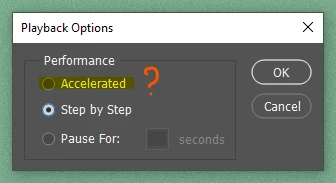
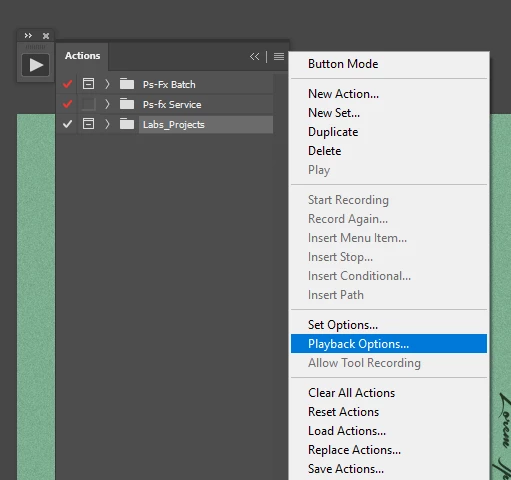
I have noticed a terrible bug that I run some scripts, I notice very slow, you can even count each step of the script. I checked in the drop-down menu in the item "PlayBack Options" in the action pallet that the performance is not in accelerated mode, it changes options automatically. Has anyone experienced this problem?

This topic has been closed for replies.
Correct answer Chuck Uebele

Add code to force acceleration:

function setActionToAcc(){
	var idsetd = charIDToTypeID( "setd" );
		var desc3 = new ActionDescriptor();
		var idnull = charIDToTypeID( "null" );
			var ref2 = new ActionReference();
			var idPrpr = charIDToTypeID( "Prpr" );
			var idPbkO = charIDToTypeID( "PbkO" );
			ref2.putProperty( idPrpr, idPbkO );
			var idcapp = charIDToTypeID( "capp" );
			var idOrdn = charIDToTypeID( "Ordn" );
			var idTrgt = charIDToTypeID( "Trgt" );
			ref2.putEnumerated( idcapp, idOrdn, idTrgt );
		desc3.putReference( idnull, ref2 );
		var idT = charIDToTypeID( "T   " );
			var desc4 = new ActionDescriptor();
			var idperformance = stringIDToTypeID( "performance" );
			var idperformance = stringIDToTypeID( "performance" );
			var idaccelerated = stringIDToTypeID( "accelerated" );
			desc4.putEnumerated( idperformance, idperformance, idaccelerated );
		var idPbkO = charIDToTypeID( "PbkO" );
		desc3.putObject( idT, idPbkO, desc4 );
	executeAction( idsetd, desc3, DialogModes.NO );
}//end function

3 replies

Chuck Uebele
Community Expert
Chuck UebeleCommunity ExpertCorrect answer
Community Expert
February 22, 2020

Add code to force acceleration:

function setActionToAcc(){
	var idsetd = charIDToTypeID( "setd" );
		var desc3 = new ActionDescriptor();
		var idnull = charIDToTypeID( "null" );
			var ref2 = new ActionReference();
			var idPrpr = charIDToTypeID( "Prpr" );
			var idPbkO = charIDToTypeID( "PbkO" );
			ref2.putProperty( idPrpr, idPbkO );
			var idcapp = charIDToTypeID( "capp" );
			var idOrdn = charIDToTypeID( "Ordn" );
			var idTrgt = charIDToTypeID( "Trgt" );
			ref2.putEnumerated( idcapp, idOrdn, idTrgt );
		desc3.putReference( idnull, ref2 );
		var idT = charIDToTypeID( "T   " );
			var desc4 = new ActionDescriptor();
			var idperformance = stringIDToTypeID( "performance" );
			var idperformance = stringIDToTypeID( "performance" );
			var idaccelerated = stringIDToTypeID( "accelerated" );
			desc4.putEnumerated( idperformance, idperformance, idaccelerated );
		var idPbkO = charIDToTypeID( "PbkO" );
		desc3.putObject( idT, idPbkO, desc4 );
	executeAction( idsetd, desc3, DialogModes.NO );
}//end function
tokuredit
tokureditAuthor
Inspiring
February 22, 2020

I put it here and it worked well Chuck Uebele. Thanks

Geppetto Luis
Legend
February 24, 2020
Stephen Marsh
Community Expert
Community Expert
February 22, 2020

The pragmatic solution would be to just set the first step to set the playback options to accelerated.


tokuredit
tokureditAuthor
Inspiring
February 22, 2020

The strange thing is that this happens with some scripts, I am not using actions.

JJMack
Community Expert
Community Expert
February 22, 2020

Then the script is using Action manager code to set the Action Palette's Playback option to Step by Step. Add chuck function to that script and add a new last line of code to the script


setActionToAcc();


The question you first need to answer is: Why is the script setting the Action Palettes Playback option to Step by Step?


JJMack
JJMack
Community Expert
Community Expert
February 21, 2020

That Fly-out menu is for Actions not scripts. What version of Photoshop are you having problems with Action performance that the playback option is automatically switching to step by step.  It should not change to step by step check that no step in the action you are play is changing the playback option. that step would look like this actions step.  Something you are usig is most likely changing the action palette's playback option.

JJMack