Participant
March 25, 2025
Answered

Accidentally saved file as a nonexistent file type

  • March 25, 2025
  • 2 replies
  • 284 views

When saving a project, I named it "Pages3and4_8x10.2" to show the size measurement of the pages. However, it registered the . as the seperation between name and filetype, and accidentally saved my project as a ".2" document.

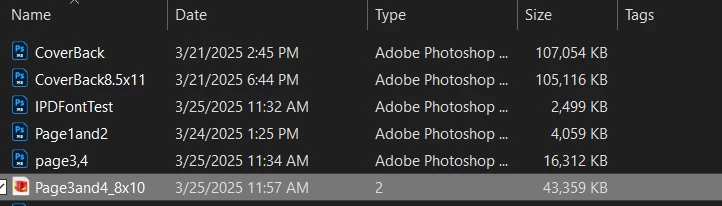
It won't open in photoshop, and I tried a file unzipper but no dice. I also tried changing the name to have ".psd" at the end, but that didn't change anything. Can't upload it to a file converter since .2 isn't a recognized filetype, of course.


Is there any way to recover this file? It's for work, so it's important.

I feel like a rube for messing this up. never saving periods in file names again. orz

Correct answer Spas K.

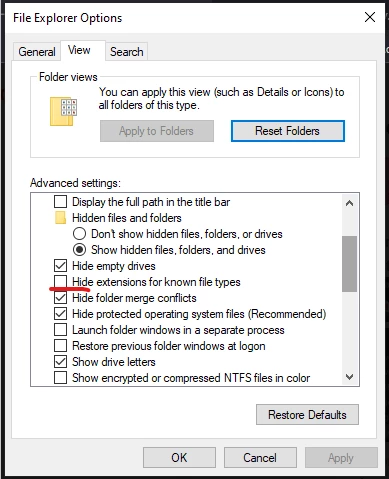
Hey there! In Windows search, type "File explorer options" and open them. In the window, go on the view tab, and find the checkbox for "Hide extensions for known file types". Uncheck it, then click Ok.


Now the file extensions on all files will be visible, and you will be able to change it to .psd and open it.


2 replies

Stephen Marsh
Community Expert
Community Expert
March 26, 2025

As @Spas K. recommended, you can just manually rename the extension to what it should be.


If you had many files like this and or a mixture of extensions that would make batch renaming hard, then I would recommend the following ExifTool command:


https://prepression.blogspot.com/2017/09/exiftool-automatically-adding-missing.html


Spas K.
Community Expert
Spas K.Community ExpertCorrect answer
Community Expert
March 26, 2025

Hey there! In Windows search, type "File explorer options" and open them. In the window, go on the view tab, and find the checkbox for "Hide extensions for known file types". Uncheck it, then click Ok.


Now the file extensions on all files will be visible, and you will be able to change it to .psd and open it.


oddiiityAuthor
Participant
March 26, 2025

Thank you so much!! You're a lifesaver. Changed it to psd and sure enough all my work is still there.