
amyb4862461
Known Participant
April 1, 2019
Answered

add Drop Shadow

  • April 1, 2019
  • 1 reply
  • 1418 views

I need to add a drop shadow.  This is the .jpg version.  I had added a drop shadow, on the .psd version, to the cat carrier and me, but then kept retouching the image and the drop shadow got deleted or cloned out a bit.  Anyway, I cannot get it back.  Thank you for any help.
    This topic has been closed for replies.
    Correct answer sharp_hands16B8

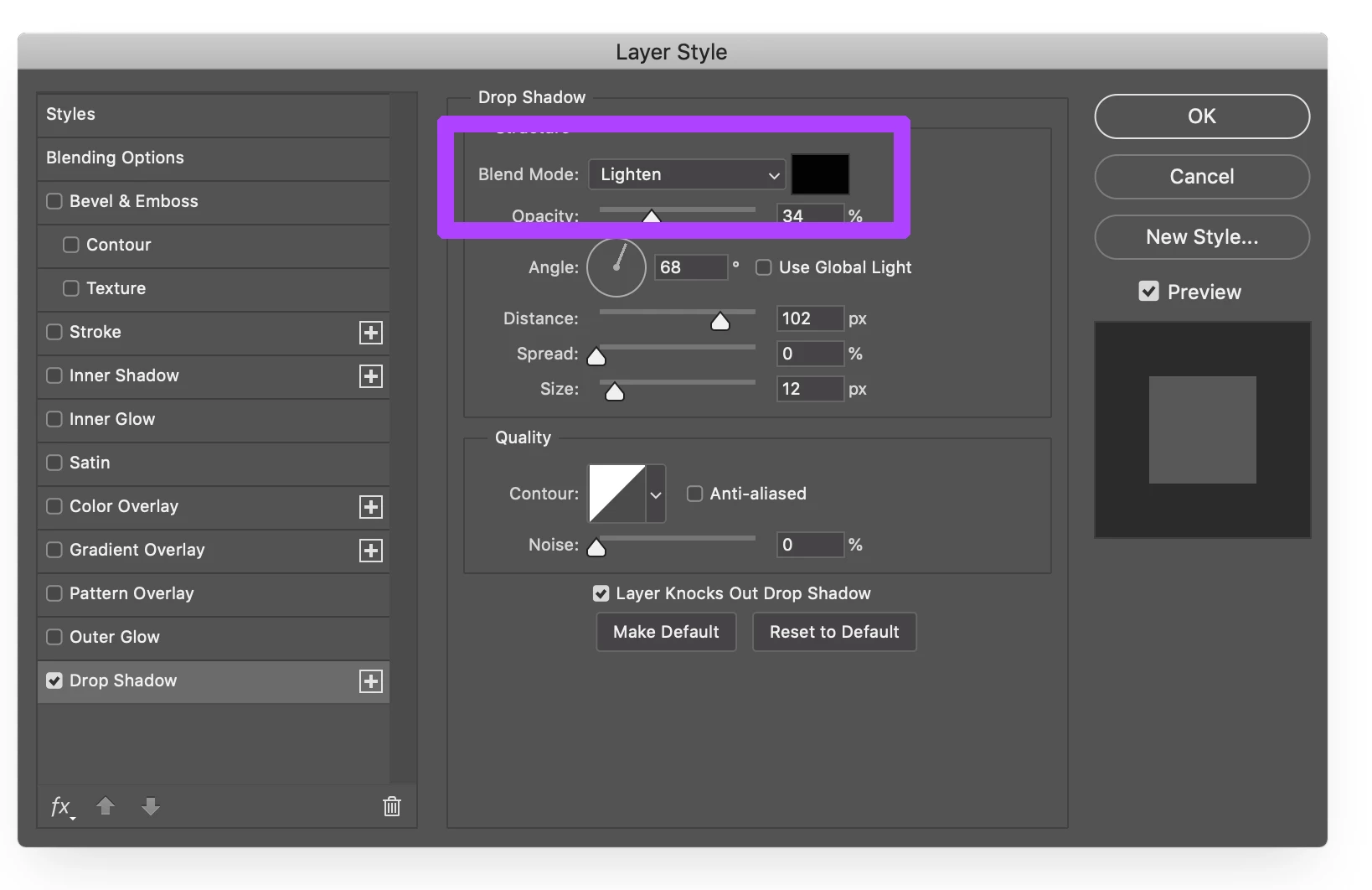
    Your Blend Mode at the top is set to Lighten. It won't show up on a white background. Change it to something like Normal and you'll see it come back.

    1 reply

    c.pfaffenbichler
    Community Expert
    Community Expert
    April 1, 2019

    Could you please post a screenshot with the pertinent Panels (Layers, Options Bar, …) visible?

    amyb4862461
    Known Participant
    April 1, 2019

    These are the settings I used and I like the way the shadow came out..

    sharp_hands16B8
    Community Expert
    sharp_hands16B8Community ExpertCorrect answer
    Community Expert
    April 1, 2019

    Your Blend Mode at the top is set to Lighten. It won't show up on a white background. Change it to something like Normal and you'll see it come back.