
Participant
November 27, 2018
Question

Adding a new filter to filter gallery

  • November 27, 2018
  • 2 replies
  • 680 views

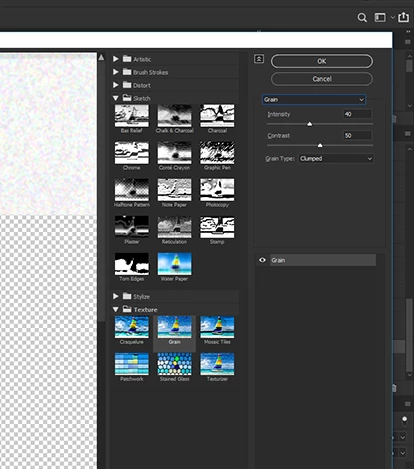
I am tring to add a new filter to my filter gallery.  I have done this for years either via a drop down in the filter gallery window or adding the psd file to a folder.

Can't find either of these two things in the newest version of Photoshop.  Any ideas??
    This topic has been closed for replies.

    2 replies

    Semaphoric
    Community Expert
    Community Expert
    November 27, 2018

    "Adding a .PSD" makes me think you're referring to  the filters that apply a texture:Rough Pastels, Underpainting, Glass, and Texturizer. There's a little drop-down menu next to the Texture field that allows you to load a .PSD as a texture.

    c.pfaffenbichler
    Community Expert
    Community Expert
    November 27, 2018

    Maybe I misunderstood, but have you alt-clicked the Filter/s?

    admr124Author
    Participant
    November 27, 2018

    I just tried.  What is that supposed to do?  What I want is to put my textures into the filter gallery so I can pull them up from the dropdown menu.  I have one called rust flakes I use a lot, and would like to have it listed.

    In previous versions of photoshop you could add textures, or put the texture in a folder with the default ones and it would show.