


Known Participant
July 21, 2026
Question

Adjusting layers in photoshop overwrites original file in master folder.

  • July 21, 2026
  • 8 replies
  • 100 views

When I click on an imported layer to adjust, when I save the change it is saving over the original file, not just overwriting the layer. How do I stop this happening. I have tried Edit contents and replace contents to try and solve this issue. Can someone help with a fix please?
Thanks

    8 replies

    davescm
    Community Expert
    Community Expert
    July 21, 2026

    To add to c.pfaffenbichler’s reply:
    1. Anything you do to the outside of a smart object, linked or embedded, does not affect the contents. 
    2. If you duplicate a smart object (Ctrl+J) within the document then changes in one smart object affect the others
    3. If you double click a smart object and edit its contents, that will be reflected in other instances of the smart object (including the original document in the case of linked smart objects)
    4. Conversion between the two types of smart object is easily achieved from the menus or from the properties panel.

    Dave 
     

    Known Participant
    July 21, 2026

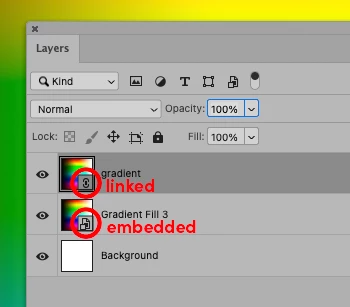
    Last try!! As you can see from the screen grab. the original file has been saved over when I double clicked the linked layer and edited it from within photoshop. This has not been happening to me before.

    c.pfaffenbichler
    Community Expert
    Community Expert
    July 21, 2026

    Then you probably have not been working with Linked Smart Objects before, but with Embedded Smart Objects. 

    c.pfaffenbichler
    Community Expert
    Community Expert
    July 21, 2026

    Your screenshot seems to show an embedded Smart Object – editing that will not change the original file in its original location on your server but will change all the instances of that SO in the containing document. 

    Editing a linked SO will change the separate file and thus all its instances in the containing document, too. 


    Their icons in the Layers Panel should allow a clear distinction.  


    Known Participant
    July 21, 2026

    Are you saying a linked file will save over files on the server as well as in the document. I have just clicked theeined file. Made a change and it ha affected the file on the server.

    c.pfaffenbichler
    Community Expert
    Community Expert
    July 21, 2026

    Are you saying a linked file will save over files on the server as well as in the document.

    Editing (and saving) a linked Smart Object changes the separate file it references and thus its instances in the layered Photoshop file (if that file is open). 

    If one changes a file that has been placed as a Linked Smart Object while the containing document is not open the instances will need to be updated later on. 

    Known Participant
    July 21, 2026

    Here is a screenshot of my artboard's. I relink file so all instances are replaced in one. Then I double click the new pen image. remove the back ground and save. But the save is not only affecting the pen in the psd file but it's saving the pen from its original location on the server. I don't want it to save over master files each time as it's going to cause issues when I open indesign files with instances of the pen. Does this make more sense. 

    davescm
    Community Expert
    Community Expert
    July 21, 2026

    The pen in your original document was in a linked smart object, the background was not. If you double click the linked smart object and edit the contents then you are updating the document that is linked. So it is working as designed.
    In this latest screenshot, your layer shows an embedded smart object. That is not linked to another file. You can convert between the two by embedding or linking using the menus or properties panel.

    Dave

    Known Participant
    July 21, 2026

    The pen is a linked smart object. So if I edit this linked smart object. (which is a file from the server) it will not only update all the linked smart objects in the psd it will save over the file from the server. This has only started doing this today. I have not changed my process for any of these slides I am creating. 

    Known Participant
    July 21, 2026

    Hello everyone. thanks for jumping on this thread to offer help. I have added an image and a description of what's happening. hopefully this will help. I have not had to embed links before. this has just started doing this. As its saving over master files its affecting links in other documents. thank again for helping!

    c.pfaffenbichler
    Community Expert
    Community Expert
    July 21, 2026

    So use 

    Layer > Smart Objects > New Smart Object via Copy 

    before replacing the contents. 

    Known Participant
    July 21, 2026

    Is this the only way to switch this function off. When I double click an imported image to adjust, when I save I don't want it to save the file in its original location. just the instance in the psd file. 

    c.pfaffenbichler
    Community Expert
    Community Expert
    July 21, 2026

    One might wonder, though, why the OP would work with Linked Smart Objects to begin with. 

    After all not pressing the alt-key when dragging an image into a Photoshop window would seem easier. 

    Stephen Marsh
    Community Expert
    Community Expert
    July 21, 2026

    A couple of related topics with scripts to automate working on copies of an original linked smart object:


    davescm
    Community Expert
    Community Expert
    July 21, 2026

    If I am reading your question correctly, it sounds like your ‘imported layer’ is a linked smart object. That linking means that when you change the original document it changes in the layer. It also means that if you double click to edit the contents, then you are changing the original document.

    You can get around that by changing the linked smart object to an embedded smart object. To do that, go to the properties panel and click ‘Embed’. Now if you double click and adjust the content it will not change the original as the layer and the original document are no longer linked.

    Dave

    Edit : It looks like c.pfaffenbichler replied while I was typing. We are both saying the same thing.

    c.pfaffenbichler
    Community Expert
    Community Expert
    July 21, 2026

    Could you please post screenshots with the pertinent Panels (Toolbar, Layers, Options Bar, …) visible? 


    If you are talking about a Linked Smart Object then you can embed it (Layer > Smart Object > Embed Linked) to break the link to the external file.