


January 19, 2017
Answered

adjusting the color of a layer? Is it really so hard?

  • January 19, 2017
  • 2 replies
  • 13538 views

So I’ve a project made up of 3 sketches on 3 independent layers staked on top of one another in Photoshop CS6. There are 3 layers because it’s a design for a screen print that will have 3 colors.

Now that the drawing is done I want to adjust the colors of each layer until I find the right combination for a print run.

I thought this would be easy and I’m sue it is but it’s proving very difficult to work out by my self.

I can select the whole layer or I can select a color or mask off part of the layer. I can, I think, select with the magic wand and change colors that way but all these methods are time consuming and very fiddly.

I just want to be able to select the layer and use the color picker or better use a set of sliders to control the hue saturation and luminescence of the whole layer; but I just cant see how to do it…

    This topic has been closed for replies.
    Correct answer Terri Stevens

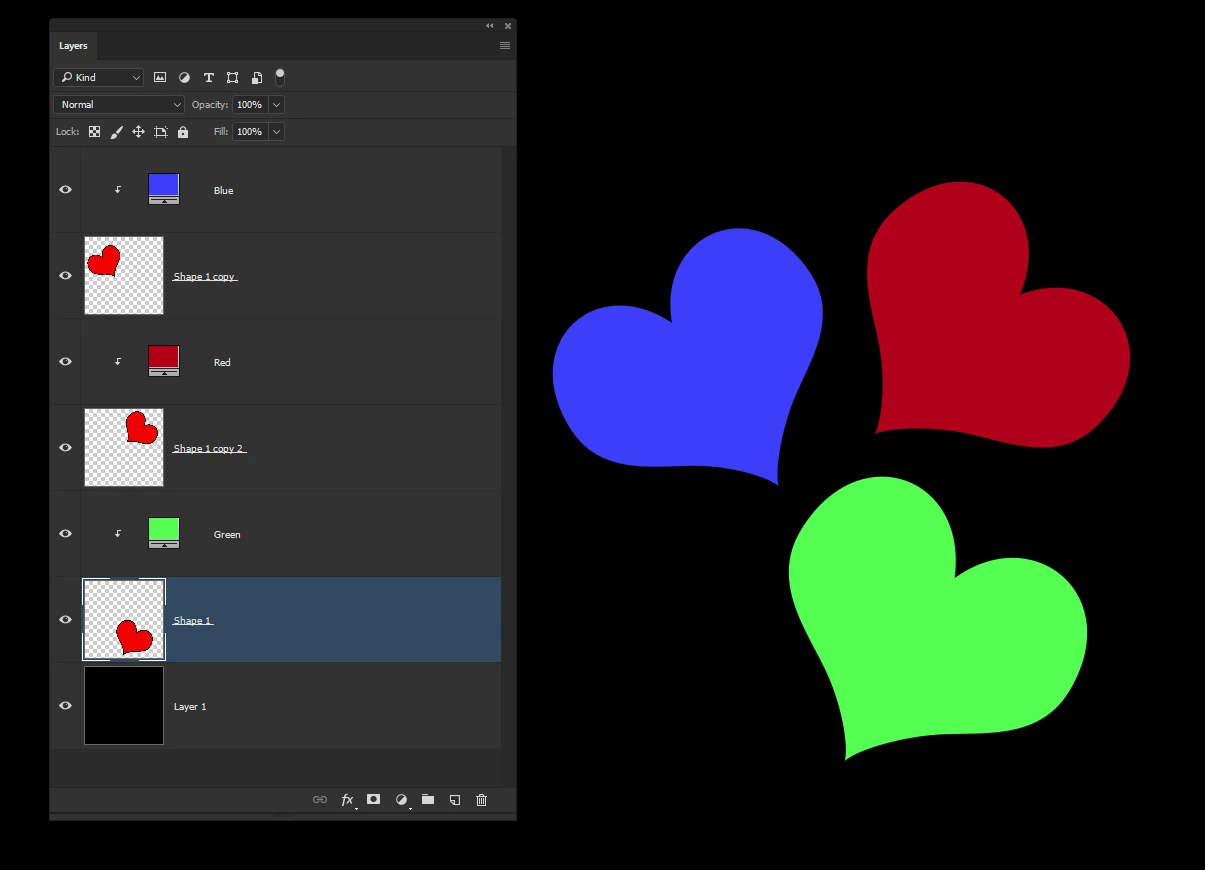
    This is just a variation on what Dave has said, but if you just want three colors then why not use three Solid Color adjustment layers with clipping masks. You can then just adjust the individual colors by double clicking each Solid Color layer

    2 replies

    Terri Stevens
    Terri StevensCorrect answer
    Legend
    January 19, 2017

    This is just a variation on what Dave has said, but if you just want three colors then why not use three Solid Color adjustment layers with clipping masks. You can then just adjust the individual colors by double clicking each Solid Color layer

    davescm
    Community Expert
    Community Expert
    January 19, 2017

    Good thinking Terri

    Dave

    January 20, 2017

    Thank you both for the explanation on how to do this, it's been a really help.

    I'm a little unsure about the color mask though Terri, is this made through the mask part of the hue and color layer I'm adding?

    davescm
    Community Expert
    Community Expert
    January 19, 2017

    Try this:

    Add a Hue and Saturation adjustment layer above the layer you want to adjust. If you just want to impact the layer immediately below, Alt click on the border between the adjustment layer and the pixel layer below, and a little right angle with downward arrow will appear. This means it will clip to that layer. below and will not affect layers further down the stack.

    You could add this to each layer if you so wish

    If you highlight the adjustment layer, the properties will give you the sliders you need

    Note : these sliders will adjust the layer colors - clicking Colorise will apply the color chosen by the sliders to the layer. You will soon see the difference.

    Dave