
Participant
October 26, 2024
Question

Adjustment Panel Not Working v. 26

  • October 26, 2024
  • 2 replies
  • 574 views

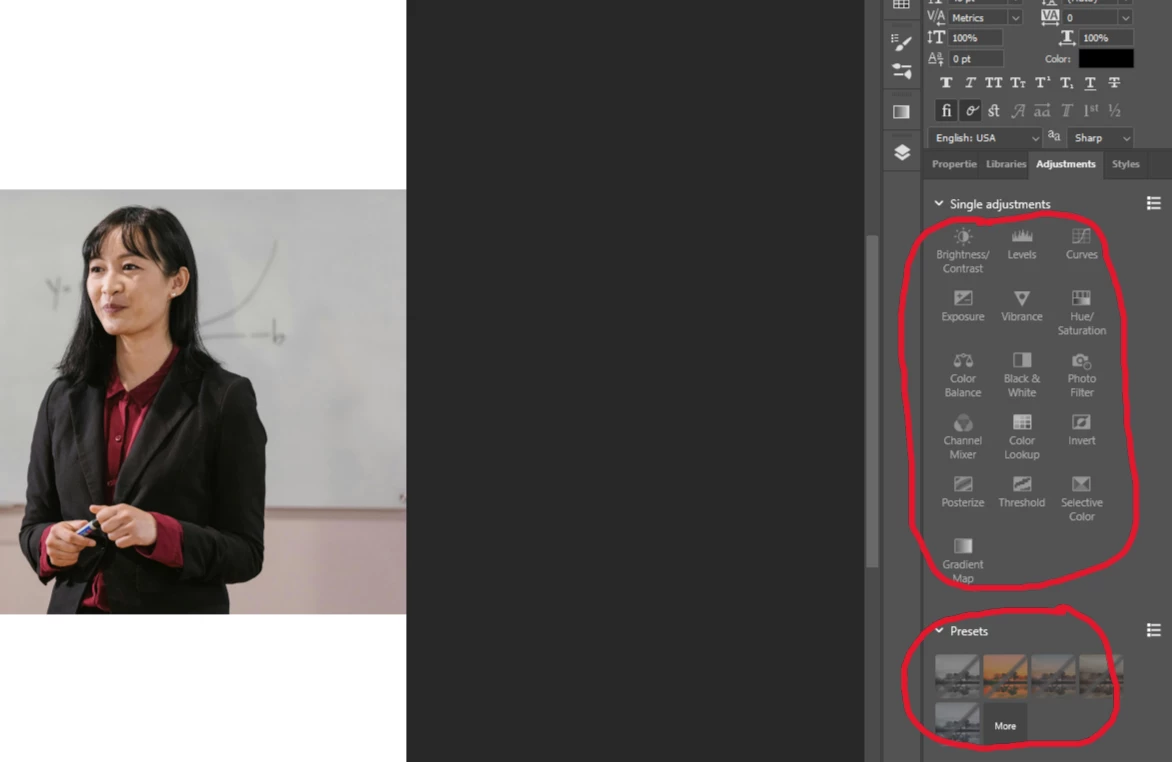
Everything in the single adjustments section of the adjustments panel is greyed out and not working, and the Presets are greyed out with a line through it. Image>Adjustments works, but not the adjustments panel. I've already uninstalled and reinstalled Photoshop because Camera Raw stopped working. What's going on with the new update?
 

2 replies

Participating Frequently
December 11, 2024

In my case, Adjustments panel is blank. This happened with v.26 and is still the same after the 26.1 update. No problem in the Beta versions. Will appreciate any helping information.

Community Manager
December 11, 2024

Hey @Mustafa Orhon! Let's try a couple of things to fix this issue.

First, can you reset your preferences? On Windows, go to Edit > Preferences > General, and on Mac, go to Photoshop > Preferences > General, then select Reset Preferences on Quit. Just make sure to back up your preferences first. You can find out how here: https://adobe.ly/3DjHA9G. After that, restart the app to apply the changes.


Another thing we can try is tweaking the graphics settings. Try turning off the "Use Graphics Processor" option. On Windows, go to Edit > Preferences > Performance; on Mac, go to Photoshop > Preferences > Performance. After turning it off, restart Photoshop.


If neither of these steps work, check out this troubleshooting guide for more solutions to graphics-related issues.: https://adobe.ly/3ZCZnAu

I hope this helps! Let me know how it goes. Thanks!
Alek

*(If you mention me with an @, like @Aleke, I’ll get a notification and can respond faster.)*
Participating Frequently
December 12, 2024
Hi! Alek,
I uninstalled the App, Installed fresh and resetted preferences and now I
have Adjustments panel back. Thank you very much.
Best regards

Mustafa
jane-e
Community Expert
Community Expert
October 26, 2024

@Beau32809471q0gq 


Can you show us your entire workspace, including the Tools panel, Layers panel, options bar, title bar, and status bar?


Jane