



michaljanata
Inspiring
June 29, 2026
Question

Adjustments panel not opening

  • June 29, 2026
  • 1 reply
  • 33 views

Window - Adjustments panel is not opening in my custom workspace. 
When I switch to default Photography workspace, it does open, but there are not some option available, for example I'm not able to select default Clip to Layer option.
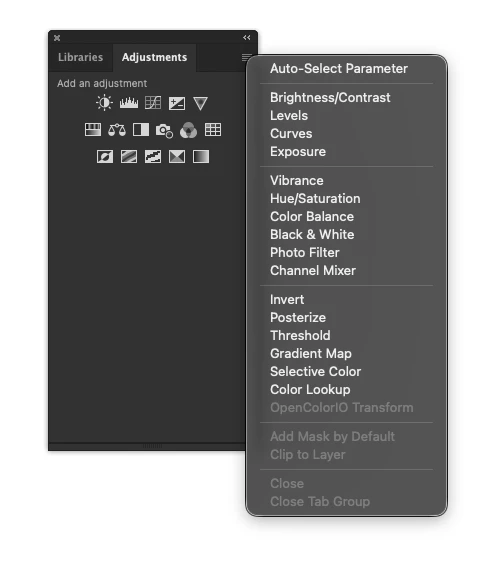
 

Adobe Photoshop Version: 27.8.0 20260610.r.13 4081857  arm64 (final, Release)

Operating System: Mac OS 26.5.1

    1 reply

    Sameer K
    Community Manager
    Community Manager
    July 21, 2026

    Hey, @michaljanata. Welcome to the Photoshop Ecosystem. I'll help you figure this out.


    I couldn't recreate this in the Classic or Modern view for the Adjustments Panel. Please ensure there are no stale preferences in your Photoshop. You can go to the location of the preference folder below and rename it to back it up. (https://adobe.ly/3u7u84j)


    This method is more effective compared to the in-app Reset Preferences at quit method. 


    macOS: Hold down the Option key in the Finder when using the Go menu. The library will appear below the current user's home directory.

    Library > Preferences > Adobe Photoshop [version] Settings

    Rename the Adobe Photoshop folder by adding a .old at the end. (Adobe Photoshop 2026 > Rename > Adobe Photoshop 2026.old)


    This will give Photoshop a fresh start as a new installation.

    Let me know if it helps. Thanks!
    Sameer K

    (Type '@' and type my name to mention me when you reply)