UXCOxygen
Participant
January 31, 2018
Answered

Adobe Photoshop CC 2018 abruptly stops working. Requires upgrade to Windows 10 to run.

  • January 31, 2018
  • 8 replies
  • 37446 views

Adobe Photoshop was working fine until last week.

It seems like the new update won't work on Windows 10.

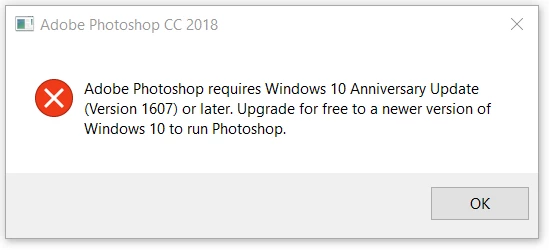
Every time I try to launch Adobe Photoshop I get the following message:

"Adobe Photoshop requires Windows 10 Anniversary Update (version 1607) or later. Upgrade for free to newer version of Windows 10 to run Photoshop."

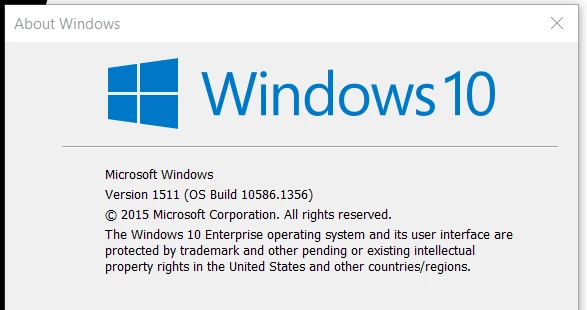
Since we are on a corporate/enterprise account (Enterprise version of Office) we cannot update to the Windows 10 Anniversary Update (version 1607) or later.

How can I get Photoshop to work again?

See screen shots for details.
    This topic has been closed for replies.
    Correct answer John T Smith

    How to get previous using a Cloud subscription https://forums.adobe.com/thread/2372985

    -an option to check to see more previous https://forums.adobe.com/thread/2426726

    -and more on previous versions https://forums.adobe.com/thread/2389056 see reply #3

    -and even more on previous versions https://forums.adobe.com/thread/2409527 see reply #1

    And, in the future, check program requirements before updating

    8 replies

    Participant
    December 30, 2020

    Then which version of photoshop can I use in Windows 10 version 1511

    Participant
    April 3, 2018

    I like the last statement, "in the future check the requirements before updating"
    NO ADOBE, Why don't you check the Operating System capabilities before Self Updating or Forcing an Update.
    Seriously, I get the Update Photoshop notice several times a day, I was one who had to roll back a couple of version because, like many, I am on a corporate environment machine and out IT department will NOT be rolling out the anniversary updates to any of our computers.

    I want this fixed, I want the new features without having to update something I cannot update. 

    3DnuTTa
    Participant
    April 2, 2018

    All good to move this to the Photoshop section, I am finding that even changing back to older versions of Photoshop I can no longer use it on my pc!! I an unable to update the windows 10 version as other software I rely on does not work well with it.

    This needs to be fixed, as why do we pay a subscription service that will stop us from using what we pay for. I did not see anything suggesting that it requires the updated win 10.

    Adobe, I am an artist and I rely on my software working, every day down is a lost day. Please take this serious.

    Jeffrey_A_Wright
    Legend
    March 20, 2018

    Moving this discussion to the Photoshop forum.

    Participant
    March 19, 2018

    Likewise, I am too on an Enterprise version of Windows 10 and stuck with the Out of Date versions.
    Thanks Adobe...

    Perhaps you should create a version that maybe disables the useless features that come from the Creators update in Windoze.

    Participating Frequently
    February 8, 2018

    This needs to be fixed.  Rolling back lost settings.  Lightroom won't launch PS.  PS prompts to update system every time.  Don't have the new features like the smart select.   Are we stuck on old PS forever or just upgrade every once in a while and hope and rollback?

    Participating Frequently
    February 1, 2018

    I had this issue too. I'm also working on Windows 10 Enterprise. It would be great if Adobe CC updates would check the system for requirements. It would save a lot of time spent troubleshooting.

    For people who need to know how to fix this right now, I'll answer this here.

    How to Fix this, and get Photoshop back working:

    1. In your CC window interface, on the photohop dropdown, go to "Other Versions" A list of previous Photoshop versions will pop up.

    2. Click "Install" from the top version in this list. This should roll you back to the version that you just left when you updated.

    Participant
    March 28, 2018

    super many thanks

    John T Smith
    Community Expert
    John T SmithCommunity ExpertCorrect answer
    Community Expert
    January 31, 2018

    How to get previous using a Cloud subscription https://forums.adobe.com/thread/2372985

    -an option to check to see more previous https://forums.adobe.com/thread/2426726

    -and more on previous versions https://forums.adobe.com/thread/2389056 see reply #3

    -and even more on previous versions https://forums.adobe.com/thread/2409527 see reply #1

    And, in the future, check program requirements before updating

    UXCOxygen
    UXCOxygenAuthor
    Participant
    January 31, 2018

    Thank you.

    I rolled back to previous version.

    And, in the future, check program requirements before updating

    Yes to this.

    Or, if Adobe is smart enough to check compatibility before install rather than after would be great.