


Participant
July 9, 2026
Question

Adobe Photoshop for Web Use's Color Wheel is always off screen.

  • July 9, 2026
  • 3 replies
  • 33 views

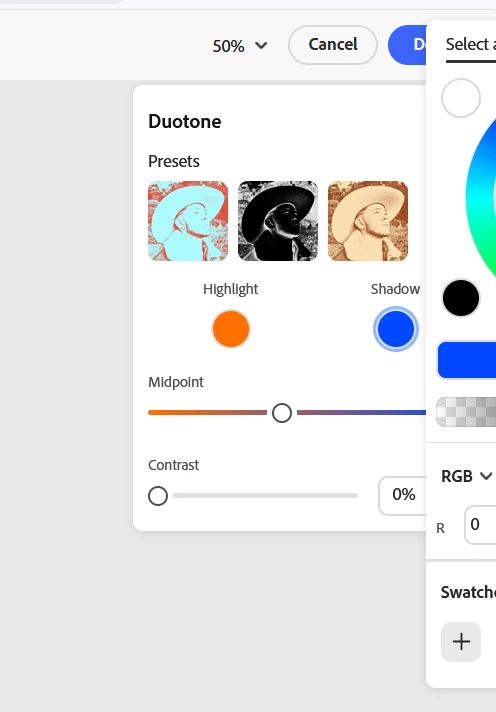
When I am using Adobe Photoshop on the web, the color wheel is always off screen with no way to center it. This makes choosing anything from the right side of the color wheel impossible. Ive tried minimizing my screen or dragging it, but its locked in one fixed part of the screen and wont move. The first color circle is cut off slightly, making easier to navigate but the second circle is always cut off. As you can see I can only access cool colors, the rest cant even be scrolled to. PLEASE, fix this issue. I love the web version of Adobe for its quickness, but this is kinda killing the need to use it. It isnt just with Duotone but basically any effect where you can change the color of the effect. 
 

    3 replies

    Anshul_Saini
    Community Manager
    Community Manager
    August 7, 2026

    Hi ​@xic,


    Thank you for reporting this and for including the screenshot, which clearly shows the color wheel being clipped on the right side in the Effects panel.
     

    I'd like to gather a few more details to help us investigate this further:

    • Which browser are you using? (Chrome, Firefox, Safari, Edge, and the version number if you can find it)

    • What is your display/screen resolution and browser zoom level? For example, if you're on a 1366×768 laptop display, or if your browser zoom is set to something other than 100%. You can check your zoom level by pressing Ctrl + 0 (Windows) or Cmd + 0 (Mac) to reset it to 100%, does the color wheel positioning change when you do that?

    • Does this happen in all browser window sizes, or only below a certain width? If you maximize your browser window to full screen, does the color wheel still clip?

    • Are you using any display scaling settings at the operating system level? (For example, Windows display scaling set to 125% or 150%, or macOS "More Space" / "Default" resolution settings)

    • Does this happen in a private/incognito window with all browser extensions disabled?

    The info requested above will help us determine whether this is connected to a particular screen or browser setup, or if it's a more widespread issue.


    Looking forward to your reply so we can dig deeper.


    Best,

    Anshul Saini

    xicAuthor
    Participant
    August 21, 2026

    Sure!

    • The browser in the screenshot is FireFox, I tested it out on Edge and the problem doesn't occur there.
    • For firefox, the zoom level does not effect the placement of the color wheel, it stays off screen no matter what percentage. 
    • Full screening browser doesn't move the clipping
    Sameer K
    Community Manager
    Community Manager
    August 21, 2026

    Hey, @xic. Thanks for the comment. It has been about a month, and updates have been released since then. Do you still see the issue?

    Could you record your screen and share the behavior?


    Thanks!
    Sameer K
    (Type '@' and type my name to mention me when you reply)