rathins54482005
Participant
Mar 23, 2023 3:29 PM UTC
Answered

after Photoshop latest update screen starts blinking

After latest update when i open any file in Photoshop screen start blinking. I install 24.2.3 (older version) it works perfect.

This topic is closed to new replies. Start a new post to keep the conversation going.
Ged_Traynor
Ged_TraynorCorrect answer
Community Expert
Mar 23, 2023 4:51 PM UTC

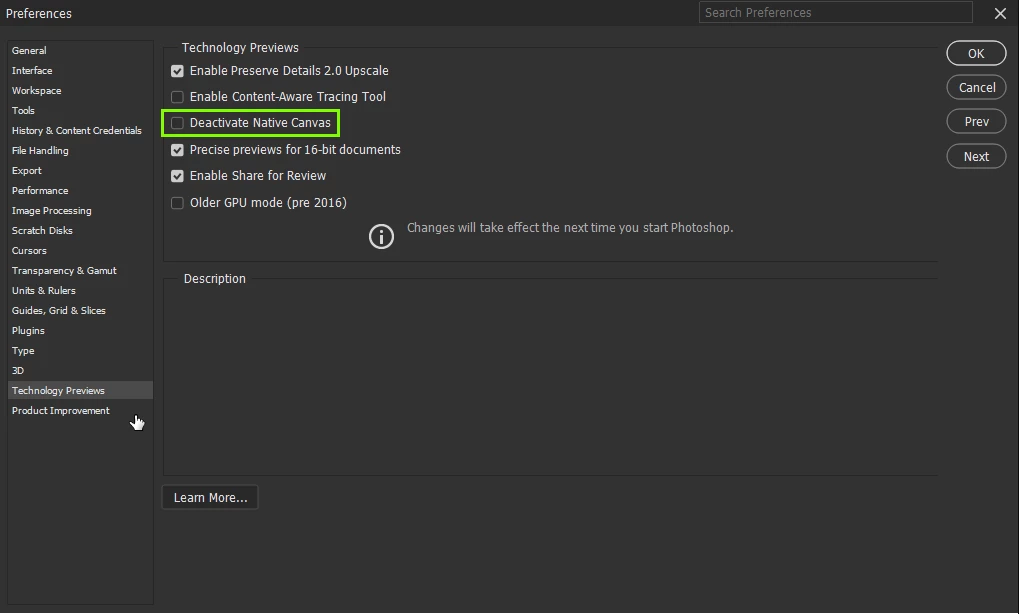
@rathins54482005 enable this option in preferences and restart Photoshop

11 replies

Participant
Mar 25, 2023 8:16 PM UTC

Thanks! I works and you saved my day ❤

Translate
Participant
Mar 25, 2023 10:03 PM UTC

This worked for me too--running Windows 10 64-bit on an older laptop, and never had an issue with PS in two decades.  NEFs opened fine in raw but not in PS (alarming flashing screen), and then I found I couldn't open jpegs or anything else.  I thought my 2015 vintage GPU might be the cause given the system requirements, but Ged_Traynor's suggestion worked for me just fine.  Thanks!

Translate
Participant
Mar 25, 2023 6:15 PM UTC

Thanks, it works.

Translate
javiera8212137
Participant
Mar 25, 2023 6:05 PM UTC

tks. It works for me!

Translate
DFru
Participant
Mar 23, 2023 6:47 PM UTC

Thanks!! T.hat fixed it


Translate
Ged_Traynor
Community Expert
Community Expert
Mar 23, 2023 5:15 PM UTC

@rathins54482005 go to Edit > Preferences > Technology Previews, remember to restart Photoshop after making the change!

Translate
Participant
Mar 27, 2023 1:10 PM UTC

Many thanks! Up and running again....;)


Translate
Participant
Mar 23, 2023 5:06 PM UTC

Thanks, it worked for my setup.

Translate
rathins54482005
Participant
Mar 23, 2023 5:04 PM UTC
I can't find this in preferences.
Can you share screenshot of Preference manu where i can find this
Translate
jane-e
Community Expert
Community Expert
Mar 25, 2023 6:49 PM UTC
I can't find this in preferences.Can you share screenshot of Preference manu where i can find this
By @rathins54482005


macOS: Photoshop menu > Preferences

Windows OS: Edit > Preferences


Then look at Ged's screenshot. He is in the Technology Previews tab.


Jane


Translate
Ged_Traynor
Community Expert
Ged_TraynorCommunity ExpertCorrect answer
Community Expert
Mar 23, 2023 4:51 PM UTC

@rathins54482005 enable this option in preferences and restart Photoshop

Translate