
joeh87907460
Inspiring
April 25, 2025
Question

After updating Photoshop today when I open it, everything is blank How do I fix it?

  • April 25, 2025
  • 3 replies
  • 566 views

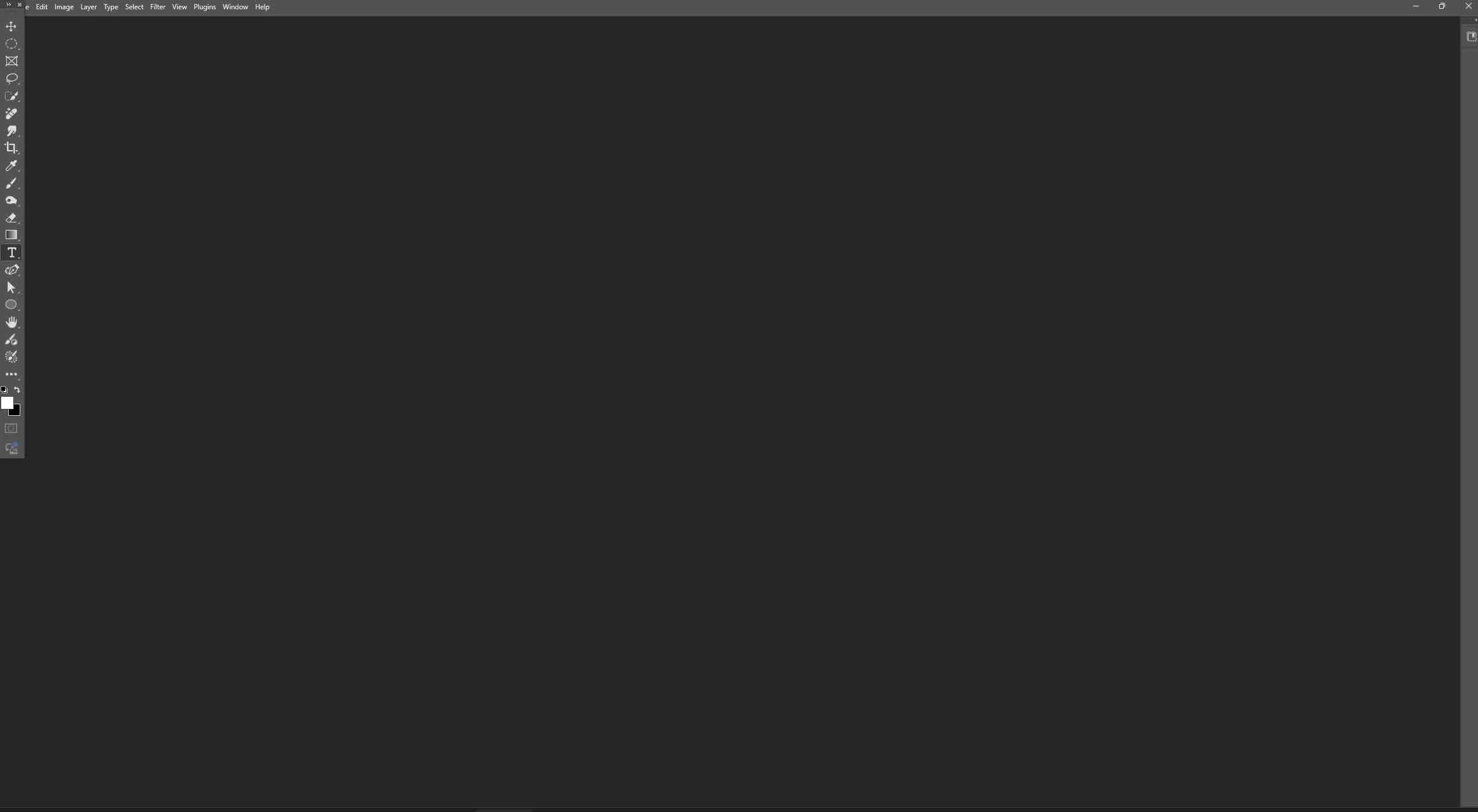
After updating everything today. I opened Photoshop and all I get is a blank gray, empty window. EVERYTHING IS GONE. And all I did was click on Update in the CC App. This junk is getitng really sickening. EVERY [removed by moderator] TIME I UPDATE IT EVERYTHING IS SCREWED UP BIG TIME... 


What can I do to fix it? I'm not talking about resetting the [removed by moderator] preferences or any of that [removed by moderator]. I need to know a ONE CLICK SOLUTION TO FIX WHAT ADOBE SCREWED UP. 


Thankfully Photoshop BEATA opened correctly and I was able to make a screenshot of what Photoshop looks like when I open it now that adobe has "Updated" it... 
3 replies

SG...
Adobe Employee
Adobe Employee
May 2, 2025

Is this the same issue?  I see you are on Windows, so the not the same.

joeh87907460
Inspiring
April 25, 2025

Thanks AxelMatt for the reply. I didn't reset the prefs, becasue every time I've done that I've had to rebuild everything from memory and it takes forever (it seems) to get it back like I had it. What I discovered is, in the latest "update" they changed the Workspace for Graphic and Web to the abomination shown in the screenshot I posted in the original post. Why they did that makes zero sense. But I "reset" Graphic and Web and that brought most of it back then I put the tabs/windows or whatever you call them back in the place I had them before. 


As far as I'm concerned, the idiots at adobe that make these stupid updates that reset everything, or change it to something different than what the customer had it, they just need to be fired and ran off. The way they are doing these things is just wrong. It's no way to treat paying customers, just disrupting them at will without giving a hoot. That's just wrong on adobe's part and they need to stop it. 


I want to thank you again for trying to help me, I do appreciate it. 

MassC
Legend
April 25, 2025

Hey @joeh87907460

I can appreciate how frustrating it is when this happens every time you update to the latest version. @AxelMatt shared some helpful steps to back up your settings before restarting. Just to confirm—are your settings not saving even after following those steps? I ask because resetting preferences can sometimes clear out whatever's causing the issue—kind of like restarting your computer to get things working again.

^CM

joeh87907460
Inspiring
May 2, 2025

Thanks for the reply Cmass. I have a great idea. Instead of the update installer just installing new preferences and deleting the old ones, how about Adobe put a few lines of code in their installer that backs up the perferences to a file, then installs the updates, then after that's finished, it UNINSTALLS the "new preferences" and reinstalls the ones it previously backed up. That way when every user starts Photoshop after the updates, everything has the exact same look and feel as it did before the update. 

That would be the most sensible thing to do rather than to expect millions of customers to back up their preferenes before every update and then reinstall the backup preferences after every update. In 'most' updates, it doesn't wipe out the preferences and rearrange all the tools and change the 'workspace'. In fact, in nearly all updates, the look and feel of the interface is not changes at all. 

Since 9 times out of 10, nothing is changed in the "look and feel" of Photoshop after an update, why should people be expected to 'backup their preferences' and then reinstall them after the update? Surely Adobe's "engineers" are smart enough to know how to put a few lines of code in the installer that does that every time without the customers haveing to do it manually... 

AxelMatt
Community Expert
Community Expert
April 25, 2025

Please try the following steps.

First try to reset the preferences of Photoshop using the steps described here:

https://helpx.adobe.com/photoshop/using/preferences.html#reset-preferences

It's recommended to backup your settings before resetting the preferences.

See here:  https://helpx.adobe.com/photoshop/using/preferences.html#backup-photoshop-preferences


If this doesn't help, try to turn off the "Use Graphics Processing" option in the Preferences. Then restart Photoshop.


Please provide a copy of your 'System Info'. This can be get from the Photoshop menu item Help > System Info. There's a copy button in the System Info dialog. Press this button and paste the info into your next forum post.


My System: Intel i7-8700K - 64GB RAM - NVidia Geforce RTX 3060 - Windows 11 Pro 25H2 -- LR-Classic 15 - Photoshop 27 - Nik Collection 8 - PureRAW 6 - Topaz Photo AI