
Participant
June 14, 2023
Answered

AI Denoiser Camera RAW Error Writing DNG File

  • June 14, 2023
  • 3 replies
  • 3045 views


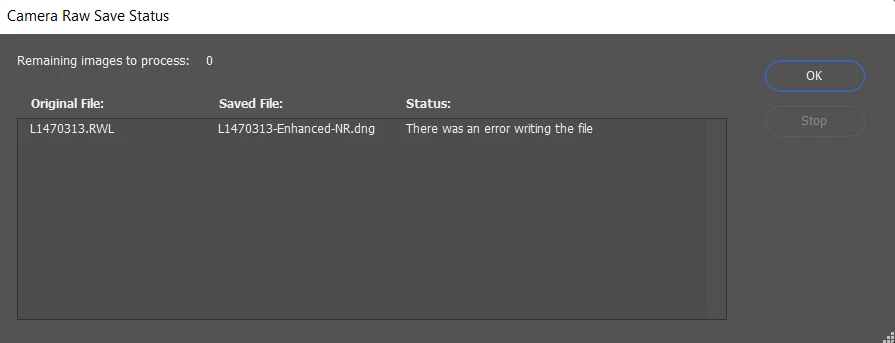
I have uninstalled and reinstalled Photoshop, it worked amazing yesterday when I discovered it. I would open RAW files within Photoshop and found this new feature that doesn't come up if I right click on my photo and "open with Photoshop" This amazing denoiser would create new DNGs in Camera RAW and after my 3rd one of my batch it stopped working. It won't tell me why or what the error even is, it'll simply load all that blue circle all the way and at the end this will pop up. I have PC. More than enough storage space. Everything up to date.
This topic has been closed for replies.
Correct answer Garcia28687020bzp4

Hey I fixed the error, turns out I was selecting and writing new DNGs within my flash card which is protected. Once I moved the images to downloads in its own folder it continued to work for me.

3 replies

Participating Frequently
July 10, 2024

I have the exact problem with deniose. I believe its on adobes end. I dont think its our computer or software. 

Participant
December 23, 2023

I had this similar issue working off my SD card once I save on my computer it worked 

Participant
June 7, 2024

Thanks for the information!

Participant
June 11, 2024

I agree with you, the information was helpful

Garcia28687020bzp4AuthorCorrect answer
Participant
June 15, 2023

Hey I fixed the error, turns out I was selecting and writing new DNGs within my flash card which is protected. Once I moved the images to downloads in its own folder it continued to work for me.

Participating Frequently
June 18, 2023

I get the same error, but I am saving to my hard drive. PS also turns off my grapic acceleration "for this session."