

Alexander-12
Participant
June 23, 2026
Question

Alguns atalhos do Photoshop não funcionam. Como saber se o problema é no teclado?

  • June 23, 2026
  • 1 reply
  • 0 views

Olá, pessoal.

Estou com um problema no Photoshop e não consigo descobrir a causa. Algumas combinações de teclas funcionam normalmente, mas outras, principalmente envolvendo Ctrl, Alt e Shift, não respondem ou funcionam apenas às vezes.

O mais estranho é que consigo digitar normalmente em outros programas e não percebo nenhum problema no uso diário do teclado.

Antes de redefinir as preferências ou reinstalar o Photoshop, gostaria de confirmar se todas as teclas e combinações estão sendo reconhecidas corretamente pelo computador.

Alguém já passou por algo parecido? Como vocês costumam verificar se o problema está no teclado ou nas configurações do Photoshop?

Obrigado!
    1 reply

    Trevor.Dennis
    Community Expert
    Community Expert
    June 23, 2026

    @Alexander-12 I'm having a problem with Photoshop and I can't figure out the cause. Some keyboard shortcuts work normally, but others, especially those involving Ctrl, Alt, and Shift, do not respond or only work sometimes.

    The strangest thing is that I can type normally in other programs and I don't notice any issues with daily keyboard usage.

    Before resetting preferences or reinstalling Photoshop, I would like to confirm whether all keys and shortcuts are being correctly recognized by the computer.

    Has anyone experienced something similar? How do you usually verify whether the problem is with the keyboard or with Photoshop's settings?


    Hi Alexander.  Some gaming keyboards can lock out certain keys, but that is unlikely to be app specific.  Some Workspaces use different shortcuts.  Motion, for instance, so make sure you have a default workspace like Essentials selected, and reset Essentials.

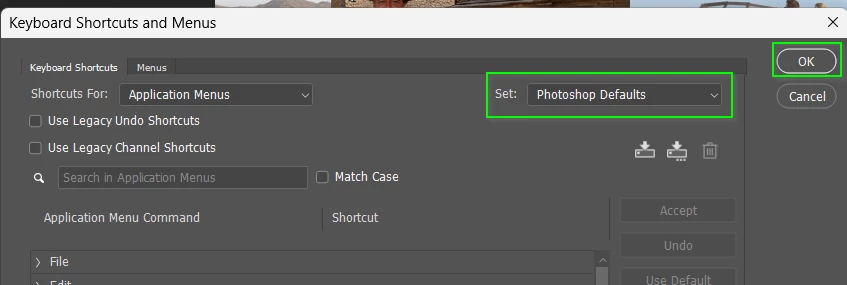
    If still not working, go Edit > Keyboard Shortcuts and use the Set drop drop down in the top right corner and select Photoshop Defaults and then OK.

     I would expect things to be working at that stage.  If not:

    Do you have any Custom Workspaces?