
michaljanata
Inspiring
May 20, 2026
Question

All proof settings remain checked

  • May 20, 2026
  • 2 replies
  • 40 views

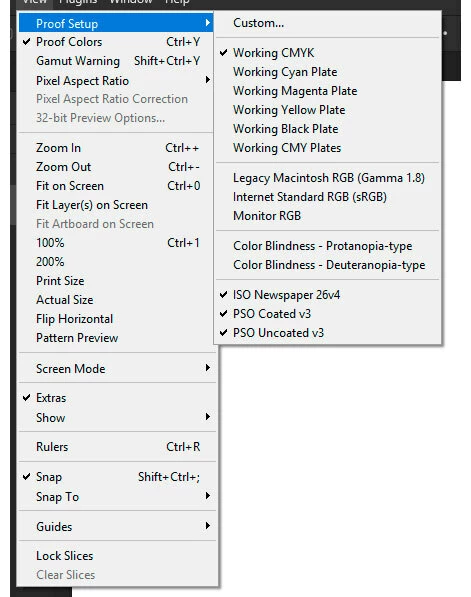
Is it OK, that all custom Proof setups remain checked, even when I select Working CMYK back?
It is really confusing.

PS 27.6, Win 11


    2 replies

    Conrad_C
    Community Expert
    Community Expert
    May 21, 2026

    This problem has actually been around for a while. I believe I reported it to Adobe a while ago. It’s very easy for me to reproduce it on macOS in seconds, see below. This is in Photoshop 27.7 on macOS 26.5, but I’ve seen this problem across multiple recent versions of Photoshop and macOS, on two different Macs. 


    Example 1: Proof Setup

    Just like michaljanata says, if I choose another Proof Setup, the first remains indicated as selected, so it looks like multiple proof setups are selected, which is not possible. The only way to understand which proof setup is actually active is to look somewhere else in the UI, such as in the document tab.


    Example 2: Free Transform

    After making a selection, the command Menu > Free Transform starts out unselected. After I choose that command to start a transformation, the command is marked in the menu as selected, as expected. I then cancel the transformation, and you can clearly see that Free Transform is no longer active in the options bar or on the canvas. But when I click the Edit menu…Free Transform says it’s selected! 


    There may be other examples, but those are the two that immediately come to mind. Since this problem started, the misleading UI feedback makes it more difficult to understand the current state of the Photoshop features it affects.

    michaljanata
    Inspiring
    May 21, 2026

    I'm glad I'm not the only one.

    Now I did try at home on my Mac Mini M4 (and PS just now updated to 27.7) and there is same bug as at work on Win 11.

    davescm
    Community Expert
    Community Expert
    May 20, 2026

    That is not normal. I’ve tried here (v27.6 and Windows 11) and I cannot get more than one to be checked. I would try resetting preferences (back them up first so you can restore them if it does not solve the issue).
    https://helpx.adobe.com/uk/photoshop/desktop/get-started/settings-and-preferences/backup-and-restore-preferences.html
     

    Dave

    michaljanata
    Inspiring
    May 20, 2026

    I just resetted preference because another problem and this is what I get - more problems then before. And this is not the only one.

    Claire H.
    Community Manager
    Community Manager
    May 20, 2026

    Hi ​@michaljanata, sorry to hear that didn’t work! Can you send your system info, a screen recording of the issue, and a list of the steps needed to reproduce it? You can find your system info by going to Help > System Info, copying and pasting it into a text file, and attaching it here. Thanks! ^CH
