


Participant
March 30, 2025
Answered

Any adobe photoshop nor illustrator files can not be saved.

  • March 30, 2025
  • 3 replies
  • 234 views

I have the latest programs and over 150gb free space on computer (2021 M1 Pro) but I can not even save the smallest files nor in photoshop or illustrator. It loads 1 minute and then tells me the -1 disk error.
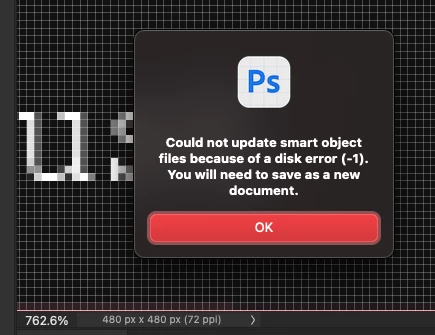


Whats the real issue??

Correct answer BallzyStudio

Hey!

Thanks for all the help. I think I got it. It seemed to be this current file error. As soon as I created a new file and duplicated the corrupted file layers onto the new one. It worked, saved etc.


Thanks again for fast reply tho!

3 replies

mglush
Community Expert
Community Expert
March 31, 2025

Great! We are glad to hear you are back up and running!

Michelle

BallzyStudioAuthorCorrect answer
Participant
March 31, 2025

Hey!

Thanks for all the help. I think I got it. It seemed to be this current file error. As soon as I created a new file and duplicated the corrupted file layers onto the new one. It worked, saved etc.


Thanks again for fast reply tho!

mglush
Community Expert
Community Expert
March 31, 2025

Hi!

We are sorry to hear you are having this issue. What Operating System are you running on your Mac? Have you checked to see if your system is compatible with the version of Photoshop you are running? Have you tried uninstalling and reinstalling the programs?

Have you checked to see if your graphics processor is compatible or up to date? Try turning your GPU off and restart Photoshop to see if it fixes the problem. Go to Preferences>Performance>Uncheck the Graphics Processor checkbox. Restart Photoshop. See if tht fixes the issue. If not, then you can turn it back on.


Did this just start happening? Did it start happening after you installed an update? Have you tried resetting your preferences? Here are a couple of help docs to help:

System Requirements: https://helpx.adobe.com/photoshop/system-requirements.html

Preferences: https://helpx.adobe.com/photoshop/using/preferences.html

Please let us know if any of these fix the issue, or it still persists? 

Michelle