


Participant
March 18, 2020
해결됨

Any way to achieve "texture" and "clarity" like controls after opening the raw image into a project?

  • March 18, 2020
  • 2 답변들
  • 1247 조회

I love the texture and clarity controls in photoshop and I'm starting to get hooked on their power.  However, I'm not able to apply them in a non-destructive mannor.  I have to choose when I open the raw where I want those settings and then they are locked.  I can use the sharpen filter, but the results look awful compared to texture or clarity.  Does anyone know how to get similar results inside of a photoshop project?  I could try re-importing images from my original raw but often my projects have different components and the images have been resized and I can't simply bring in another version and fit it perfectly to the same position as I had the previous version pixel for pixel.    Does anyone know of a tool in photoship that works as well as texture and clarity on photoshop layers? or a third party filter?


Thanks!
이 주제는 답변이 닫혔습니다.
최고의 답변: didiermazier

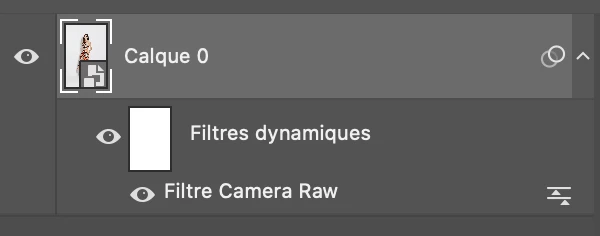
Convert your background into a smart object.

Go to Filter > Camera Raw and you access excatly the same settings as opening. Texture, clarity and all of them

It is non destructive and you can even play with the blending mode and opacity of the CR filter…


2 답변

didiermazier
Community Expert
Community Expert
March 18, 2020

Convert your background into a smart object.

Go to Filter > Camera Raw and you access excatly the same settings as opening. Texture, clarity and all of them

It is non destructive and you can even play with the blending mode and opacity of the CR filter…


Participant
March 18, 2020

didiermazier you rock!  Thanks for the visual.  Very helpful.  And thanks again c_pfaffenbichler

c.pfaffenbichler
Community Expert
Community Expert
March 18, 2020

Why don’t you open the RAW images as Smart Objects? 

And even if there is a reason not to you could convert them to SOs later on and apply Filter > Camera Raw. 

Participant
March 18, 2020

Thanks c_pfaffenbichler!  I've never known about that feature but will look up how to do that.  That sounds amazing!  THANK YOU!

c.pfaffenbichler
Community Expert
Community Expert
March 18, 2020