

Participating Frequently
March 7, 2025
Answered

application frame not responding

  • March 7, 2025
  • 2 replies
  • 562 views

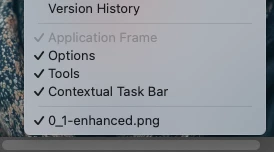
Hey, everyone; please let me know if you already have this issue. It seems like the application frame "isn't working." I can't turn it off. Does someone know how to fix it?

Correct answer Jeff Arola

Go to Photoshop 2025>Settings>Workspace, uncheck Enable Native Full Screen, then restart Photoshop and see if Application Frame is available

2 replies

Legend
March 7, 2025

Window>Application Frame, for those playing the game at home.

That's odd. I can toggle the setting whether or not an image is open.

I can think of situation where the application frame is grayed out -- when an action is required -- when the reset/cancel/commit is displayed, e.g., when cropping.


Larry
Jeff Arola
Community Expert
Jeff ArolaCommunity ExpertCorrect answer
Community Expert
March 7, 2025

Go to Photoshop 2025>Settings>Workspace, uncheck Enable Native Full Screen, then restart Photoshop and see if Application Frame is available

Participating Frequently
March 10, 2025

thanks Jeff!
