Inspiring
August 22, 2026
Answered

Applying Gaussian Blur to a layer also blurs the layer mask.

  • August 22, 2026
  • 10 replies
  • 84 views

If I add a layer mask to an art (pixel) layer and mask out part of the layer then select the layer icon (not the mask) and apply Gaussian blur both the pixels on the layer and the mask are blurred. Is this a new bug or am I missing something? Ps version 27.9.1. Thanks.

    Correct answer c.pfaffenbichler

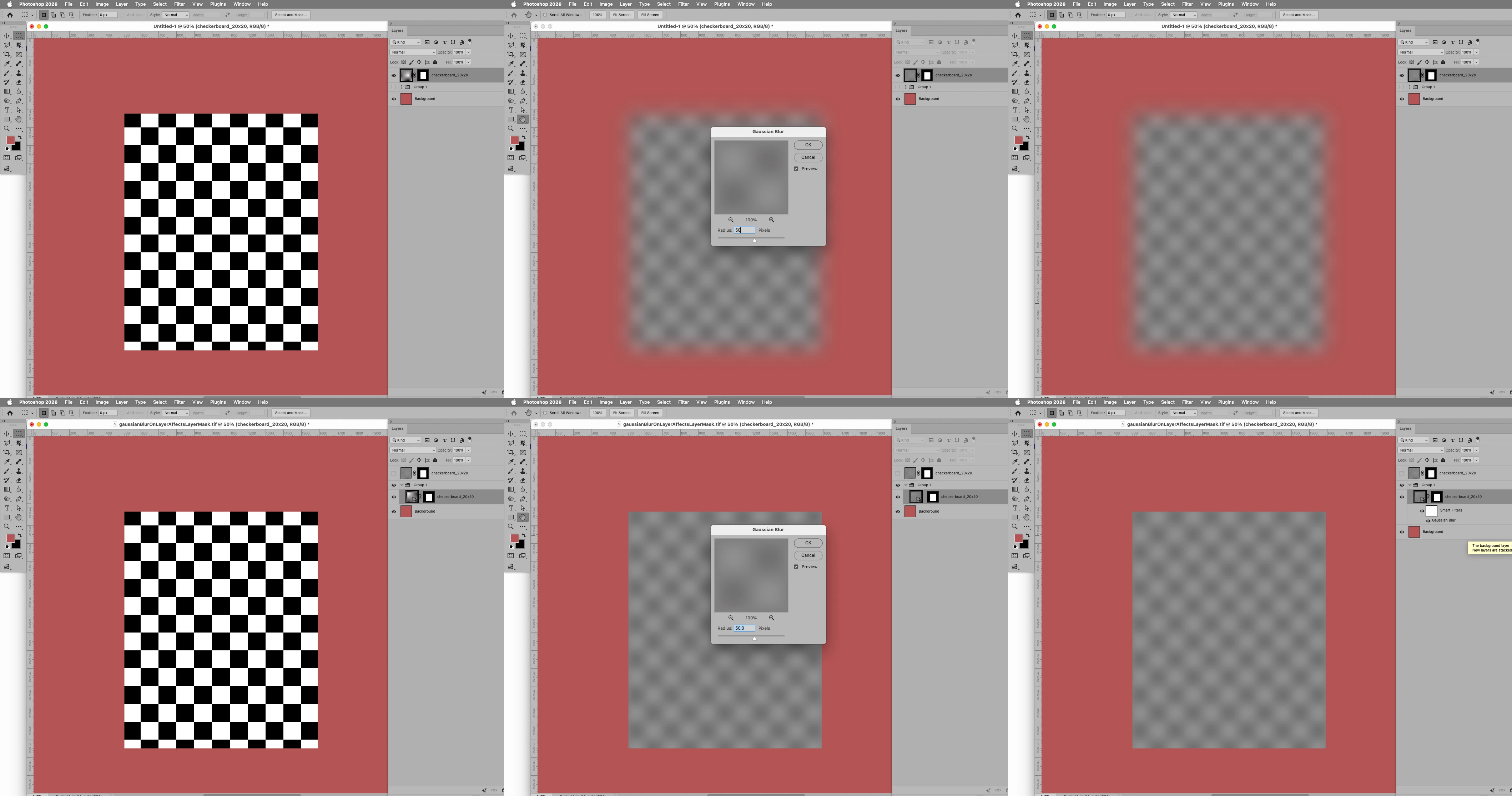
    Well, whaddaya know … I can reproduce the problem. (see screenshots in first line below)


    I guess I hadn’t noticed because I hardly ever destructively blur a Layer and with Smart Objects the 

    Layer Mask is not being damaged. (see screenshots in second line below)


    10 replies

    Stephen Marsh
    Community Expert
    Community Expert
    August 23, 2026

    Also here:


    BazslAuthor
    Inspiring
    August 23, 2026

    Open a photo in Photoshop.

    Duplicate the layer.

    Add a layer mask.

    Mask part of the layer with a hard black brush.

    Click the image icon to select the layer, not the mask.

    Apply Gaussian blur.

    The blur is applied to both the layer’s pixels and to the layer mask. Blurring the image should not blur the mask.

    c.pfaffenbichler
    Community Expert
    Community Expert
    August 23, 2026

    Unlinking the Layer Mask seems to prevent the issue … of course risky for later moving of the Layer. 


    c.pfaffenbichler
    Community Expert
    Community Expert
    August 23, 2026

    As a work-around I would recommend applying the Filter on a Smart Object or, if you prefer not to use Smart Filters, applying the Layer Mask to a Group containing the Layer. 

    Applying the Filter on two of the composite channels and then on the third one seems too convoluted. 


    Dang, the Filter application even seems to honour Selections on all four Channels (the three composite and the mask). 


    I wonder if this might be a feature request-implementation gone wrong? 

    c.pfaffenbichler
    Community Expert
    c.pfaffenbichlerCommunity ExpertCorrect answer
    Community Expert
    August 23, 2026

    Well, whaddaya know … I can reproduce the problem. (see screenshots in first line below)


    I guess I hadn’t noticed because I hardly ever destructively blur a Layer and with Smart Objects the 

    Layer Mask is not being damaged. (see screenshots in second line below)


    BazslAuthor
    Inspiring
    August 23, 2026

    I have been using Ps for many years and this is the first time I have encountered this behavior. I cannot think of a situation where I would want the mask to blur when I blur the image. The work around is to apply the mask after the blur. It’s good to know that it works the way I think it should with a smart object. Thanks for that information.

    c.pfaffenbichler
    Community Expert
    Community Expert
    August 23, 2026

    Even though the Layer Mask is obviously not selected in the Channels Panel (as well as in the Layer Panel) it is being affected, so it definitely seems like unintended behaviour. 


    You might want to post a Bug Report. 

    c.pfaffenbichler
    Community Expert
    Community Expert
    August 23, 2026

    Please post screenshots taken at view > 100% against a one-color background with the pertinent panels visible to illustrate.

    Trevor.Dennis
    Community Expert
    Community Expert
    August 23, 2026

    That’s normal behaviour when you have the layer selected and not the mask.  If the mask is selected, then only the mask is blurred.  It is different again if the mask is selected, and you have an active selection.  Gaussian blur is not always the right choice with masks because the blur bleeds past the mask.  Lens blur does not do that.