


Inspiring
May 7, 2025
Answered

Artboards To Files - "Include Overlappting Areas" vs "Artboard Content Only"?

  • May 7, 2025
  • 1 reply
  • 257 views

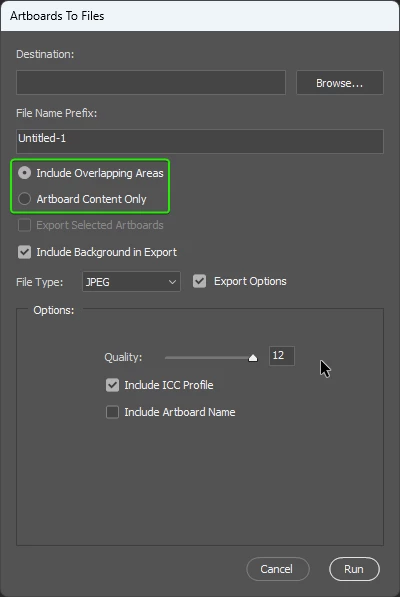
When exporting arboards using File > Export > Artboards To Files...
There's a radio button to choose between two options:

  • Include Overlapping Areas
  • Artboard Content Only


Does anyone maybe know what each of these options do? I've tested numerous artboards with overlapping content, without overlapping content, etc. Both options seem to produce the same results.



Correct answer creative explorer

@aaddiiooss When exporting artboards, Artboard Content Only means it will only save what's strictly inside each artboard's boundaries, cutting off anything that goes over the edges. This is usually what you want for finished files for websites or printing. On the other hand, Include Overlapping Areas will save everything visible, even if it extends beyond the artboard or onto other nearby artboards, making the exported file potentially larger. This option is handier for specific needs like printing with bleeds or making a visual overview that shows elements spilling between artboards.

If you're not seeing a difference in your tests, it's probably because your artwork isn't truly extending far enough outside the artboard's edge or crossing into other artboards' spaces to trigger the "Include Overlapping Areas" effect.

1 reply

creative explorer
Community Expert
creative explorerCommunity ExpertCorrect answer
Community Expert
May 25, 2025

@aaddiiooss When exporting artboards, Artboard Content Only means it will only save what's strictly inside each artboard's boundaries, cutting off anything that goes over the edges. This is usually what you want for finished files for websites or printing. On the other hand, Include Overlapping Areas will save everything visible, even if it extends beyond the artboard or onto other nearby artboards, making the exported file potentially larger. This option is handier for specific needs like printing with bleeds or making a visual overview that shows elements spilling between artboards.

If you're not seeing a difference in your tests, it's probably because your artwork isn't truly extending far enough outside the artboard's edge or crossing into other artboards' spaces to trigger the "Include Overlapping Areas" effect.

m