Inspiring
September 27, 2021
Question

Auto-Blend Layers not Working

  • September 27, 2021
  • 2 replies
  • 571 views

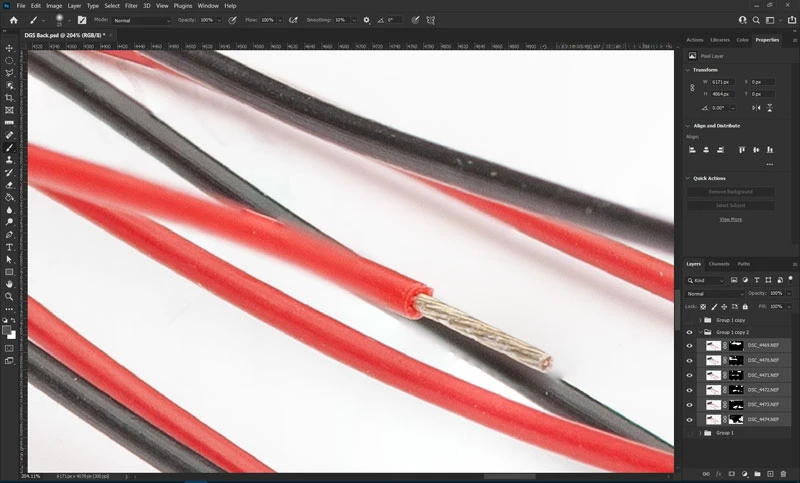
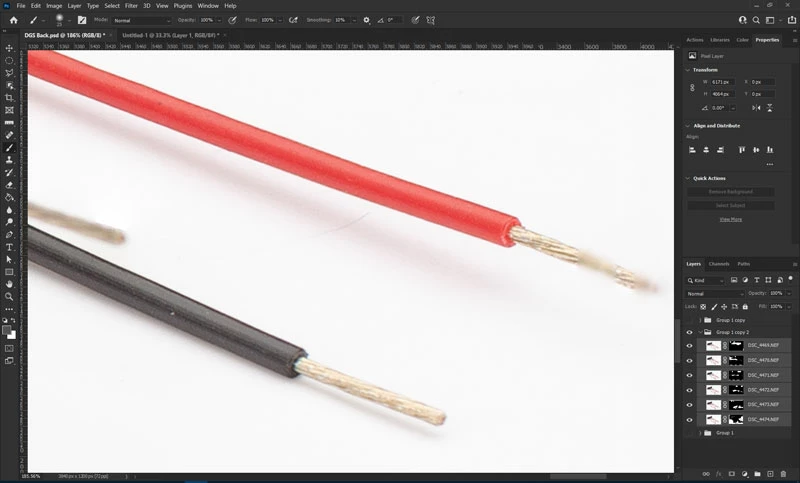
I'm trying to focus stack in Photoshop using Auto-Align and Auto-Blend. However, the results are pretty poor. I don't understand why PS is interespersing segments of out-of-focus wire between segments of in-focus wire. If it just used the same layer/photo for those segments, it would be much sharper.


Are these results to be expected from Photoshop? Should I instead use other software to perform focus stacking?


Windows 10 OS, PS ver 22.5.1


This topic has been closed for replies.

2 replies

ScottJ53Author
Inspiring
October 1, 2021

@JohanElzenga

Yes, I auto-aligned before auto-blending. Apologies if I wasn't clear in my post.

Thanks. That makes sense that "seamless tones and colors" would probably alter the individual layers.

JohanElzenga
Community Expert
Community Expert
September 28, 2021

Did you auto-align before you used auto-blend? Even if you shoot from a tripod, you must use auto align. The reason is that changing focus at macro distance also changes the subject size, so auto-align must correct this first.


To answer your second question: Photoshop only changes the layers if you select that option in the Auto Blend dialog. That is the 'Seamless colors' option (I'm typing this on my iPad, so I don't know the exact words).


-- Johan W. Elzenga