
Participating Frequently
May 11, 2017
Answered

auto-collapse for panels does not work in photoshop

  • May 11, 2017
  • 3 replies
  • 818 views

auto-collapse for panels does not work in  photoshop. WHY?

am I the only one having this issue?! what is wrong with photoshop.. recent years been a disaster of updates.

if anyone had the same issue, please share your experience n how to deal with it.


+ is it possible to get an older version somewhere? had to reinstall the software and got all the new updates with annoying bugs it goes with..
This topic has been closed for replies.
Correct answer Jeff Arola

What version of photoshop and operating system are you using?

To see the exact version of photoshop go to Help>System Info in photoshop and top line is the photoshop version.

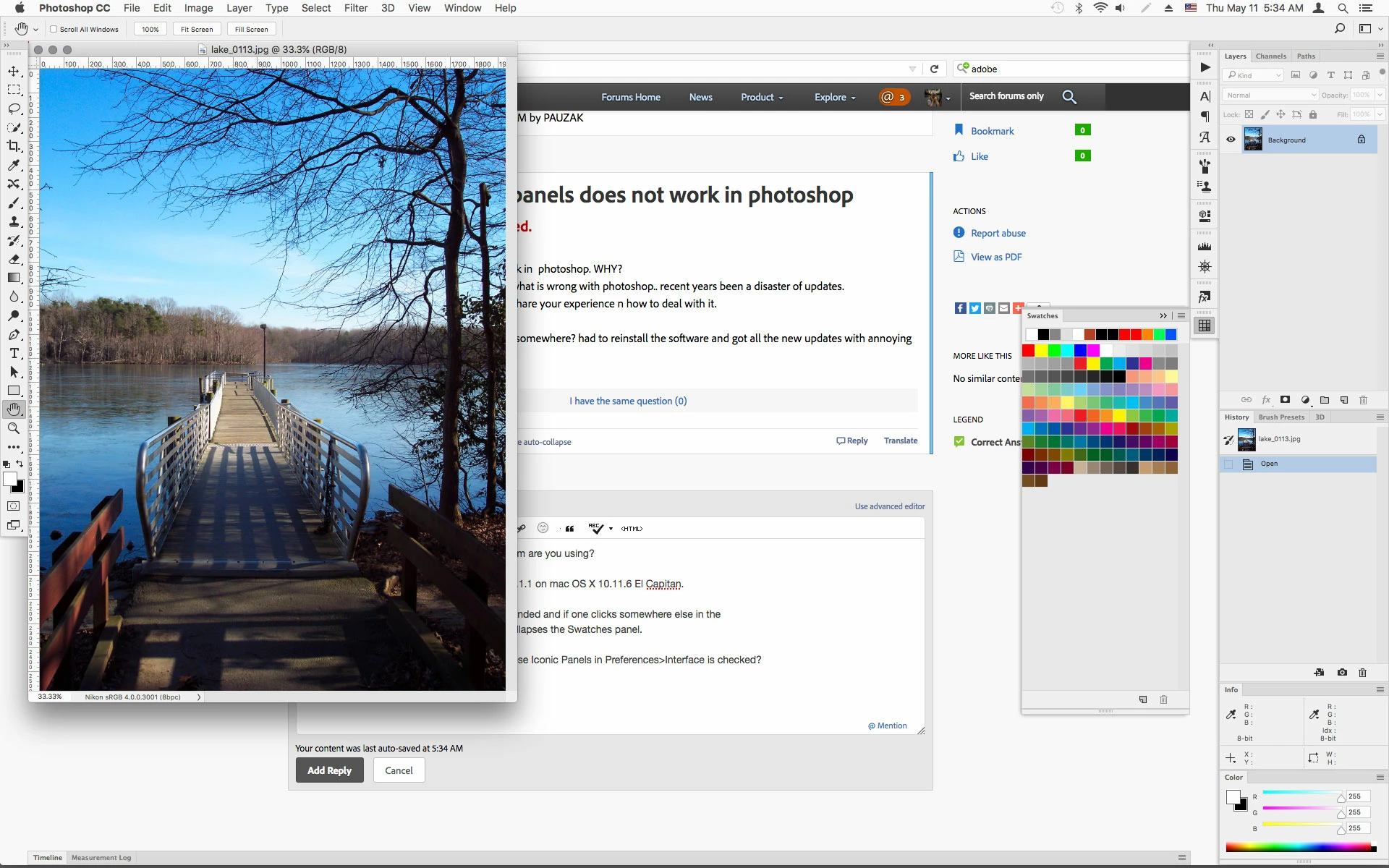
It seems to work here with photoshop CC 2017.1.1 on mac OS X 10.11.6 El Capitan.

As illustrated below the Swatches panel is expanded and if one clicks somewhere else in the

photoshop interface, like on the picture, that collapses the Swatches panel.

Is that the behavior your expecting when Auto - Collapse Iconic Panels in Preferences>Workspace is checked?

3 replies

PAUZAKAuthor
Participating Frequently
May 11, 2017

this issue was bothering after reinstalling the software last week. apparently we missed the newest update which came out couple days later. problem solved!

in our business we tend to ignore ADOBE ****** updates and changes since it's distorting our workflow. because some plugins stop working, like tinyPNG and etc problems appear, just like the one mentioned above (auto-collapse not working after installing newest version - rly..?). updates - no thank you.

thank you for your time, guys! auto-collapse restored! but plugins topped working and there's no older PS version - well, **** you ADOBE, very much!

back to PS - Clip Studio workflow-mix-up madness..

D Fosse
Community Expert
Community Expert
May 11, 2017

Auto-collapsible iconic panels have been part of my standard workspace for years and years. My whole workflow would collapse if it didn't work, but I have never had any issues with it.

I'd consider resetting preferences if it doesn't work properly.

Jeff Arola
Community Expert
Jeff ArolaCommunity ExpertCorrect answer
Community Expert
May 11, 2017

What version of photoshop and operating system are you using?

To see the exact version of photoshop go to Help>System Info in photoshop and top line is the photoshop version.

It seems to work here with photoshop CC 2017.1.1 on mac OS X 10.11.6 El Capitan.

As illustrated below the Swatches panel is expanded and if one clicks somewhere else in the

photoshop interface, like on the picture, that collapses the Swatches panel.

Is that the behavior your expecting when Auto - Collapse Iconic Panels in Preferences>Workspace is checked?