Known Participant
June 6, 2026
Answered

Auto merge overlaps vector layers?

  • June 6, 2026
  • 2 replies
  • 70 views

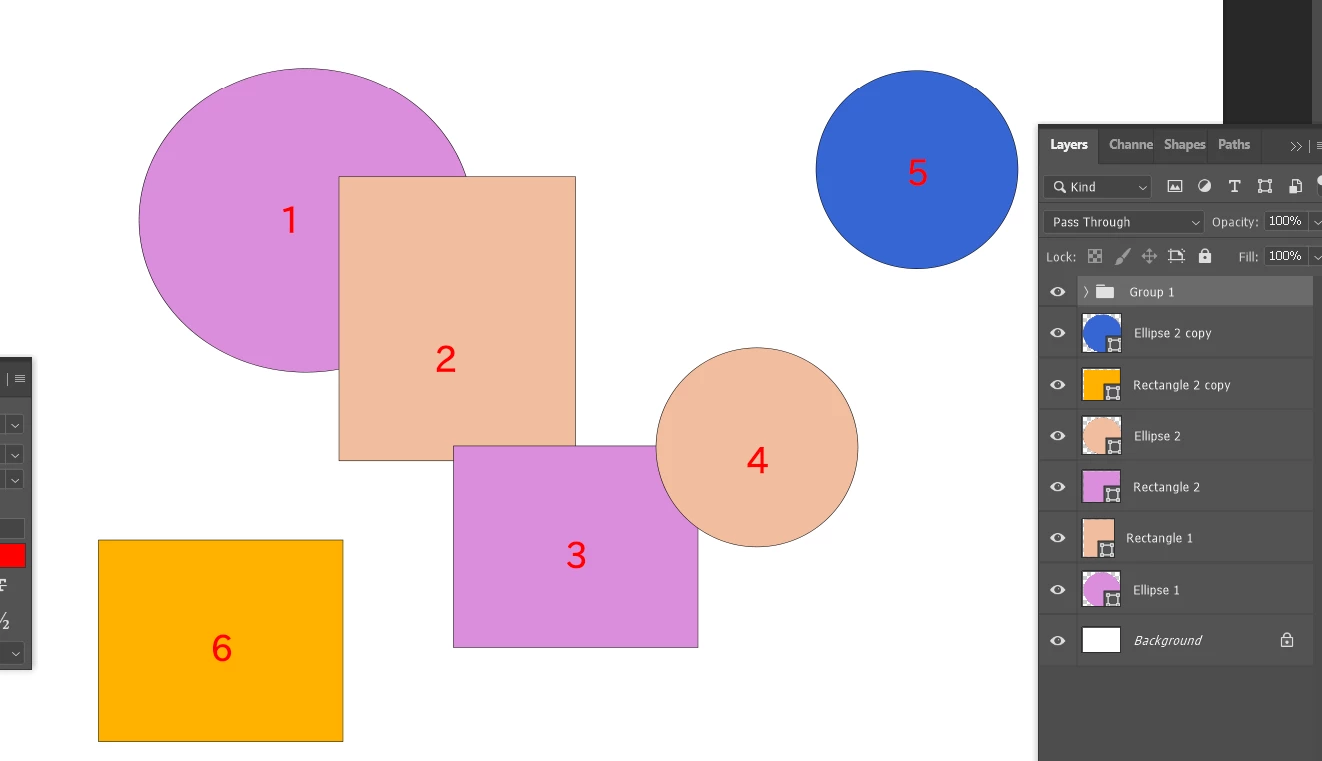
I'm working with Photoshop 22.0.0 and I have a PSD containing more than 1000 dividual shape layers (vector layers). Many of these shapes overlap each other. For example:

  •  


Even if Shape 1 does not directly overlap Shape 4, they should all be considered part of the same connected group. So I need a Photoshop script that works as follows:

  1. When I selects a single Shape Layer, the script will find all Shape Layers that overlap the selected layer.

  2. All layers in that connected group should be merged into a single Shape Layer. Layers that are not connected to the group must remain untouched.

  3. The final merged shape should use the appearance (fill/stroke/style) of the originally selected Shape Layer.

Thank you for your all help!

    Correct answer Stephen Marsh

    Here is a first draft, it doesn't explicitly work with groups, it only works on the root-level layers.


    /*
    * Select And Merge Overlapping Visually Connected Vector Layers.jsx
    * Stephen Marsh
    * v1.0 - 7th June 2026: Initial release
    * https://community.adobe.com/questions-712/auto-merge-overlaps-vector-layers-1626768
    *
    * 1. From the one selected vector shape layer ("target layer"), the Breadth-First Search (BFS)
    * finds all visually connected (overlapping) vector shape layer "components".
    * 2. If the target layer has a layer style, copies it via AM copyLayerStyle.
    * 3. Moves the target layer layer to the top of the components stack, as the
    * top layer in the stack, as the merge retains the fill and stroke properties.
    * 4. Selects the whole connected components, merges them into one shape layer
    * (keeps vectors live with an option to destructively combine).
    * 5. If a layer style was captured, pastes it via AM pasteLayerStyle.
    *
    * Only vector shape layers are selected. Pixel, text, smart-object and
    * adjustment layers are completely ignored throughout.
    *
    */

    app.activeDocument.suspendHistory("Select And Merge Overlapping Visually Connected Vector Layers", "main()");

    function main() {

    // Debug: set true to show a layer-bounds report before BFS
    var DEBUG = false;

    // 1. Checks
    var doc;
    try { doc = app.activeDocument; }
    catch (e) { alert("No document is open."); return; }
    var selectedLayers = getSelectedLayers(doc);
    if (selectedLayers.length === 0) {
    alert("No layers are currently selected."); return;
    }
    if (selectedLayers.length > 1) {
    alert("Please select exactly ONE vector layer before running.\n" +
    "Currently selected: " + selectedLayers.length + " layers."); return;
    }
    var targetLayer = selectedLayers[0];
    if (!isVectorLayer(targetLayer)) {
    alert("\"" + targetLayer.name + "\" is not a vector shape layer.\n" +
    "Please select a vector shape layer and try again."); return;
    }

    // 2. Collect all vector layers (flat, no groups)
    var allLayers = [];
    collectVectorLayers(doc.layers, allLayers);

    if (allLayers.length < 2) {
    alert("There is only one vector layer in this document - nothing to connect."); return;
    }

    // 3. Bounding box cache
    var bounds = [];
    var targetIndex = -1;

    for (var i = 0; i < allLayers.length; i++) {
    bounds[i] = safeBounds(allLayers[i]);
    if (allLayers[i].id === targetLayer.id) { targetIndex = i; }
    }

    if (targetIndex === -1) {
    alert("Could not locate target layer in vector list: " + targetLayer.name); return;
    }

    if (DEBUG) {
    var dbg = ["Vector layers (" + allLayers.length + "):\n"];
    for (var d = 0; d < allLayers.length; d++) {
    var bd = bounds[d];
    dbg.push(allLayers[d].name + (bd
    ? " [L:" + Math.round(bd.left) + " T:" + Math.round(bd.top) +
    " R:" + Math.round(bd.right) + " B:" + Math.round(bd.bottom) + "]"
    : " [no bounds]"));
    }
    alert(dbg.join("\n"));
    }

    // 4. Copy layer style from target (if it has one)
    // Use AM copyLayerStyle while the target layer still exists.
    // The boolean controls whether to paste later.
    var hasCopiedStyle = false;
    if (hasLayerStyle(targetLayer)) {
    copyLayerStyle(targetLayer);
    hasCopiedStyle = true;
    }

    // 5. Alert target layer
    /* alert("Initially selected layer:\n\n \"" + targetLayer.name + "\""); */

    // 6. BFS
    var visited = [];
    var queue = [];
    var component = [];

    for (var k = 0; k < allLayers.length; k++) { visited[k] = false; }
    visited[targetIndex] = true;
    queue.push(targetIndex);

    while (queue.length > 0) {
    var current = queue.shift();
    component.push(allLayers[current]);
    for (var j = 0; j < allLayers.length; j++) {
    if (!visited[j] && boundsOverlap(bounds[current], bounds[j])) {
    visited[j] = true;
    queue.push(j);
    }
    }
    }

    // 7. Alert connected component
    var names = [];
    for (var n = 0; n < component.length; n++) {
    names.push(" \"" + component[n].name + "\"");
    }
    if (component.length === 1) {
    alert("This vector layer has NO visually connected neighbours.\n\n" +
    "Selected layer:\n" + names.join("\n"));
    return; // nothing to merge
    }
    /* alert("Found " + component.length + " visually connected vector layer(s).\n" +
    "All are now selected:\n\n" + names.join("\n")); */

    // 8. Move target layer above all other component layers
    // Photoshop's "Merge Shapes" merges into the topmost selected layer, so we
    // move the target to the top of the component stack before selecting/merging.
    // That guarantees the target layer survives as the merge target and its name,
    // fill and or stroke is kept on the resulting merged shape layer.
    moveTargetAboveComponents(targetLayer, component);

    // 9. Select the component in the Layers panel
    selectLayersById(component);

    // 10. Merge shapes (Edit > Merge Shapes keeps paths live)
    mergeSelectedShapes();
    // After merge, the new combined layer becomes the active layer
    var mergedLayer = doc.activeLayer;

    // 11. Paste layer style onto the merged layer (if targetLayer had one)
    if (hasCopiedStyle) {
    pasteLayerStyle(mergedLayer);
    }

    // 12. End of script notification
    app.beep();

    }


    ///// FUNCTIONS /////

    /*
    * Returns true if the layer has at least one live layer effect (fx).
    * Checks the "layerEffects" key in the layer descriptor - it is only present
    * when effects have been added, and its "scale" sub-key alone doesn't count.
    */
    function hasLayerStyle(lyr) {
    try {
    var ref = new ActionReference();
    ref.putIdentifier(charIDToTypeID("Lyr "), lyr.id);
    var desc = executeActionGet(ref);
    var fxKey = stringIDToTypeID("layerEffects");
    if (!desc.hasKey(fxKey)) { return false; }

    // "layerEffects" exists but may contain only the "scale" key with no
    // actual effects enabled - check that at least one effect key is present.
    var fxDesc = desc.getObjectValue(fxKey);
    var effectKeys = [
    "dropShadow", "innerShadow", "outerGlow", "innerGlow",
    "bevelEmboss", "chromeFX", "solidFill", "gradientFill",
    "patternFill", "frameFX"
    ];
    for (var i = 0; i < effectKeys.length; i++) {
    var ek = stringIDToTypeID(effectKeys[i]);
    if (fxDesc.hasKey(ek)) { return true; }
    }
    return false;
    } catch (e) { return false; }
    }

    /*
    * Copies the layer style of the given layer to Photoshop's internal clipboard
    * using the AM "copyEffects" event (Layer > Layer Style > Copy Layer Style).
    */
    function copyLayerStyle(lyr) {
    // Make the layer active so copyEffects targets it
    app.activeDocument.activeLayer = lyr;
    try {
    executeAction(stringIDToTypeID("copyEffects"), undefined, DialogModes.NO);
    } catch (e) {
    alert("Warning: could not copy layer style from \"" + lyr.name + "\".\n" + e);
    }
    }

    /*
    * Pastes the previously copied layer style onto the given layer
    * using the AM "pasteEffects" event (Layer > Layer Style > Paste Layer Style).
    */
    function pasteLayerStyle(lyr) {
    app.activeDocument.activeLayer = lyr;
    try {
    executeAction(stringIDToTypeID("pasteEffects"), undefined, DialogModes.NO);
    } catch (e) {
    alert("Warning: could not paste layer style onto \"" + lyr.name + "\".\n" + e);
    }
    }

    /*
    * Merges the currently selected components into one live shape layer.
    */
    function mergeSelectedShapes() {
    try {
    var idMrgtwo = charIDToTypeID("Mrg2");
    var desc3766 = new ActionDescriptor();
    var idshapeOperation = stringIDToTypeID("shapeOperation");
    var idshapeOperation = stringIDToTypeID("shapeOperation");
    var idAdd = charIDToTypeID("Add ");
    desc3766.putEnumerated(idshapeOperation, idshapeOperation, idAdd);
    executeAction(idMrgtwo, desc3766, DialogModes.NO);

    /*
    // Optional: Combine/Add live shapes into a single path (destructive operation)
    var idcombine = stringIDToTypeID( "combine" );
    var desc3845 = new ActionDescriptor();
    var idnull = charIDToTypeID( "null" );
    var ref710 = new ActionReference();
    var idPath = charIDToTypeID( "Path" );
    var idOrdn = charIDToTypeID( "Ordn" );
    var idTrgt = charIDToTypeID( "Trgt" );
    ref710.putEnumerated( idPath, idOrdn, idTrgt );
    desc3845.putReference( idnull, ref710 );
    executeAction( idcombine, desc3845, DialogModes.NO );
    */

    } catch (e) {}
    }

    function isVectorLayer(lyr) {
    try {
    var ref = new ActionReference();
    ref.putIdentifier(charIDToTypeID("Lyr "), lyr.id);
    var desc = executeActionGet(ref);
    var vmKey = stringIDToTypeID("vectorMaskEnabled");
    return desc.hasKey(vmKey) && desc.getBoolean(vmKey);
    } catch (e) { return false; }
    }

    function collectVectorLayers(layerSet, result) {
    for (var i = 0; i < layerSet.length; i++) {
    var lyr = layerSet[i];
    if (lyr.typename === "LayerSet") {
    collectVectorLayers(lyr.layers, result);
    } else if (isVectorLayer(lyr)) {
    result.push(lyr);
    }
    }
    }

    function safeBounds(lyr) {
    try {
    var b = lyr.bounds;
    var l = b[0].as("px"), t = b[1].as("px"),
    r = b[2].as("px"), bm = b[3].as("px");
    if (l === r || t === bm) { return null; }
    return { left: l, top: t, right: r, bottom: bm };
    } catch (e) { return null; }
    }

    function boundsOverlap(a, b) {
    if (!a || !b) { return false; }
    return !(a.right <= b.left || b.right <= a.left ||
    a.bottom <= b.top || b.bottom <= a.top);
    }

    function getSelectedLayers(doc) {
    var selected = [];
    try {
    var ref = new ActionReference();
    ref.putEnumerated(charIDToTypeID("Dcmn"), charIDToTypeID("Ordn"), charIDToTypeID("Trgt"));
    var desc = executeActionGet(ref);
    var layerIDs = desc.getList(stringIDToTypeID("targetLayersIDs"));
    for (var i = 0; i < layerIDs.count; i++) {
    var lyID = layerIDs.getReference(i).getIdentifier();
    var found = null;
    try { found = doc.layerTree.getByID(lyID); } catch(e2) {}
    if (!found) { found = getLayerByID(doc, lyID); }
    if (found) { selected.push(found); }
    }
    } catch (e) {
    if (doc.activeLayer) { selected.push(doc.activeLayer); }
    }
    return selected;
    }

    function getLayerByID(doc, id) {
    var all = [];
    collectAllLeaves(doc.layers, all);
    for (var i = 0; i < all.length; i++) {
    if (all[i].id === id) { return all[i]; }
    }
    return null;
    }

    function collectAllLeaves(layerSet, result) {
    for (var i = 0; i < layerSet.length; i++) {
    var lyr = layerSet[i];
    if (lyr.typename === "LayerSet") { collectAllLeaves(lyr.layers, result); }
    else { result.push(lyr); }
    }
    }

    function selectLayersById(layers) {
    if (layers.length === 0) { return; }
    app.activeDocument.activeLayer = layers[0];
    if (layers.length === 1) { return; }
    for (var i = 1; i < layers.length; i++) {
    var desc = new ActionDescriptor();
    var ref = new ActionReference();
    ref.putIdentifier(charIDToTypeID("Lyr "), layers[i].id);
    desc.putReference(charIDToTypeID("null"), ref);
    desc.putEnumerated(
    stringIDToTypeID("selectionModifier"),
    stringIDToTypeID("selectionModifierType"),
    stringIDToTypeID("addToSelection")
    );
    desc.putBoolean(charIDToTypeID("MkVs"), false);
    try { executeAction(charIDToTypeID("slct"), desc, DialogModes.NO); }
    catch (e) { /* locked/hidden - skip */ }
    }
    }

    /*
    * Moves the target layer to sit above all other layers in the component.
    *
    * Photoshop's "Merge Shapes" (mergeLayersNew) merges all selected paths into
    * the topmost selected layer and uses that layer's name for the result.
    * By moving the target layer to the top of the component stack first, we ensure:
    * - the target layer becomes the merge target, not an arbitrary component layer.
    * - the merged layer retains the target layer's name, fill and or stroke.
    *
    * Implementation: uses the scripting DOM layer.move() with
    * ElementPlacement.PLACEBEFORE to reorder the target layer above the topmost
    * component member without touching layer content. If the target layer is already
    * topmost in the component, this is a no-op.
    */
    function moveTargetAboveComponents(target, component) {

    // Build a lookup of component layer IDs for fast membership testing
    var inComponent = {};
    for (var i = 0; i < component.length; i++) {
    inComponent[component[i].id] = true;
    }

    // Walk the flat layer list (top to bottom in stack order) to find which
    // component member is currently the topmost.
    var allLeaves = [];
    collectAllLeaves(app.activeDocument.layers, allLeaves);

    var topmostComponentIndex = -1;
    for (var k = 0; k < allLeaves.length; k++) {
    if (inComponent[allLeaves[k].id]) {
    topmostComponentIndex = k;
    break; // first hit is the topmost
    }
    }

    if (topmostComponentIndex === -1) { return; } // safety - should never happen

    // If the target layer is already the topmost component layer, nothing to do.
    if (allLeaves[topmostComponentIndex].id === target.id) { return; }

    // Move target layer to just above the current topmost component member using the
    // scripting DOM's layer.move() with ElementPlacement.PLACEBEFORE.
    // PLACEBEFORE places the target layer directly above the reference layer in the stack.
    try {
    target.move(allLeaves[topmostComponentIndex], ElementPlacement.PLACEBEFORE);
    } catch (e) {
    alert("Warning: could not reorder target layer \"" + target.name + "\" above the component.\n" +
    "The merge will still proceed but may target a different layer. Double check the fill and or stroke attributes!\n\nError: " + e);
    }
    }



    2 replies

    Stephen Marsh
    Community Expert
    Stephen MarshCommunity ExpertCorrect answer
    Community Expert
    June 7, 2026

    Here is a first draft, it doesn't explicitly work with groups, it only works on the root-level layers.


    /*
    * Select And Merge Overlapping Visually Connected Vector Layers.jsx
    * Stephen Marsh
    * v1.0 - 7th June 2026: Initial release
    * https://community.adobe.com/questions-712/auto-merge-overlaps-vector-layers-1626768
    *
    * 1. From the one selected vector shape layer ("target layer"), the Breadth-First Search (BFS)
    * finds all visually connected (overlapping) vector shape layer "components".
    * 2. If the target layer has a layer style, copies it via AM copyLayerStyle.
    * 3. Moves the target layer layer to the top of the components stack, as the
    * top layer in the stack, as the merge retains the fill and stroke properties.
    * 4. Selects the whole connected components, merges them into one shape layer
    * (keeps vectors live with an option to destructively combine).
    * 5. If a layer style was captured, pastes it via AM pasteLayerStyle.
    *
    * Only vector shape layers are selected. Pixel, text, smart-object and
    * adjustment layers are completely ignored throughout.
    *
    */

    app.activeDocument.suspendHistory("Select And Merge Overlapping Visually Connected Vector Layers", "main()");

    function main() {

    // Debug: set true to show a layer-bounds report before BFS
    var DEBUG = false;

    // 1. Checks
    var doc;
    try { doc = app.activeDocument; }
    catch (e) { alert("No document is open."); return; }
    var selectedLayers = getSelectedLayers(doc);
    if (selectedLayers.length === 0) {
    alert("No layers are currently selected."); return;
    }
    if (selectedLayers.length > 1) {
    alert("Please select exactly ONE vector layer before running.\n" +
    "Currently selected: " + selectedLayers.length + " layers."); return;
    }
    var targetLayer = selectedLayers[0];
    if (!isVectorLayer(targetLayer)) {
    alert("\"" + targetLayer.name + "\" is not a vector shape layer.\n" +
    "Please select a vector shape layer and try again."); return;
    }

    // 2. Collect all vector layers (flat, no groups)
    var allLayers = [];
    collectVectorLayers(doc.layers, allLayers);

    if (allLayers.length < 2) {
    alert("There is only one vector layer in this document - nothing to connect."); return;
    }

    // 3. Bounding box cache
    var bounds = [];
    var targetIndex = -1;

    for (var i = 0; i < allLayers.length; i++) {
    bounds[i] = safeBounds(allLayers[i]);
    if (allLayers[i].id === targetLayer.id) { targetIndex = i; }
    }

    if (targetIndex === -1) {
    alert("Could not locate target layer in vector list: " + targetLayer.name); return;
    }

    if (DEBUG) {
    var dbg = ["Vector layers (" + allLayers.length + "):\n"];
    for (var d = 0; d < allLayers.length; d++) {
    var bd = bounds[d];
    dbg.push(allLayers[d].name + (bd
    ? " [L:" + Math.round(bd.left) + " T:" + Math.round(bd.top) +
    " R:" + Math.round(bd.right) + " B:" + Math.round(bd.bottom) + "]"
    : " [no bounds]"));
    }
    alert(dbg.join("\n"));
    }

    // 4. Copy layer style from target (if it has one)
    // Use AM copyLayerStyle while the target layer still exists.
    // The boolean controls whether to paste later.
    var hasCopiedStyle = false;
    if (hasLayerStyle(targetLayer)) {
    copyLayerStyle(targetLayer);
    hasCopiedStyle = true;
    }

    // 5. Alert target layer
    /* alert("Initially selected layer:\n\n \"" + targetLayer.name + "\""); */

    // 6. BFS
    var visited = [];
    var queue = [];
    var component = [];

    for (var k = 0; k < allLayers.length; k++) { visited[k] = false; }
    visited[targetIndex] = true;
    queue.push(targetIndex);

    while (queue.length > 0) {
    var current = queue.shift();
    component.push(allLayers[current]);
    for (var j = 0; j < allLayers.length; j++) {
    if (!visited[j] && boundsOverlap(bounds[current], bounds[j])) {
    visited[j] = true;
    queue.push(j);
    }
    }
    }

    // 7. Alert connected component
    var names = [];
    for (var n = 0; n < component.length; n++) {
    names.push(" \"" + component[n].name + "\"");
    }
    if (component.length === 1) {
    alert("This vector layer has NO visually connected neighbours.\n\n" +
    "Selected layer:\n" + names.join("\n"));
    return; // nothing to merge
    }
    /* alert("Found " + component.length + " visually connected vector layer(s).\n" +
    "All are now selected:\n\n" + names.join("\n")); */

    // 8. Move target layer above all other component layers
    // Photoshop's "Merge Shapes" merges into the topmost selected layer, so we
    // move the target to the top of the component stack before selecting/merging.
    // That guarantees the target layer survives as the merge target and its name,
    // fill and or stroke is kept on the resulting merged shape layer.
    moveTargetAboveComponents(targetLayer, component);

    // 9. Select the component in the Layers panel
    selectLayersById(component);

    // 10. Merge shapes (Edit > Merge Shapes keeps paths live)
    mergeSelectedShapes();
    // After merge, the new combined layer becomes the active layer
    var mergedLayer = doc.activeLayer;

    // 11. Paste layer style onto the merged layer (if targetLayer had one)
    if (hasCopiedStyle) {
    pasteLayerStyle(mergedLayer);
    }

    // 12. End of script notification
    app.beep();

    }


    ///// FUNCTIONS /////

    /*
    * Returns true if the layer has at least one live layer effect (fx).
    * Checks the "layerEffects" key in the layer descriptor - it is only present
    * when effects have been added, and its "scale" sub-key alone doesn't count.
    */
    function hasLayerStyle(lyr) {
    try {
    var ref = new ActionReference();
    ref.putIdentifier(charIDToTypeID("Lyr "), lyr.id);
    var desc = executeActionGet(ref);
    var fxKey = stringIDToTypeID("layerEffects");
    if (!desc.hasKey(fxKey)) { return false; }

    // "layerEffects" exists but may contain only the "scale" key with no
    // actual effects enabled - check that at least one effect key is present.
    var fxDesc = desc.getObjectValue(fxKey);
    var effectKeys = [
    "dropShadow", "innerShadow", "outerGlow", "innerGlow",
    "bevelEmboss", "chromeFX", "solidFill", "gradientFill",
    "patternFill", "frameFX"
    ];
    for (var i = 0; i < effectKeys.length; i++) {
    var ek = stringIDToTypeID(effectKeys[i]);
    if (fxDesc.hasKey(ek)) { return true; }
    }
    return false;
    } catch (e) { return false; }
    }

    /*
    * Copies the layer style of the given layer to Photoshop's internal clipboard
    * using the AM "copyEffects" event (Layer > Layer Style > Copy Layer Style).
    */
    function copyLayerStyle(lyr) {
    // Make the layer active so copyEffects targets it
    app.activeDocument.activeLayer = lyr;
    try {
    executeAction(stringIDToTypeID("copyEffects"), undefined, DialogModes.NO);
    } catch (e) {
    alert("Warning: could not copy layer style from \"" + lyr.name + "\".\n" + e);
    }
    }

    /*
    * Pastes the previously copied layer style onto the given layer
    * using the AM "pasteEffects" event (Layer > Layer Style > Paste Layer Style).
    */
    function pasteLayerStyle(lyr) {
    app.activeDocument.activeLayer = lyr;
    try {
    executeAction(stringIDToTypeID("pasteEffects"), undefined, DialogModes.NO);
    } catch (e) {
    alert("Warning: could not paste layer style onto \"" + lyr.name + "\".\n" + e);
    }
    }

    /*
    * Merges the currently selected components into one live shape layer.
    */
    function mergeSelectedShapes() {
    try {
    var idMrgtwo = charIDToTypeID("Mrg2");
    var desc3766 = new ActionDescriptor();
    var idshapeOperation = stringIDToTypeID("shapeOperation");
    var idshapeOperation = stringIDToTypeID("shapeOperation");
    var idAdd = charIDToTypeID("Add ");
    desc3766.putEnumerated(idshapeOperation, idshapeOperation, idAdd);
    executeAction(idMrgtwo, desc3766, DialogModes.NO);

    /*
    // Optional: Combine/Add live shapes into a single path (destructive operation)
    var idcombine = stringIDToTypeID( "combine" );
    var desc3845 = new ActionDescriptor();
    var idnull = charIDToTypeID( "null" );
    var ref710 = new ActionReference();
    var idPath = charIDToTypeID( "Path" );
    var idOrdn = charIDToTypeID( "Ordn" );
    var idTrgt = charIDToTypeID( "Trgt" );
    ref710.putEnumerated( idPath, idOrdn, idTrgt );
    desc3845.putReference( idnull, ref710 );
    executeAction( idcombine, desc3845, DialogModes.NO );
    */

    } catch (e) {}
    }

    function isVectorLayer(lyr) {
    try {
    var ref = new ActionReference();
    ref.putIdentifier(charIDToTypeID("Lyr "), lyr.id);
    var desc = executeActionGet(ref);
    var vmKey = stringIDToTypeID("vectorMaskEnabled");
    return desc.hasKey(vmKey) && desc.getBoolean(vmKey);
    } catch (e) { return false; }
    }

    function collectVectorLayers(layerSet, result) {
    for (var i = 0; i < layerSet.length; i++) {
    var lyr = layerSet[i];
    if (lyr.typename === "LayerSet") {
    collectVectorLayers(lyr.layers, result);
    } else if (isVectorLayer(lyr)) {
    result.push(lyr);
    }
    }
    }

    function safeBounds(lyr) {
    try {
    var b = lyr.bounds;
    var l = b[0].as("px"), t = b[1].as("px"),
    r = b[2].as("px"), bm = b[3].as("px");
    if (l === r || t === bm) { return null; }
    return { left: l, top: t, right: r, bottom: bm };
    } catch (e) { return null; }
    }

    function boundsOverlap(a, b) {
    if (!a || !b) { return false; }
    return !(a.right <= b.left || b.right <= a.left ||
    a.bottom <= b.top || b.bottom <= a.top);
    }

    function getSelectedLayers(doc) {
    var selected = [];
    try {
    var ref = new ActionReference();
    ref.putEnumerated(charIDToTypeID("Dcmn"), charIDToTypeID("Ordn"), charIDToTypeID("Trgt"));
    var desc = executeActionGet(ref);
    var layerIDs = desc.getList(stringIDToTypeID("targetLayersIDs"));
    for (var i = 0; i < layerIDs.count; i++) {
    var lyID = layerIDs.getReference(i).getIdentifier();
    var found = null;
    try { found = doc.layerTree.getByID(lyID); } catch(e2) {}
    if (!found) { found = getLayerByID(doc, lyID); }
    if (found) { selected.push(found); }
    }
    } catch (e) {
    if (doc.activeLayer) { selected.push(doc.activeLayer); }
    }
    return selected;
    }

    function getLayerByID(doc, id) {
    var all = [];
    collectAllLeaves(doc.layers, all);
    for (var i = 0; i < all.length; i++) {
    if (all[i].id === id) { return all[i]; }
    }
    return null;
    }

    function collectAllLeaves(layerSet, result) {
    for (var i = 0; i < layerSet.length; i++) {
    var lyr = layerSet[i];
    if (lyr.typename === "LayerSet") { collectAllLeaves(lyr.layers, result); }
    else { result.push(lyr); }
    }
    }

    function selectLayersById(layers) {
    if (layers.length === 0) { return; }
    app.activeDocument.activeLayer = layers[0];
    if (layers.length === 1) { return; }
    for (var i = 1; i < layers.length; i++) {
    var desc = new ActionDescriptor();
    var ref = new ActionReference();
    ref.putIdentifier(charIDToTypeID("Lyr "), layers[i].id);
    desc.putReference(charIDToTypeID("null"), ref);
    desc.putEnumerated(
    stringIDToTypeID("selectionModifier"),
    stringIDToTypeID("selectionModifierType"),
    stringIDToTypeID("addToSelection")
    );
    desc.putBoolean(charIDToTypeID("MkVs"), false);
    try { executeAction(charIDToTypeID("slct"), desc, DialogModes.NO); }
    catch (e) { /* locked/hidden - skip */ }
    }
    }

    /*
    * Moves the target layer to sit above all other layers in the component.
    *
    * Photoshop's "Merge Shapes" (mergeLayersNew) merges all selected paths into
    * the topmost selected layer and uses that layer's name for the result.
    * By moving the target layer to the top of the component stack first, we ensure:
    * - the target layer becomes the merge target, not an arbitrary component layer.
    * - the merged layer retains the target layer's name, fill and or stroke.
    *
    * Implementation: uses the scripting DOM layer.move() with
    * ElementPlacement.PLACEBEFORE to reorder the target layer above the topmost
    * component member without touching layer content. If the target layer is already
    * topmost in the component, this is a no-op.
    */
    function moveTargetAboveComponents(target, component) {

    // Build a lookup of component layer IDs for fast membership testing
    var inComponent = {};
    for (var i = 0; i < component.length; i++) {
    inComponent[component[i].id] = true;
    }

    // Walk the flat layer list (top to bottom in stack order) to find which
    // component member is currently the topmost.
    var allLeaves = [];
    collectAllLeaves(app.activeDocument.layers, allLeaves);

    var topmostComponentIndex = -1;
    for (var k = 0; k < allLeaves.length; k++) {
    if (inComponent[allLeaves[k].id]) {
    topmostComponentIndex = k;
    break; // first hit is the topmost
    }
    }

    if (topmostComponentIndex === -1) { return; } // safety - should never happen

    // If the target layer is already the topmost component layer, nothing to do.
    if (allLeaves[topmostComponentIndex].id === target.id) { return; }

    // Move target layer to just above the current topmost component member using the
    // scripting DOM's layer.move() with ElementPlacement.PLACEBEFORE.
    // PLACEBEFORE places the target layer directly above the reference layer in the stack.
    try {
    target.move(allLeaves[topmostComponentIndex], ElementPlacement.PLACEBEFORE);
    } catch (e) {
    alert("Warning: could not reorder target layer \"" + target.name + "\" above the component.\n" +
    "The merge will still proceed but may target a different layer. Double check the fill and or stroke attributes!\n\nError: " + e);
    }
    }


    c.pfaffenbichler
    Community Expert
    Community Expert
    June 8, 2026

    I think the bounds can be a tricky property in this case. 


    Stephen Marsh
    Community Expert
    Community Expert
    June 8, 2026

    @c.pfaffenbichler I agree, as no file was provided for testing, what I built for proof of concept testing was rather simple.

    Stephen Marsh
    Community Expert
    Community Expert
    June 7, 2026

    @Junyi24858697x32l 


    This is not an easy task! I'll take a look at it, but I can't promise anything...

    c.pfaffenbichler
    Community Expert
    Community Expert
    June 7, 2026

    I expect it would be possible to check the Bounds of each pair of Shape Layers against each other and, if there is a Bounds-overlap, to check each path segment of the two paths for intersecting,

    The Selection-route would probably take too long for a file with more than 1000 Shape Layers. 


    @Junyi24858697x32l , does each Shape Layer contain only one subPathItem?