Inspiring
Oct 1, 2026 12:45 PM UTC
Answered

Avant la dernière MAJ de Photoshop, la barre contextuelle proposait la commande "isoler un sujet" bien pratique. Depuis il est proposé effectuer un prompt. Comment retrouver l'a commande? merci pour vore retour

Bonjour

La barre des taches contextuelle proposait dans la partie gauche la commande “Isoler un sujet”, on pouvait isoler le sujet principal de la photo et retravailler séparément sujet et arrière plan.

Depuis la dernière mise à jour, la commande est remplacée par “Du prompt à la modification” et je n’arrive plus à retrouver l’ancienne commande.

A-t-elle était supprimée ou bien déplacée. Je ne la retrouve pas.

Merci pour votre retour.

Jean Nabuse

    Srishti Bali
    Srishti BaliCorrect answer
    Community Manager
    Oct 1, 2026 4:55 PM UTC

    Hi ​@Jean Nabuse 


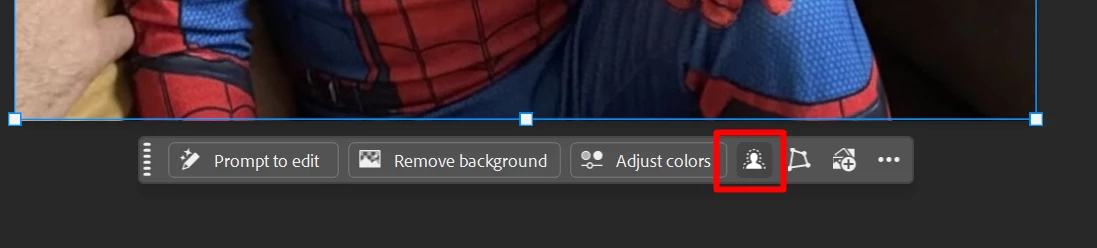
    Thanks for reaching out. Here is the option you are looking for:


    Let us know if this helps or if you have any further questions. 

    Thanks, Srishti Bali | Community & Engagement Strategist, Digital Imaging | Adobe

    6 replies

    Srishti Bali
    Community Manager
    Srishti BaliCommunity ManagerCorrect answer
    Community Manager
    Oct 1, 2026 4:55 PM UTC

    Hi ​@Jean Nabuse 


    Thanks for reaching out. Here is the option you are looking for:


    Let us know if this helps or if you have any further questions. 

    Translate
    Thanks, Srishti Bali | Community & Engagement Strategist, Digital Imaging | Adobe
    Inspiring
    Oct 2, 2026 4:36 PM UTC

    Un grand merci, ça marche, sur le PC et le Mac😊

    Translate
    Derek Cross
    Community Expert
    Community Expert
    Oct 1, 2026 3:13 PM UTC

    Try the keyboard shortcut:
    Control / Apple B instead

    Translate
    Inspiring
    Oct 1, 2026 4:32 PM UTC

    je suis sur PC : Pomme ??

    Translate
    Inspiring
    Oct 1, 2026 4:43 PM UTC

    on active la balance des couleurs aussi bien sur Mac que sur PC

    Translate