
Participating Frequently
July 12, 2025
Question

B&W Images Washed Out for Book Printing

  • July 12, 2025
  • 2 replies
  • 830 views

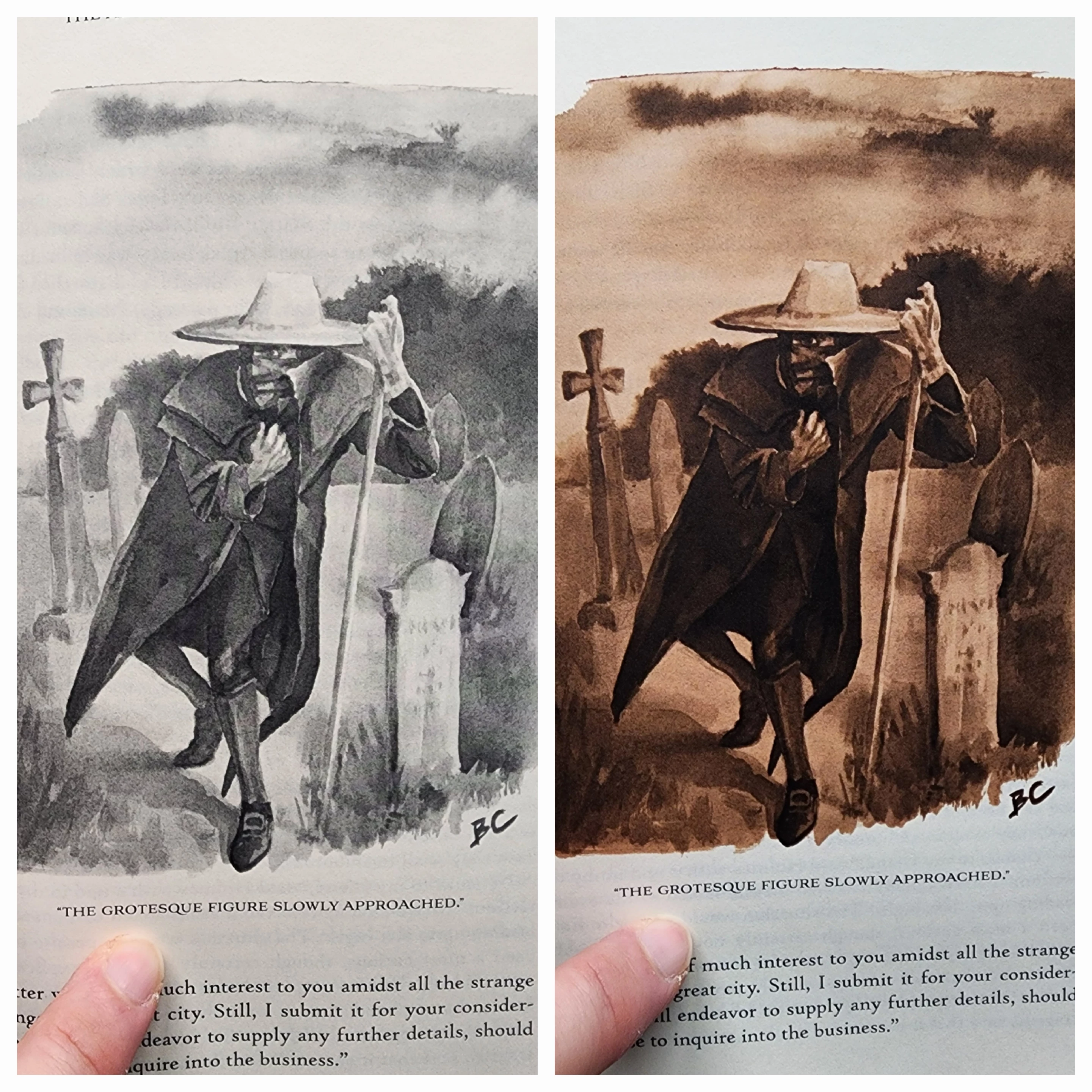
I have recently had two proofs made for a book that I have written and illustrated. I would like to print in black and white if possible to keep costs down, however I've been having trouble with the grayscale images losing their contrast and rich blacks. The second proof was done in color, and the sepia images look great. I've put them side by side for comparison (the b&w appears more washed out in person). Is there something I should be doing to the b&w files to avoid the loss of values? I edited them in photoshop, converted to grayscale, increased contrast, saved as PNG's, dropped into my InDesign book file, and then exported for print. Thanks!
 

2 replies

Stephen Marsh
Community Expert
Community Expert
July 12, 2025

Presuming a single/short run PoD book publishing service.


Mono/Black & White printing will use a single toner/ink, therefore it will naturally have lesser density. It costs less to print and doesn't have concerns with maintaining neutrality.


Full colour print will offer greater density due to having four toners/inks buiilding the shadows. You may have issues with maintaining neutral tones.


For the sepia or colour images, were these supplied as RGB or CMYK files? What ICC profile or conversion did the images or PDF conversion use?


Are the proofs close to what you see on screen for both mono and sepia/colour, particularly density and detail?


Are the proofs inkjet proofs or actual prints from the digital press used for production on the final stock?

Participating Frequently
July 12, 2025

Thanks for the questions, I'll do my best to answer-

-For the last question, these are proofs done on the digital press and will be the exact same as final production/ final stock. 

-The color (sepia) images are very close to what I see on screen. The mono are not close- they appear rich and dark on screen, and the value range is reduced significantly in the proof print.

-I supplied the color images (I believe) as RGB. I converted those to grayscale when saving files for the mono print, though when I open those files in photoshop now, they still list RGB as the color profile. If I can find where to look I'll let you know the ICC profile. I placed the images in InDesign and exported the PDF- I didn't change any of the settings (high quality print). 

Also, the printer is BookBaby and they use "HP Indigo and Xeikon printing presses". I talked to a rep about how to prepare the mono images, but they couldn't give me any advice

pixxxelschubser
Community Expert
Community Expert
July 12, 2025

How about with a Black&White adjustment layer?
I've added one default setting and one custom setting


Participating Frequently
July 12, 2025

I haven't done much with B&W adjustment layers in the past, but I can certainly give it a try. Would the correct usage be to edit the color image this way and then save in CMYK? Or should I still convert to grayscale?

pixxxelschubser
Community Expert
Community Expert
July 12, 2025

I would probably convert the file to greyscale in Photoshop. Or, depending on your workflow, work media-neutral in RGB in your layout programme and convert to CMYK when outputting the print file with Device Link Profile.