I am converting a large number of files (.ai and .psd) to .png.
Within Photoshop, I can do this efficiently using automation tools. The only problem is that when I convert a tranche of files, I am noticing that the height and width of the first image in the batch is being imposed on the other images in that batch. Example: If the first image is 5 x 1 in, those dimensions are applied to every other image in that batch after conversion. Desired behavior is that each image should keep its original dimension. I understand how to do this when converting images one-by-one, but how can I prevent this when working in batches?
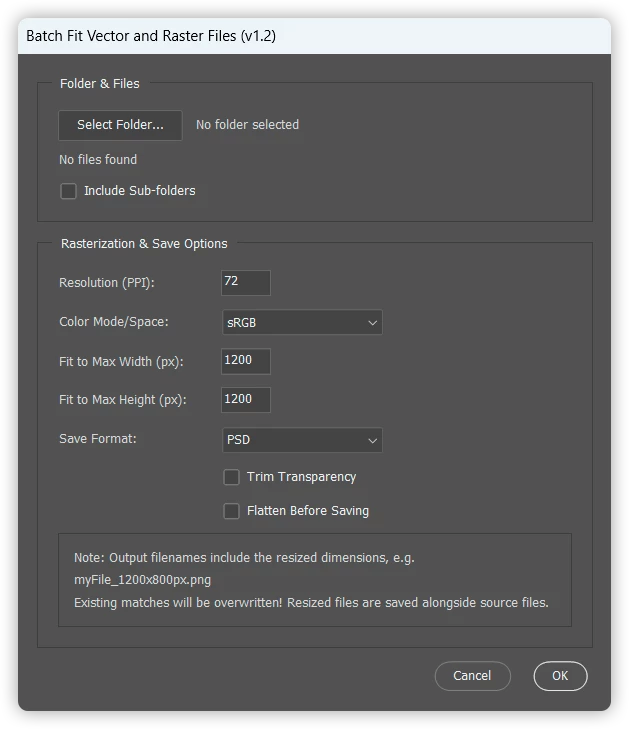
When it comes to batch processing, raster and vector files are like "oil and water”. This Photoshop script batch-resizes a folder of vector and raster files to a maximum width/height and re-saves them in a chosen format.
What it does:
Shows a UI dialog to pick a source folder (with optional subfolder recursion)
Lets the user set: output PPI, color mode/space (Working RGB, sRGB, Working CMYK, Working Grayscale), max fit width/height, output save format, optional "Trim Transparency" and "Flatten Before Saving" options
Appends the final resized pixel dimensions to each output filename (myFile_1200x800px.png)
Per-format save options (JPEG quality, PNG compression, WebP compression/metadata, TIFF compression/byte order, etc.) are configured via global variables at the top of the script rather than in the UI
/* Batch Fit Vector and Raster Files Stephen Marsh v1.0 - 19th July 2026: Initial release v1.1 - 21st July 2026: Output filenames now include the final resized width/height in px (e.g. myFile_1200x800px.png) v1.2 - 23rd July 2026: Added an "sRGB" Color Mode/Space option, which opens using Working RGB and then converts the profile to sRGB IEC61966-2.1 v1.3 - 8th August 2026: Added WebP Photoshop version support check https://community.adobe.com/questions-712/batch-converting-images-multiple-sizes-to-png-1631899 */
#target photoshop
///// Adjust the following "user friendly" variables as required. A GUI for these file format options isn't planned!
// saveJPEG global variables var jpegEmbedColorProfile = true; // Boolean: true | false var jpegFormatOptions = FormatOptions.STANDARDBASELINE; // FormatOptions.STANDARDBASELINE | FormatOptions.OPTIMIZEDBASELINE | FormatOptions.PROGRESSIVE var jpegMatte = MatteType.NONE; // MatteType.NONE | MatteType.WHITE | MatteType.BLACK var jpegQuality = 10; // Numeric: 0 - 12 (low quality to highest quality)
// savePNG global variables var pngCompression = 1; // Numeric: 0 - 9 (low compression to highest) var pngInterlaced = false; // Boolean: true | false
// saveWebP global variables var webPCompressionType = "compressionLossy"; // String: "compressionLossless" | "compressionLossy" var webPCompIsLossless = false; // Boolean: true | false var webPQuality = 75; // Numeric: 0 - 100 (low quality to highest quality) var webPIncludeXMPData = true; // Boolean: true | false var webPIncludeEXIFData = false; // Boolean: true | false var webPIncludePsExtras = false; // Boolean: true | false var webPLowerCase = true; // Boolean: true | false var webPEmbedProfiles = true; // Boolean: true | false
// saveTIFF global variables var tiffEmbedColorProfile = true; // Boolean: true | false var tiffByteOrder = ByteOrder.IBM; // ByteOrder.MACOS | ByteOrder.IBM var tiffTransparency = true; // Boolean: true | false var tiffLayerCompression = LayerCompression.ZIP; // LayerCompression.RLE | LayerCompression.ZIP var tiffInterleaveChannels = true; // Boolean: true | false var tiffAlphaChannels = true; // Boolean: true | false var tiffAnnotations = true; // Boolean: true | false var tiffSpotColors = true; // Boolean: true | false var tiffSaveLayers = true; // Boolean: true | false var tiffSaveImagePyramid = false; // Boolean: true | false var tiffImageCompression = TIFFEncoding.TIFFLZW; // TIFFEncoding.NONE | TIFFEncoding.JPEG | TIFFEncoding.TIFFLZW | TIFFEncoding.TIFFZIP
// No PSD or PSB options required, all params are set to true!
/////
function showRasterizeDialog() {
var selectedFiles = []; var selectedFolder = null;
var dlg = new Window("dialog", "Batch Fit Vector and Raster Files (v1.3)"); dlg.orientation = "column"; dlg.alignChildren = "fill"; dlg.spacing = 10; dlg.margins = 16;
// Row group: button + folder path side by side var folderRow = filePanel.add("group"); folderRow.orientation = "row"; folderRow.alignChildren = ["left", "center"]; folderRow.spacing = 10;
var folderBtn = folderRow.add("button", undefined, "Select Folder..."); folderBtn.preferredSize.width = 100;
var folderPathText = folderRow.add("statictext", undefined, "No folder selected", { truncate: "middle" }); folderPathText.preferredSize.width = 240;
var fileInfo = filePanel.add("statictext", undefined, "No files found"); fileInfo.preferredSize.width = 320;
var recurseCheckbox = filePanel.add("checkbox", undefined, "Include Sub-folders");
folderBtn.onClick = function() { var result = selectSourceFolder(recurseCheckbox.value); if (result === null) { return; } selectedFolder = result.folder; folderPathText.text = selectedFolder.fsName; if (result.files.length > 0) { selectedFiles = result.files; updateFileInfo(); } else { selectedFiles = []; updateFileInfo(); alert("No supported file formats were found in the selected folder!"); } };
// Re-scan the already-selected folder whenever the recurse setting is toggled recurseCheckbox.onClick = function() { if (!selectedFolder) { return; } var files = getSupportedFiles(selectedFolder, recurseCheckbox.value); selectedFiles = files; updateFileInfo(); if (files.length === 0) { alert("No supported file formats were found in the selected folder!"); } };
function updateFileInfo() { if (selectedFiles.length === 0) { fileInfo.text = "No folder selected"; } else if (selectedFiles.length === 1) { fileInfo.text = decodeURI(selectedFiles[0].name); } else { fileInfo.text = selectedFiles.length + " files found"; } }
// PPI var ppiGroup = optionsPanel.add("group"); var ppiLabel = ppiGroup.add("statictext", undefined, "Resolution (PPI):"); ppiLabel.preferredSize.width = labelWidth; var ppiInput = ppiGroup.add("editnumber", undefined, "72"); ppiInput.characters = 4; ppiInput.onChanging = function() { this.text = this.text.replace(/[^0-9]/g, ""); };
// Color mode var modeGroup = optionsPanel.add("group"); var modeLabel = modeGroup.add("statictext", undefined, "Color Mode/Space:"); modeLabel.preferredSize.width = labelWidth; var modeDropdown = modeGroup.add("dropdownlist", undefined, ["Working RGB", "sRGB", "Working CMYK", "Working Grayscale"]); modeDropdown.selection = 1; // sRGB modeDropdown.preferredSize.width = 130; modeDropdown.helpTip = "\"sRGB\" opens/converts using Working RGB, then converts the profile to sRGB IEC61966-2.1 before saving. Applies to vector and raster files alike.";
// Fit to max width var widthGroup = optionsPanel.add("group"); var widthLabel = widthGroup.add("statictext", undefined, "Fit to Max Width (px):"); widthLabel.preferredSize.width = labelWidth; var widthInput = widthGroup.add("editnumber", undefined, "1200"); widthInput.characters = 4; widthInput.onChanging = function() { this.text = this.text.replace(/[^0-9]/g, ""); };
// Fit to max height var heightGroup = optionsPanel.add("group"); var heightLabel = heightGroup.add("statictext", undefined, "Fit to Max Height (px):"); heightLabel.preferredSize.width = labelWidth; var heightInput = heightGroup.add("editnumber", undefined, "1200"); heightInput.characters = 4; heightInput.onChanging = function() { this.text = this.text.replace(/[^0-9]/g, ""); };
// Save format var saveGroup = optionsPanel.add("group"); var saveLabel = saveGroup.add("statictext", undefined, "Save Format:"); saveLabel.preferredSize.width = labelWidth;
saveDropdown.selection = 0; saveDropdown.preferredSize.width = 130; saveDropdown.helpTip = "Adjust the file format variables at the top of the script code as required...";
// Trim transparency before saving var trimGroup = optionsPanel.add("group"); var trimSpacer = trimGroup.add("statictext", undefined, ""); trimSpacer.preferredSize.width = labelWidth; var trimCheckbox = trimGroup.add("checkbox", undefined, "Trim Transparency"); trimCheckbox.value = false;
// Flatten before saving var flattenGroup = optionsPanel.add("group"); var flattenSpacer = flattenGroup.add("statictext", undefined, ""); flattenSpacer.preferredSize.width = labelWidth; var flattenCheckbox = flattenGroup.add("checkbox", undefined, "Flatten Before Saving"); flattenCheckbox.value = false;
// Update save formats based on color mode function updateSaveFormats() { var currentSelection = saveDropdown.selection ? saveDropdown.selection.text : "PSD"; var isRGB = modeDropdown.selection.text === "Working RGB" || modeDropdown.selection.text === "sRGB";
var formats = [ "PSD", "PSB", "JPEG", "TIFF" ];
if (isRGB) { formats.push("PNG");
// Create the conditional dropdown options array based on Photoshop version 2022 check/test if (parseFloat(app.version) >= 23) { formats.push("WebP"); } }
// Clear and repopulate the format dropdown saveDropdown.removeAll(); for (var i = 0; i < formats.length; i++) { saveDropdown.add("item", formats[i]); }
// Try to restore previous selection if possible var newSelectionIndex = -1; for (var j = 0; j < formats.length; j++) { if (formats[j] === currentSelection) { newSelectionIndex = j; break; } } if (newSelectionIndex === -1) { newSelectionIndex = 0; // Default to first item (PSD) } saveDropdown.selection = newSelectionIndex; }
// Initial update updateSaveFormats();
// Update on color mode change modeDropdown.onChange = updateSaveFormats;
// Create a sub-panel inside optionsPanel for footer notes var footerPanel = optionsPanel.add("panel", undefined, ""); footerPanel.orientation = "column"; footerPanel.alignChildren = ["left", "top"]; footerPanel.margins = 10; // Internal padding footerPanel.spacing = 3; // Space between text lines footerPanel.alignment = ["fill", "top"]; // Stretch to fill optionsPanel width // Add the footer text lines var info1 = footerPanel.add("statictext", undefined, "Note: Output filenames include the resized dimensions, e.g."); var info2 = footerPanel.add("statictext", undefined, "myFile_1200x800px.png"); var info3 = footerPanel.add("statictext", undefined, "Existing matches will be overwritten! Resized files are saved alongside source files.");
// Cancel and OK buttons var btnGroup = dlg.add("group"); btnGroup.alignment = "right"; btnGroup.spacing = 8;
var cancelBtn = btnGroup.add("button", undefined, "Cancel"); var okBtn = btnGroup.add("button", undefined, "OK");
var result = null;
cancelBtn.onClick = function() { dlg.close(); };
okBtn.onClick = function() { if (selectedFiles.length === 0) { alert("Please select a folder containing at least one AI, PDF, EPS, SVG, PSD, PSB, TIFF, JPEG, PNG, or WebP file!"); return; }
var ppiVal = parseInt(ppiInput.text, 10); var wVal = parseInt(widthInput.text, 10); var hVal = parseInt(heightInput.text, 10);
if (isNaN(ppiVal) || ppiVal <= 0) { alert("Please enter a valid Resolution (PPI) value!"); return; } if (isNaN(wVal) || wVal <= 0) { alert("Please enter a valid Width value!"); return; } if (isNaN(hVal) || hVal <= 0) { alert("Please enter a valid Height value!"); return; }
// AM code for RGB, CMYK and Grayscale mode used to match the AM code rasterization function // "sRGB" opens/converts using the same Working RGB AM/DOM values, then convertProfile() is used // afterwards to switch the document to the sRGB IEC61966-2.1 profile (see the main processing loop below). var colorModeMap = { // Don't use DOM code here "Working RGB": "RGBC", "sRGB": "RGBC", "Working CMYK": "ECMY", "Working Grayscale": "Grys" };
// DOM DocumentMode used to check a raster file's current mode against the desired working mode var colorModeDocumentMap = { "Working RGB": DocumentMode.RGB, "sRGB": DocumentMode.RGB, "Working CMYK": DocumentMode.CMYK, "Working Grayscale": DocumentMode.GRAYSCALE };
// DOM ChangeMode used to convert a raster file to the desired working mode var colorModeChangeModeMap = { "Working RGB": ChangeMode.RGB, "sRGB": ChangeMode.RGB, "Working CMYK": ChangeMode.CMYK, "Working Grayscale": ChangeMode.GRAYSCALE };
// File extensions handled by the raster parser (vector routing already uses explicit eps/svg // checks with an ai/pdf fallback, so no separate vector regex is needed here) var rasterExtensions = /^(psd|psb|tiff?|jpe?g|png|webp)$/i;
app.displayDialogs = DialogModes.NO; try {
var userOptions = showRasterizeDialog();
if (userOptions) { var totalFiles = userOptions.files.length;
// Progress bar var progressWin = new Window("palette", "Processing Batch...", undefined, { closeButton: false }); progressWin.orientation = "column"; progressWin.alignChildren = "fill"; progressWin.spacing = 10; progressWin.margins = 16; progressWin.preferredSize.width = 300;
var progressText = progressWin.add("statictext", undefined, "Initializing..."); var progressBar = progressWin.add("progressbar", undefined, 0, totalFiles);
progressWin.center(); progressWin.show();
for (var i = 0; i < totalFiles; i++) { var currentFile = userOptions.files[i]; var docName = decodeURI(currentFile.name).replace(/\.[^\.]+$/, "");
// Update Progress Bar progressText.text = "Processing file " + (i + 1) + " of " + totalFiles + "..."; progressBar.value = i + 1; progressWin.update(); // Forces ScriptUI to refresh visually
// EPS and SVG files can't use the AI/PDF rasterization function; raster files use a separate parser var fileExt = decodeURI(currentFile.name).match(/\.([^\.]+)$/); fileExt = fileExt ? fileExt[1].toLowerCase() : ""; if (fileExt === "eps") { rasterizeEPS( docName, userOptions.ppi, userOptions.width, userOptions.height, currentFile, userOptions.colorMode );
if (userOptions.convertToSRGB) { activeDocument.convertProfile("sRGB IEC61966-2.1", Intent.RELATIVECOLORIMETRIC, true, false); }
if (userOptions.trim) { trimTransparency(); }
if (userOptions.flatten) { app.activeDocument.flatten(); }
var doc = app.activeDocument;
// Include the final (resized) document dimensions in the output filename var finalWidth = Math.round(doc.width.as("px")); var finalHeight = Math.round(doc.height.as("px")); var outputName = docName + "_" + finalWidth + "x" + finalHeight + "px";
// Combines the vector and raster file parsers into a single sorted file list function getSupportedFiles(theFolder, recurse) { var files = getVectorFiles(theFolder, recurse).concat(getRasterFiles(theFolder, recurse)); files.sort(function(a, b) { var nameA = decodeURI(a.name).toLowerCase(); var nameB = decodeURI(b.name).toLowerCase(); if (nameA < nameB) return -1; if (nameA > nameB) return 1; return 0; }); return files; }
function getVectorFiles(theFolder, recurse) { var results = []; var items = theFolder.getFiles();
for (var i = 0; i < items.length; i++) { var item = items[i]; if (item instanceof Folder) { if (recurse) { results = results.concat(getVectorFiles(item, recurse)); } } else if (item instanceof File && /\.(ai|pdf|eps|svg)$/i.test(item.name)) { results.push(item); } }
return results; }
// Separate file parser for common raster-based files (PSD|PSB|TIFF|TIF|JPG|JPEG|PNG|WEBP) function getRasterFiles(theFolder, recurse) { var results = []; var items = theFolder.getFiles();
for (var i = 0; i < items.length; i++) { var item = items[i]; if (item instanceof Folder) { if (recurse) { results = results.concat(getRasterFiles(item, recurse)); } } else if (item instanceof File && /\.(psd|psb|tiff?|jpe?g|png|webp)$/i.test(item.name)) { results.push(item); } }
return results; }
// Generic PDF/AI rasterizer function rasterizePDF(docName, ppi, w, h, file, colorMode) { function cTID(s) { return app.charIDToTypeID(s); };
// EPS Rasterizer - width first, height on portrait orientation function rasterizeEPS(docName, ppi, w, h, file, colorMode) { // Save original display dialog setting so it can be restored afterwards var startDisplayDialogs = app.displayDialogs; try { // Conditional landscape orientation var doc = rasterizeEPShelper(file, w, true, ppi, colorMode); // Conditional portrait orientation if (doc.height.value > doc.width.value) { app.displayDialogs = DialogModes.NO; doc.saved = true; doc.close(SaveOptions.DONOTSAVECHANGES); app.displayDialogs = startDisplayDialogs; // Landscape orientation: Open using height doc = rasterizeEPShelper(file, h, false, ppi, colorMode); } doc.saved = true; } finally { app.displayDialogs = startDisplayDialogs; } return doc; }
function rasterizeEPShelper(file, size, useWidth, ppi, colorMode) { // Conditionally set the max width or height on document orientation var idOpn = charIDToTypeID("Opn "); var desc = new ActionDescriptor(); desc.putBoolean(stringIDToTypeID("dontRecord"), false); desc.putBoolean(stringIDToTypeID("forceNotify"), false); desc.putPath(charIDToTypeID("null"), file); var openOptions = new ActionDescriptor(); if (useWidth) { // Landscape orientation openOptions.putUnitDouble(charIDToTypeID("Wdth"), charIDToTypeID("#Pxl"), size); } else { // Portrait orientation openOptions.putUnitDouble(charIDToTypeID("Hght"), charIDToTypeID("#Pxl"), size); } openOptions.putUnitDouble(charIDToTypeID("Rslt"), charIDToTypeID("#Rsl"), ppi); openOptions.putEnumerated(charIDToTypeID("Md "), charIDToTypeID("ClrS"), charIDToTypeID(colorMode)); openOptions.putBoolean(charIDToTypeID("AntA"), true); openOptions.putBoolean(charIDToTypeID("CnsP"), true); desc.putObject(charIDToTypeID("As "), charIDToTypeID("EPSG"), openOptions); desc.putInteger(charIDToTypeID("DocI"), 1414); desc.putBoolean(stringIDToTypeID("template"), false); executeAction(idOpn, desc, DialogModes.NO); return app.activeDocument; }
// SVG Rasterizer - width first, height on portrait orientation function rasterizeSVG(docName, ppi, w, h, file, colorMode) { // Save original display dialog setting so it can be restored afterwards var startDisplayDialogs = app.displayDialogs; try { // Conditional landscape orientation var doc = rasterizeSVGhelper(file, w, true, ppi, colorMode); // Conditional portrait orientation if (doc.height.value > doc.width.value) { app.displayDialogs = DialogModes.NO; doc.saved = true; doc.close(SaveOptions.DONOTSAVECHANGES); app.displayDialogs = startDisplayDialogs; // Landscape orientation: Open using height doc = rasterizeSVGhelper(file, h, false, ppi, colorMode); } doc.saved = true; } finally { app.displayDialogs = startDisplayDialogs; } return doc; }
function rasterizeSVGhelper(file, size, useWidth, ppi, colorMode) { // Conditionally set the max width or height on document orientation var idOpn = charIDToTypeID("Opn "); var desc = new ActionDescriptor(); desc.putBoolean(stringIDToTypeID("dontRecord"), false); desc.putBoolean(stringIDToTypeID("forceNotify"), true); desc.putPath(charIDToTypeID("null"), file); var openOptions = new ActionDescriptor(); if (useWidth) { // Landscape orientation openOptions.putUnitDouble(charIDToTypeID("Wdth"), charIDToTypeID("#Pxl"), size); } else { // Portrait orientation openOptions.putUnitDouble(charIDToTypeID("Hght"), charIDToTypeID("#Pxl"), size); } openOptions.putUnitDouble(charIDToTypeID("Rslt"), charIDToTypeID("#Rsl"), ppi); openOptions.putEnumerated(charIDToTypeID("Md "), charIDToTypeID("ClrS"), charIDToTypeID(colorMode)); openOptions.putBoolean(charIDToTypeID("AntA"), true); openOptions.putBoolean(charIDToTypeID("CnsP"), true); desc.putObject(charIDToTypeID("As "), stringIDToTypeID("svgFormat"), openOptions); desc.putInteger(charIDToTypeID("DocI"), 1704); desc.putBoolean(stringIDToTypeID("template"), false); executeAction(idOpn, desc, DialogModes.NO); return app.activeDocument; }
// Raster file parser - opens PSD/PSB/TIFF/TIF/JPG/JPEG/PNG/WEBP files directly (no rasterization then fits // them to the same max width/height and PPI options used for the vector files, and converts them to the // selected working colour mode. function processRasterFile(ppi, w, h, file, colorModeText) { var doc = app.open(file);
// Determine current orientation from the raster file's own pixel dimensions and fit to // the max width (landscape/square) or max height (portrait), matching the vector logic var curWidth = doc.width.as("px"); var curHeight = doc.height.as("px");
if (curHeight > curWidth) { // Portrait orientation: constrain to max height doc.resizeImage(undefined, UnitValue(h, "px"), ppi, ResampleMethod.BICUBICAUTOMATIC); } else { // Landscape or square orientation: constrain to max width doc.resizeImage(UnitValue(w, "px"), undefined, ppi, ResampleMethod.BICUBICAUTOMATIC); }
// Bitmap mode images must pass through Grayscale before converting to another mode if (doc.mode === DocumentMode.BITMAP) { doc.changeMode(ChangeMode.GRAYSCALE); }
// Convert to the selected working colour mode (matches the vector rasterization color mode option) var targetDocMode = colorModeDocumentMap[colorModeText]; var targetChangeMode = colorModeChangeModeMap[colorModeText]; if (doc.mode !== targetDocMode) { doc.changeMode(targetChangeMode); }
return doc; }
function savePSD(saveFile) { var psdSaveOptions = new PhotoshopSaveOptions(); psdSaveOptions.embedColorProfile = true; psdSaveOptions.alphaChannels = true; psdSaveOptions.layers = true; psdSaveOptions.annotations = true; psdSaveOptions.spotColors = true; app.activeDocument.saveAs(File(saveFile), psdSaveOptions, false); }
function savePSB(saveFile) { var s2t = function(s) { return app.stringIDToTypeID(s); }; var descriptor = new ActionDescriptor(); var descriptor2 = new ActionDescriptor(); descriptor2.putBoolean(s2t("maximizeCompatibility"), true); descriptor.putObject(s2t("as"), s2t("largeDocumentFormat"), descriptor2); descriptor.putPath(s2t("in"), saveFile); descriptor.putBoolean(s2t("lowerCase"), true); descriptor.putBoolean(s2t("layers"), true); executeAction(s2t("save"), descriptor, DialogModes.NO); }
function jpegSaveOptions() { var jpgOptions = new JPEGSaveOptions(); jpgOptions.formatOptions = jpegFormatOptions; jpgOptions.embedColorProfile = jpegEmbedColorProfile; jpgOptions.matte = jpegMatte; jpgOptions.quality = jpegQuality; return jpgOptions; }
function pngSaveOptions() { var pngOptions = new PNGSaveOptions(); pngOptions.compression = pngCompression; pngOptions.interlaced = pngInterlaced; return pngOptions; }
function saveWebP(saveFile) { var s2t = function(s) { return app.stringIDToTypeID(s); }; var descriptor = new ActionDescriptor(); var descriptor2 = new ActionDescriptor(); descriptor2.putEnumerated(s2t("compression"), s2t("WebPCompression"), s2t(webPCompressionType)); if (webPCompIsLossless == false) { descriptor2.putInteger(s2t("quality"), webPQuality); } descriptor2.putBoolean(s2t("includeXMPData"), webPIncludeXMPData); descriptor2.putBoolean(s2t("includeEXIFData"), webPIncludeEXIFData); descriptor2.putBoolean(s2t("includePsExtras"), webPIncludePsExtras); descriptor.putObject(s2t("as"), s2t("WebPFormat"), descriptor2); descriptor.putPath(s2t("in"), saveFile); descriptor.putBoolean(s2t("lowerCase"), webPLowerCase); descriptor.putBoolean(s2t("embedProfiles"), webPEmbedProfiles); executeAction(s2t("save"), descriptor, DialogModes.NO); }
It sounds like your Action is recording a resize-related step rather than just the export. When Photoshop runs a batch, it repeats every recorded step exactly, so if the Action contains Image Size, Canvas Size, Crop, or Fit Image, those dimensions will be applied to every file in the batch.
If your goal is simply to convert each .ai and .psd file to PNG while preserving its original dimensions, try recording a new Action that only performs the PNG export and doesn't include any resizing commands. Then run it with File → Automate → Batch (or Image Processor) and let Photoshop save each file without changing its size.
When it comes to batch processing, raster and vector files are like "oil and water”. This Photoshop script batch-resizes a folder of vector and raster files to a maximum width/height and re-saves them in a chosen format.
What it does:
Shows a UI dialog to pick a source folder (with optional subfolder recursion)
Lets the user set: output PPI, color mode/space (Working RGB, sRGB, Working CMYK, Working Grayscale), max fit width/height, output save format, optional "Trim Transparency" and "Flatten Before Saving" options
Appends the final resized pixel dimensions to each output filename (myFile_1200x800px.png)
Per-format save options (JPEG quality, PNG compression, WebP compression/metadata, TIFF compression/byte order, etc.) are configured via global variables at the top of the script rather than in the UI
/* Batch Fit Vector and Raster Files Stephen Marsh v1.0 - 19th July 2026: Initial release v1.1 - 21st July 2026: Output filenames now include the final resized width/height in px (e.g. myFile_1200x800px.png) v1.2 - 23rd July 2026: Added an "sRGB" Color Mode/Space option, which opens using Working RGB and then converts the profile to sRGB IEC61966-2.1 v1.3 - 8th August 2026: Added WebP Photoshop version support check https://community.adobe.com/questions-712/batch-converting-images-multiple-sizes-to-png-1631899 */
#target photoshop
///// Adjust the following "user friendly" variables as required. A GUI for these file format options isn't planned!
// saveJPEG global variables var jpegEmbedColorProfile = true; // Boolean: true | false var jpegFormatOptions = FormatOptions.STANDARDBASELINE; // FormatOptions.STANDARDBASELINE | FormatOptions.OPTIMIZEDBASELINE | FormatOptions.PROGRESSIVE var jpegMatte = MatteType.NONE; // MatteType.NONE | MatteType.WHITE | MatteType.BLACK var jpegQuality = 10; // Numeric: 0 - 12 (low quality to highest quality)
// savePNG global variables var pngCompression = 1; // Numeric: 0 - 9 (low compression to highest) var pngInterlaced = false; // Boolean: true | false
// saveWebP global variables var webPCompressionType = "compressionLossy"; // String: "compressionLossless" | "compressionLossy" var webPCompIsLossless = false; // Boolean: true | false var webPQuality = 75; // Numeric: 0 - 100 (low quality to highest quality) var webPIncludeXMPData = true; // Boolean: true | false var webPIncludeEXIFData = false; // Boolean: true | false var webPIncludePsExtras = false; // Boolean: true | false var webPLowerCase = true; // Boolean: true | false var webPEmbedProfiles = true; // Boolean: true | false
// saveTIFF global variables var tiffEmbedColorProfile = true; // Boolean: true | false var tiffByteOrder = ByteOrder.IBM; // ByteOrder.MACOS | ByteOrder.IBM var tiffTransparency = true; // Boolean: true | false var tiffLayerCompression = LayerCompression.ZIP; // LayerCompression.RLE | LayerCompression.ZIP var tiffInterleaveChannels = true; // Boolean: true | false var tiffAlphaChannels = true; // Boolean: true | false var tiffAnnotations = true; // Boolean: true | false var tiffSpotColors = true; // Boolean: true | false var tiffSaveLayers = true; // Boolean: true | false var tiffSaveImagePyramid = false; // Boolean: true | false var tiffImageCompression = TIFFEncoding.TIFFLZW; // TIFFEncoding.NONE | TIFFEncoding.JPEG | TIFFEncoding.TIFFLZW | TIFFEncoding.TIFFZIP
// No PSD or PSB options required, all params are set to true!
/////
function showRasterizeDialog() {
var selectedFiles = []; var selectedFolder = null;
var dlg = new Window("dialog", "Batch Fit Vector and Raster Files (v1.3)"); dlg.orientation = "column"; dlg.alignChildren = "fill"; dlg.spacing = 10; dlg.margins = 16;
// Row group: button + folder path side by side var folderRow = filePanel.add("group"); folderRow.orientation = "row"; folderRow.alignChildren = ["left", "center"]; folderRow.spacing = 10;
var folderBtn = folderRow.add("button", undefined, "Select Folder..."); folderBtn.preferredSize.width = 100;
var folderPathText = folderRow.add("statictext", undefined, "No folder selected", { truncate: "middle" }); folderPathText.preferredSize.width = 240;
var fileInfo = filePanel.add("statictext", undefined, "No files found"); fileInfo.preferredSize.width = 320;
var recurseCheckbox = filePanel.add("checkbox", undefined, "Include Sub-folders");
folderBtn.onClick = function() { var result = selectSourceFolder(recurseCheckbox.value); if (result === null) { return; } selectedFolder = result.folder; folderPathText.text = selectedFolder.fsName; if (result.files.length > 0) { selectedFiles = result.files; updateFileInfo(); } else { selectedFiles = []; updateFileInfo(); alert("No supported file formats were found in the selected folder!"); } };
// Re-scan the already-selected folder whenever the recurse setting is toggled recurseCheckbox.onClick = function() { if (!selectedFolder) { return; } var files = getSupportedFiles(selectedFolder, recurseCheckbox.value); selectedFiles = files; updateFileInfo(); if (files.length === 0) { alert("No supported file formats were found in the selected folder!"); } };
function updateFileInfo() { if (selectedFiles.length === 0) { fileInfo.text = "No folder selected"; } else if (selectedFiles.length === 1) { fileInfo.text = decodeURI(selectedFiles[0].name); } else { fileInfo.text = selectedFiles.length + " files found"; } }
// PPI var ppiGroup = optionsPanel.add("group"); var ppiLabel = ppiGroup.add("statictext", undefined, "Resolution (PPI):"); ppiLabel.preferredSize.width = labelWidth; var ppiInput = ppiGroup.add("editnumber", undefined, "72"); ppiInput.characters = 4; ppiInput.onChanging = function() { this.text = this.text.replace(/[^0-9]/g, ""); };
// Color mode var modeGroup = optionsPanel.add("group"); var modeLabel = modeGroup.add("statictext", undefined, "Color Mode/Space:"); modeLabel.preferredSize.width = labelWidth; var modeDropdown = modeGroup.add("dropdownlist", undefined, ["Working RGB", "sRGB", "Working CMYK", "Working Grayscale"]); modeDropdown.selection = 1; // sRGB modeDropdown.preferredSize.width = 130; modeDropdown.helpTip = "\"sRGB\" opens/converts using Working RGB, then converts the profile to sRGB IEC61966-2.1 before saving. Applies to vector and raster files alike.";
// Fit to max width var widthGroup = optionsPanel.add("group"); var widthLabel = widthGroup.add("statictext", undefined, "Fit to Max Width (px):"); widthLabel.preferredSize.width = labelWidth; var widthInput = widthGroup.add("editnumber", undefined, "1200"); widthInput.characters = 4; widthInput.onChanging = function() { this.text = this.text.replace(/[^0-9]/g, ""); };
// Fit to max height var heightGroup = optionsPanel.add("group"); var heightLabel = heightGroup.add("statictext", undefined, "Fit to Max Height (px):"); heightLabel.preferredSize.width = labelWidth; var heightInput = heightGroup.add("editnumber", undefined, "1200"); heightInput.characters = 4; heightInput.onChanging = function() { this.text = this.text.replace(/[^0-9]/g, ""); };
// Save format var saveGroup = optionsPanel.add("group"); var saveLabel = saveGroup.add("statictext", undefined, "Save Format:"); saveLabel.preferredSize.width = labelWidth;
saveDropdown.selection = 0; saveDropdown.preferredSize.width = 130; saveDropdown.helpTip = "Adjust the file format variables at the top of the script code as required...";
// Trim transparency before saving var trimGroup = optionsPanel.add("group"); var trimSpacer = trimGroup.add("statictext", undefined, ""); trimSpacer.preferredSize.width = labelWidth; var trimCheckbox = trimGroup.add("checkbox", undefined, "Trim Transparency"); trimCheckbox.value = false;
// Flatten before saving var flattenGroup = optionsPanel.add("group"); var flattenSpacer = flattenGroup.add("statictext", undefined, ""); flattenSpacer.preferredSize.width = labelWidth; var flattenCheckbox = flattenGroup.add("checkbox", undefined, "Flatten Before Saving"); flattenCheckbox.value = false;
// Update save formats based on color mode function updateSaveFormats() { var currentSelection = saveDropdown.selection ? saveDropdown.selection.text : "PSD"; var isRGB = modeDropdown.selection.text === "Working RGB" || modeDropdown.selection.text === "sRGB";
var formats = [ "PSD", "PSB", "JPEG", "TIFF" ];
if (isRGB) { formats.push("PNG");
// Create the conditional dropdown options array based on Photoshop version 2022 check/test if (parseFloat(app.version) >= 23) { formats.push("WebP"); } }
// Clear and repopulate the format dropdown saveDropdown.removeAll(); for (var i = 0; i < formats.length; i++) { saveDropdown.add("item", formats[i]); }
// Try to restore previous selection if possible var newSelectionIndex = -1; for (var j = 0; j < formats.length; j++) { if (formats[j] === currentSelection) { newSelectionIndex = j; break; } } if (newSelectionIndex === -1) { newSelectionIndex = 0; // Default to first item (PSD) } saveDropdown.selection = newSelectionIndex; }
// Initial update updateSaveFormats();
// Update on color mode change modeDropdown.onChange = updateSaveFormats;
// Create a sub-panel inside optionsPanel for footer notes var footerPanel = optionsPanel.add("panel", undefined, ""); footerPanel.orientation = "column"; footerPanel.alignChildren = ["left", "top"]; footerPanel.margins = 10; // Internal padding footerPanel.spacing = 3; // Space between text lines footerPanel.alignment = ["fill", "top"]; // Stretch to fill optionsPanel width // Add the footer text lines var info1 = footerPanel.add("statictext", undefined, "Note: Output filenames include the resized dimensions, e.g."); var info2 = footerPanel.add("statictext", undefined, "myFile_1200x800px.png"); var info3 = footerPanel.add("statictext", undefined, "Existing matches will be overwritten! Resized files are saved alongside source files.");
// Cancel and OK buttons var btnGroup = dlg.add("group"); btnGroup.alignment = "right"; btnGroup.spacing = 8;
var cancelBtn = btnGroup.add("button", undefined, "Cancel"); var okBtn = btnGroup.add("button", undefined, "OK");
var result = null;
cancelBtn.onClick = function() { dlg.close(); };
okBtn.onClick = function() { if (selectedFiles.length === 0) { alert("Please select a folder containing at least one AI, PDF, EPS, SVG, PSD, PSB, TIFF, JPEG, PNG, or WebP file!"); return; }
var ppiVal = parseInt(ppiInput.text, 10); var wVal = parseInt(widthInput.text, 10); var hVal = parseInt(heightInput.text, 10);
if (isNaN(ppiVal) || ppiVal <= 0) { alert("Please enter a valid Resolution (PPI) value!"); return; } if (isNaN(wVal) || wVal <= 0) { alert("Please enter a valid Width value!"); return; } if (isNaN(hVal) || hVal <= 0) { alert("Please enter a valid Height value!"); return; }
// AM code for RGB, CMYK and Grayscale mode used to match the AM code rasterization function // "sRGB" opens/converts using the same Working RGB AM/DOM values, then convertProfile() is used // afterwards to switch the document to the sRGB IEC61966-2.1 profile (see the main processing loop below). var colorModeMap = { // Don't use DOM code here "Working RGB": "RGBC", "sRGB": "RGBC", "Working CMYK": "ECMY", "Working Grayscale": "Grys" };
// DOM DocumentMode used to check a raster file's current mode against the desired working mode var colorModeDocumentMap = { "Working RGB": DocumentMode.RGB, "sRGB": DocumentMode.RGB, "Working CMYK": DocumentMode.CMYK, "Working Grayscale": DocumentMode.GRAYSCALE };
// DOM ChangeMode used to convert a raster file to the desired working mode var colorModeChangeModeMap = { "Working RGB": ChangeMode.RGB, "sRGB": ChangeMode.RGB, "Working CMYK": ChangeMode.CMYK, "Working Grayscale": ChangeMode.GRAYSCALE };
// File extensions handled by the raster parser (vector routing already uses explicit eps/svg // checks with an ai/pdf fallback, so no separate vector regex is needed here) var rasterExtensions = /^(psd|psb|tiff?|jpe?g|png|webp)$/i;
app.displayDialogs = DialogModes.NO; try {
var userOptions = showRasterizeDialog();
if (userOptions) { var totalFiles = userOptions.files.length;
// Progress bar var progressWin = new Window("palette", "Processing Batch...", undefined, { closeButton: false }); progressWin.orientation = "column"; progressWin.alignChildren = "fill"; progressWin.spacing = 10; progressWin.margins = 16; progressWin.preferredSize.width = 300;
var progressText = progressWin.add("statictext", undefined, "Initializing..."); var progressBar = progressWin.add("progressbar", undefined, 0, totalFiles);
progressWin.center(); progressWin.show();
for (var i = 0; i < totalFiles; i++) { var currentFile = userOptions.files[i]; var docName = decodeURI(currentFile.name).replace(/\.[^\.]+$/, "");
// Update Progress Bar progressText.text = "Processing file " + (i + 1) + " of " + totalFiles + "..."; progressBar.value = i + 1; progressWin.update(); // Forces ScriptUI to refresh visually
// EPS and SVG files can't use the AI/PDF rasterization function; raster files use a separate parser var fileExt = decodeURI(currentFile.name).match(/\.([^\.]+)$/); fileExt = fileExt ? fileExt[1].toLowerCase() : ""; if (fileExt === "eps") { rasterizeEPS( docName, userOptions.ppi, userOptions.width, userOptions.height, currentFile, userOptions.colorMode );
if (userOptions.convertToSRGB) { activeDocument.convertProfile("sRGB IEC61966-2.1", Intent.RELATIVECOLORIMETRIC, true, false); }
if (userOptions.trim) { trimTransparency(); }
if (userOptions.flatten) { app.activeDocument.flatten(); }
var doc = app.activeDocument;
// Include the final (resized) document dimensions in the output filename var finalWidth = Math.round(doc.width.as("px")); var finalHeight = Math.round(doc.height.as("px")); var outputName = docName + "_" + finalWidth + "x" + finalHeight + "px";
// Combines the vector and raster file parsers into a single sorted file list function getSupportedFiles(theFolder, recurse) { var files = getVectorFiles(theFolder, recurse).concat(getRasterFiles(theFolder, recurse)); files.sort(function(a, b) { var nameA = decodeURI(a.name).toLowerCase(); var nameB = decodeURI(b.name).toLowerCase(); if (nameA < nameB) return -1; if (nameA > nameB) return 1; return 0; }); return files; }
function getVectorFiles(theFolder, recurse) { var results = []; var items = theFolder.getFiles();
for (var i = 0; i < items.length; i++) { var item = items[i]; if (item instanceof Folder) { if (recurse) { results = results.concat(getVectorFiles(item, recurse)); } } else if (item instanceof File && /\.(ai|pdf|eps|svg)$/i.test(item.name)) { results.push(item); } }
return results; }
// Separate file parser for common raster-based files (PSD|PSB|TIFF|TIF|JPG|JPEG|PNG|WEBP) function getRasterFiles(theFolder, recurse) { var results = []; var items = theFolder.getFiles();
for (var i = 0; i < items.length; i++) { var item = items[i]; if (item instanceof Folder) { if (recurse) { results = results.concat(getRasterFiles(item, recurse)); } } else if (item instanceof File && /\.(psd|psb|tiff?|jpe?g|png|webp)$/i.test(item.name)) { results.push(item); } }
return results; }
// Generic PDF/AI rasterizer function rasterizePDF(docName, ppi, w, h, file, colorMode) { function cTID(s) { return app.charIDToTypeID(s); };
// EPS Rasterizer - width first, height on portrait orientation function rasterizeEPS(docName, ppi, w, h, file, colorMode) { // Save original display dialog setting so it can be restored afterwards var startDisplayDialogs = app.displayDialogs; try { // Conditional landscape orientation var doc = rasterizeEPShelper(file, w, true, ppi, colorMode); // Conditional portrait orientation if (doc.height.value > doc.width.value) { app.displayDialogs = DialogModes.NO; doc.saved = true; doc.close(SaveOptions.DONOTSAVECHANGES); app.displayDialogs = startDisplayDialogs; // Landscape orientation: Open using height doc = rasterizeEPShelper(file, h, false, ppi, colorMode); } doc.saved = true; } finally { app.displayDialogs = startDisplayDialogs; } return doc; }
function rasterizeEPShelper(file, size, useWidth, ppi, colorMode) { // Conditionally set the max width or height on document orientation var idOpn = charIDToTypeID("Opn "); var desc = new ActionDescriptor(); desc.putBoolean(stringIDToTypeID("dontRecord"), false); desc.putBoolean(stringIDToTypeID("forceNotify"), false); desc.putPath(charIDToTypeID("null"), file); var openOptions = new ActionDescriptor(); if (useWidth) { // Landscape orientation openOptions.putUnitDouble(charIDToTypeID("Wdth"), charIDToTypeID("#Pxl"), size); } else { // Portrait orientation openOptions.putUnitDouble(charIDToTypeID("Hght"), charIDToTypeID("#Pxl"), size); } openOptions.putUnitDouble(charIDToTypeID("Rslt"), charIDToTypeID("#Rsl"), ppi); openOptions.putEnumerated(charIDToTypeID("Md "), charIDToTypeID("ClrS"), charIDToTypeID(colorMode)); openOptions.putBoolean(charIDToTypeID("AntA"), true); openOptions.putBoolean(charIDToTypeID("CnsP"), true); desc.putObject(charIDToTypeID("As "), charIDToTypeID("EPSG"), openOptions); desc.putInteger(charIDToTypeID("DocI"), 1414); desc.putBoolean(stringIDToTypeID("template"), false); executeAction(idOpn, desc, DialogModes.NO); return app.activeDocument; }
// SVG Rasterizer - width first, height on portrait orientation function rasterizeSVG(docName, ppi, w, h, file, colorMode) { // Save original display dialog setting so it can be restored afterwards var startDisplayDialogs = app.displayDialogs; try { // Conditional landscape orientation var doc = rasterizeSVGhelper(file, w, true, ppi, colorMode); // Conditional portrait orientation if (doc.height.value > doc.width.value) { app.displayDialogs = DialogModes.NO; doc.saved = true; doc.close(SaveOptions.DONOTSAVECHANGES); app.displayDialogs = startDisplayDialogs; // Landscape orientation: Open using height doc = rasterizeSVGhelper(file, h, false, ppi, colorMode); } doc.saved = true; } finally { app.displayDialogs = startDisplayDialogs; } return doc; }
function rasterizeSVGhelper(file, size, useWidth, ppi, colorMode) { // Conditionally set the max width or height on document orientation var idOpn = charIDToTypeID("Opn "); var desc = new ActionDescriptor(); desc.putBoolean(stringIDToTypeID("dontRecord"), false); desc.putBoolean(stringIDToTypeID("forceNotify"), true); desc.putPath(charIDToTypeID("null"), file); var openOptions = new ActionDescriptor(); if (useWidth) { // Landscape orientation openOptions.putUnitDouble(charIDToTypeID("Wdth"), charIDToTypeID("#Pxl"), size); } else { // Portrait orientation openOptions.putUnitDouble(charIDToTypeID("Hght"), charIDToTypeID("#Pxl"), size); } openOptions.putUnitDouble(charIDToTypeID("Rslt"), charIDToTypeID("#Rsl"), ppi); openOptions.putEnumerated(charIDToTypeID("Md "), charIDToTypeID("ClrS"), charIDToTypeID(colorMode)); openOptions.putBoolean(charIDToTypeID("AntA"), true); openOptions.putBoolean(charIDToTypeID("CnsP"), true); desc.putObject(charIDToTypeID("As "), stringIDToTypeID("svgFormat"), openOptions); desc.putInteger(charIDToTypeID("DocI"), 1704); desc.putBoolean(stringIDToTypeID("template"), false); executeAction(idOpn, desc, DialogModes.NO); return app.activeDocument; }
// Raster file parser - opens PSD/PSB/TIFF/TIF/JPG/JPEG/PNG/WEBP files directly (no rasterization then fits // them to the same max width/height and PPI options used for the vector files, and converts them to the // selected working colour mode. function processRasterFile(ppi, w, h, file, colorModeText) { var doc = app.open(file);
// Determine current orientation from the raster file's own pixel dimensions and fit to // the max width (landscape/square) or max height (portrait), matching the vector logic var curWidth = doc.width.as("px"); var curHeight = doc.height.as("px");
if (curHeight > curWidth) { // Portrait orientation: constrain to max height doc.resizeImage(undefined, UnitValue(h, "px"), ppi, ResampleMethod.BICUBICAUTOMATIC); } else { // Landscape or square orientation: constrain to max width doc.resizeImage(UnitValue(w, "px"), undefined, ppi, ResampleMethod.BICUBICAUTOMATIC); }
// Bitmap mode images must pass through Grayscale before converting to another mode if (doc.mode === DocumentMode.BITMAP) { doc.changeMode(ChangeMode.GRAYSCALE); }
// Convert to the selected working colour mode (matches the vector rasterization color mode option) var targetDocMode = colorModeDocumentMap[colorModeText]; var targetChangeMode = colorModeChangeModeMap[colorModeText]; if (doc.mode !== targetDocMode) { doc.changeMode(targetChangeMode); }
return doc; }
function savePSD(saveFile) { var psdSaveOptions = new PhotoshopSaveOptions(); psdSaveOptions.embedColorProfile = true; psdSaveOptions.alphaChannels = true; psdSaveOptions.layers = true; psdSaveOptions.annotations = true; psdSaveOptions.spotColors = true; app.activeDocument.saveAs(File(saveFile), psdSaveOptions, false); }
function savePSB(saveFile) { var s2t = function(s) { return app.stringIDToTypeID(s); }; var descriptor = new ActionDescriptor(); var descriptor2 = new ActionDescriptor(); descriptor2.putBoolean(s2t("maximizeCompatibility"), true); descriptor.putObject(s2t("as"), s2t("largeDocumentFormat"), descriptor2); descriptor.putPath(s2t("in"), saveFile); descriptor.putBoolean(s2t("lowerCase"), true); descriptor.putBoolean(s2t("layers"), true); executeAction(s2t("save"), descriptor, DialogModes.NO); }
function jpegSaveOptions() { var jpgOptions = new JPEGSaveOptions(); jpgOptions.formatOptions = jpegFormatOptions; jpgOptions.embedColorProfile = jpegEmbedColorProfile; jpgOptions.matte = jpegMatte; jpgOptions.quality = jpegQuality; return jpgOptions; }
function pngSaveOptions() { var pngOptions = new PNGSaveOptions(); pngOptions.compression = pngCompression; pngOptions.interlaced = pngInterlaced; return pngOptions; }
function saveWebP(saveFile) { var s2t = function(s) { return app.stringIDToTypeID(s); }; var descriptor = new ActionDescriptor(); var descriptor2 = new ActionDescriptor(); descriptor2.putEnumerated(s2t("compression"), s2t("WebPCompression"), s2t(webPCompressionType)); if (webPCompIsLossless == false) { descriptor2.putInteger(s2t("quality"), webPQuality); } descriptor2.putBoolean(s2t("includeXMPData"), webPIncludeXMPData); descriptor2.putBoolean(s2t("includeEXIFData"), webPIncludeEXIFData); descriptor2.putBoolean(s2t("includePsExtras"), webPIncludePsExtras); descriptor.putObject(s2t("as"), s2t("WebPFormat"), descriptor2); descriptor.putPath(s2t("in"), saveFile); descriptor.putBoolean(s2t("lowerCase"), webPLowerCase); descriptor.putBoolean(s2t("embedProfiles"), webPEmbedProfiles); executeAction(s2t("save"), descriptor, DialogModes.NO); }
This is the one. I tried multiple methods of batching files (not just Actions) and the unwanted behavior was present each time. The issue is that I was trying to handle multiple file types in one batch. Thank you and apologies for the delayed response.
Yes, the issue is that you were combining the rasterization of vectors in with the processing of files that were already raster.
I originally created a separate script to only process AI/PDF/EPS/SVG, but you would then still need to process your raster files separately… This can be done using Adobe Bridge to filter out unwanted file types and then run an action of the resulting selected files.
Therefore, I expanded the script to handle common raster files as well as vector files all in a single script.
AI/PDF use the same rasterization method.
EPS use a different rasterization method.
SVG also use a different rasterization method.
So I needed to isolate the vectors and treat them differently to each other, as well as handle the raster files differently than the vector.
Illustrator files require rasterization… Either to a fixed pixel width or height, letting the other dimension proportionally size - or to a specific resolution PPI value, where you could then use Fit Image to resize to the longest required width or height pixel value.
This fundamental difference between working with .AI files vs. .PSD is critical to understand and factor into an automated workflow.
Are you running a batch of both .ai and .psd files using the same action and batch? If so, I recommend that you create two different actions for separate batching by file type, one for vector and one for raster input, as both have very different requirements.
It would help if you can provide screenshots of the action with all steps expanded and visible and also of the batch command.
I use this to do the same thing. You can also create a droplet the same way if you can get droplets to work anymore.
Open a file then Start a new action and record.Save as, then close the file. Stop the acton recording. In the batch dialogue box (or droplet dialogue box) you can select the destination folder and other parameters. But this shouldn’t resize the images like the first one.
This usually happens because the automation or action is recording the canvas size or image size from the first file and applying it to every file in the batch.
To keep each image's original dimensions:
Make sure your Action does not include any Image Size, Canvas Size, or Crop commands unless they're absolutely necessary.
If you're using Export As or Quick Export as PNG, these methods preserve each document's original dimensions by default.
If you're using Image Processor or Batch, ensure the Resize to Fit option is disabled (if available).
Test your Action on two files with different dimensions before running it on the entire batch.
As long as the Action only opens the file and exports it as a PNG without resizing, each image should retain its original width and height.




 AdChoices