

GeneStevo
Participant
July 7, 2021
Answered

Batch process 60 odd jpg images to a specific max file size.

  • July 7, 2021
  • 1 reply
  • 958 views

Hi Folks, I look after a camera club website and need to batch optimize for web viewing approx' 60 jpg at a time. They are all similiar sizes 1600x1200px max. The trouble is that some can be up to 2MB each in weight. Is there an action where by I can batch process all the images in a folder to say 0.7MB each so as to optimize for web viewing? I realise I'll be saving a jpg as a jpg but if I ask members to submite two versions of a comp image (one for competetion and one for web gallery) sod all will happen.

BTW I'm using Photoshop CS5.Thanks in advance. 

Eugene.
This topic has been closed for replies.
Correct answer JJMack

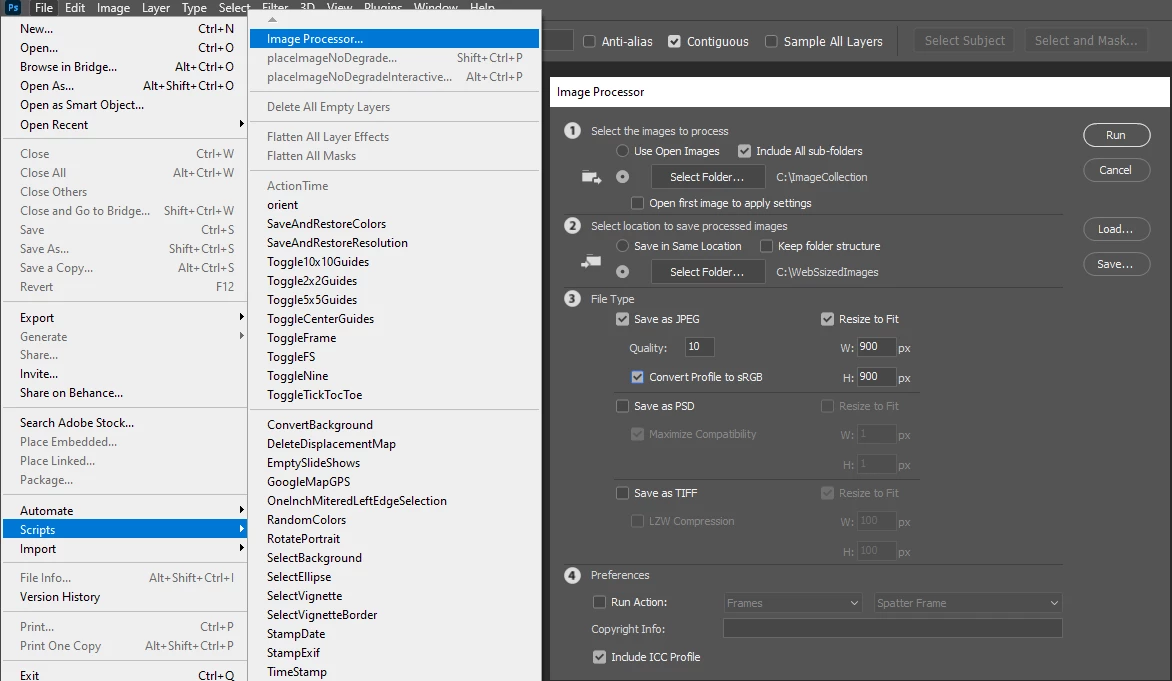
Photoshop menu File>Scripts>Image Processor... can batch process all your image files and save out resized  images  sized to  Fit some browser page image area  like an area 900Px by 900Px.  Your images will be resized the fit within the area retain their aspect ratio so the are not distorted, converted to SRGB Color Space  and saved as  Jpeg images, The actual image files can be any Photoshop supported  file type and have been edited in any standard color space.

1 reply

JJMack
Community Expert
JJMackCommunity ExpertCorrect answer
Community Expert
July 7, 2021

Photoshop menu File>Scripts>Image Processor... can batch process all your image files and save out resized  images  sized to  Fit some browser page image area  like an area 900Px by 900Px.  Your images will be resized the fit within the area retain their aspect ratio so the are not distorted, converted to SRGB Color Space  and saved as  Jpeg images, The actual image files can be any Photoshop supported  file type and have been edited in any standard color space.

JJMack
GeneStevo
GeneStevoAuthor
Participant
July 8, 2021

Thank you so much for your help. Thal looks like just the thing I need.

Cheers and best wishes,

Eugene