Inspiring
March 2, 2026
Question

Batch: Save As.... Avoid asking me to save when closing original?

  • March 2, 2026
  • 4 replies
  • 71 views

I’m converting jpegs to webps and Saving As into a new folder.

Is there a way to have Photoshop simply close the originals without asking me about them?

thanks

    4 replies

    Inspiring
    May 9, 2026

    I do something similar using an Action.
    Photoshop NEVER used to ask me if I wanted to save the original before closing it.
    It has been resized and saved elsewhere via the Action.
    This has started happening after the latest update 27.6.0. Annoying. 
    I don’t have a solution apart from adding a step to the end of the Action where I close the image and clink no to saving it before closing.  
    I sometimes don’t want to close the image so this is not 100% ideal.
    Have tried checking and unchecking Enable legacy “Save As” in Preferences. Makes no difference. 

    Stephen Marsh
    Community Expert
    Community Expert
    March 2, 2026

    The batch command uses an action. So look at the action steps, where a close without saving command could be used.


    That being said, this was my Batch action setup from that old topic:
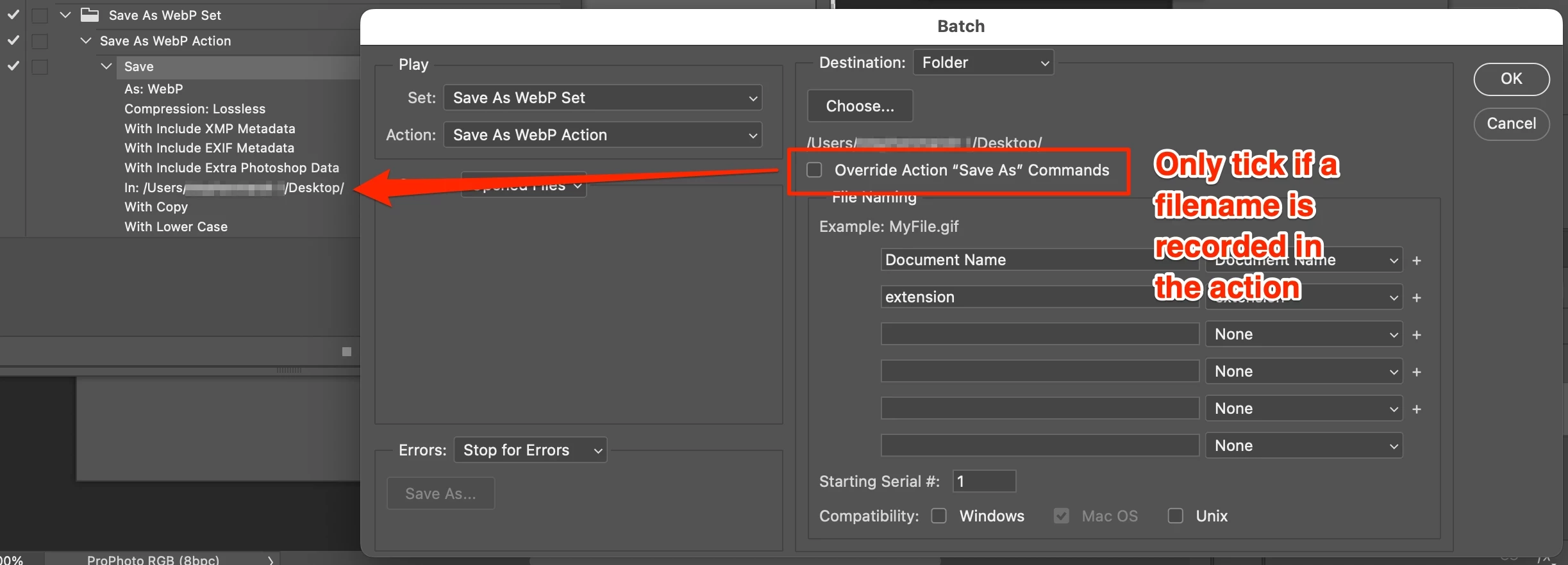


    Stephen Marsh
    Community Expert
    Community Expert
    March 2, 2026

    I created a batch script here (currently at v1.8):


    Legend
    March 2, 2026

    That would likely require a scripting solution. Do a search, I believe there is a script that extends Image Processor to add webp.

    Stephen Marsh
    Community Expert
    Community Expert
    March 2, 2026

     The extended Image Processor script was for PNG, from the late Mike Hale (I’m not aware of a WebP version, but it would be easy enough to swap out):


    https://www.ps-scripts.com/viewtopic.php?f=51&t=10225&p=54270&hilit=Image+Processor+with+PNG+support