


hennyd67658191
Known Participant
December 11, 2017
Answered

Black thumbnail

  • December 11, 2017
  • 2 replies
  • 5221 views

Hi,

I have a question. Not special for Adobe, but because I cannot find an answer anywhere, I hope one of you can help me out.

My problem is that the last couple of months the background of my thumbnails in Windows 10 Explorer are black. I have a lot of brushes and other (semi_black files and now I cannot see the picture on the thumbnail. When I click on it to show it bigger on the right side of the screen, the bigger view is also black.

Does anyone knows how I can turn thiese backgrounds back to white again????
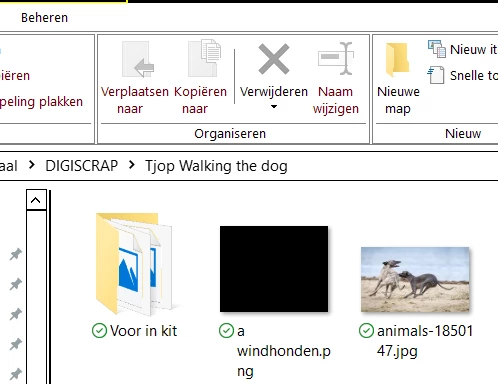
    Correct answer

    Nope, Everything turns into white, except my png-thumbnail...


    Sorry I'm all out of suggestions, I've Googled everything I could find and can't find anyone with a similar issue

    It's either Bridge or FastStone image viewer that I mentioned above

    You could try this, but not sure if that will fix the issue

    How to Scan Windows 10 Files with SFC /SCANNOW - Windows 10

    2 replies

    Participant
    May 9, 2025

    Hi, 

    I am new to Elements but has the same issue. I can offer two suggestions that I got from using the AI Beta Help Bot in Elements. First, is that the Thumb nail cache appears to not like massive files sizes, Each time you perform an edit, you create a layer that adds to your file size. Check the info, on your photo and you will see it is well above what your original file size was. I found two things helped reduce the file size. First I Flattened the layers...this merges all layers into one. Note: That unless you are advanced, this is a one way trip, There is no Undo button....so be certain you do not want to modify the layers. My second step was to reduce the file size by Opening the File in Elements>Select File>Save for Web. Then select JPEG as your format. Optimization gives you a nice small file size, or you can choose Progressive and use the slider button to view other sizes. Once I chose Progressive, I could not seem to go back to Optimization again.


    If this is not what you like, you can use the AI Beta Bot and type in Black Thumb Nail and it will give you instructions on how to locate the Thumb Nail cashe file and rename it. Seems like this might be a bug fix. I did not attempt this because I take a lot of photos and I do not want huge files being saved on my laptop. BTW- I am running Elements 2025.

    Norman Sanders
    Legend
    December 11, 2017

    Since you are looking for an Adobe solution, I suggest you look at your thumbnails via Bridge. Once there, go to Preferences > Interface > Image Backdrop where, using the slider, you have the options of black, white and all the tones between those extremes.

    hennyd67658191
    Known Participant
    December 11, 2017

    Thank you for reacting Norman. I hace the Photographer version (Photoshop and Lightroom). No Brigde :-(

    Do you have another suggestion? Don't need to be an Adobe-one...

    December 11, 2017

    You can install Bridge as part of your subscription.

    You can also try this

    FastStone Image Viewer, Screen Capture, Photo Resizer ...