maltje1962
Inspiring
October 5, 2025
Answered

Blending mode

  • October 5, 2025
  • 2 replies
  • 309 views

Photoshop 26.10

I don't have the option "screen (scherm)" in blending mode.All other options I see.

I use the dutch version of photoshop.

 

Correct answer LAMY2017

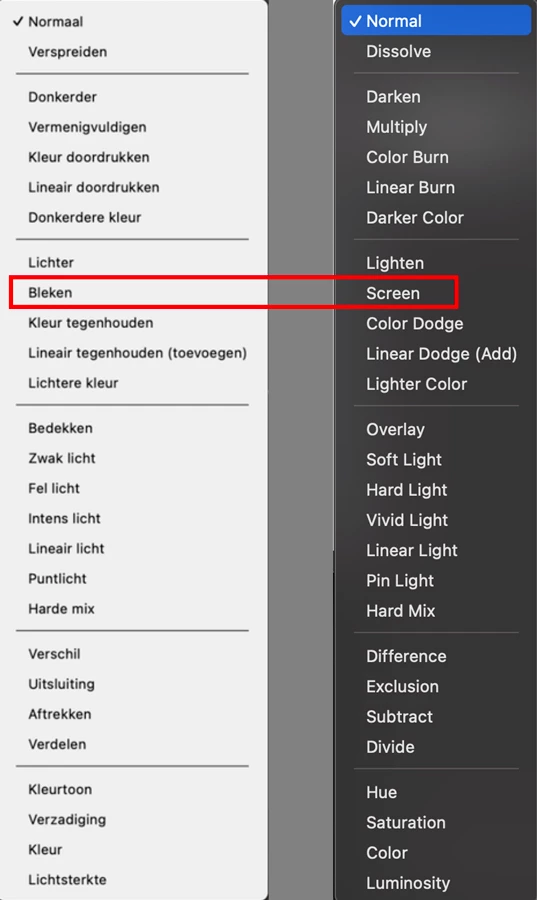
Although, I don't speak Dutch, I don't see the problem in your screen shot. The third group of blending options contains five options, in your screenshot, which would correspond to :
Lighten
Screen
Color Dodge
Linear Dodge (Add)
Lighter Color

Dave


Dave is right. Again!

My translator failed. A 1,000 pardons, Dave.


The Dutch list and English list correspond, one-to-one. 


2 replies

Legend
October 5, 2025

(IS there a Dutch version of Ps, or doesn't it depend on the language set in MacOS?)

Apple Translate shows sherm to mean screen, and bleken means bleach.


maltje -- so Screen should be between Lighten (verlichten) and Color Dodge (kleur ontwijken). Not there?

Can you post a screenshot?


Possible things to do --

  • reset preferences
  • install v26.11


Larry
maltje1962
Inspiring
October 5, 2025

I have istalled ps again and it is the same problem.

davescm
Community Expert
Community Expert
October 5, 2025

Although, I don't speak Dutch, I don't see the problem in your screen shot. The third group of blending options contains five options, in your screenshot, which would correspond to :
Lighten
Screen
Color Dodge
Linear Dodge (Add)
Lighter Color

Dave

Jeff Arola
Community Expert
Community Expert
October 5, 2025

I believe Bleken is Adobe's translation of Screen in Dutch.

https://helpx.adobe.com/nl/photoshop/using/blending-modes.html

maltje1962
Inspiring
October 5, 2025

thnx