
Known Participant
February 23, 2023
Question

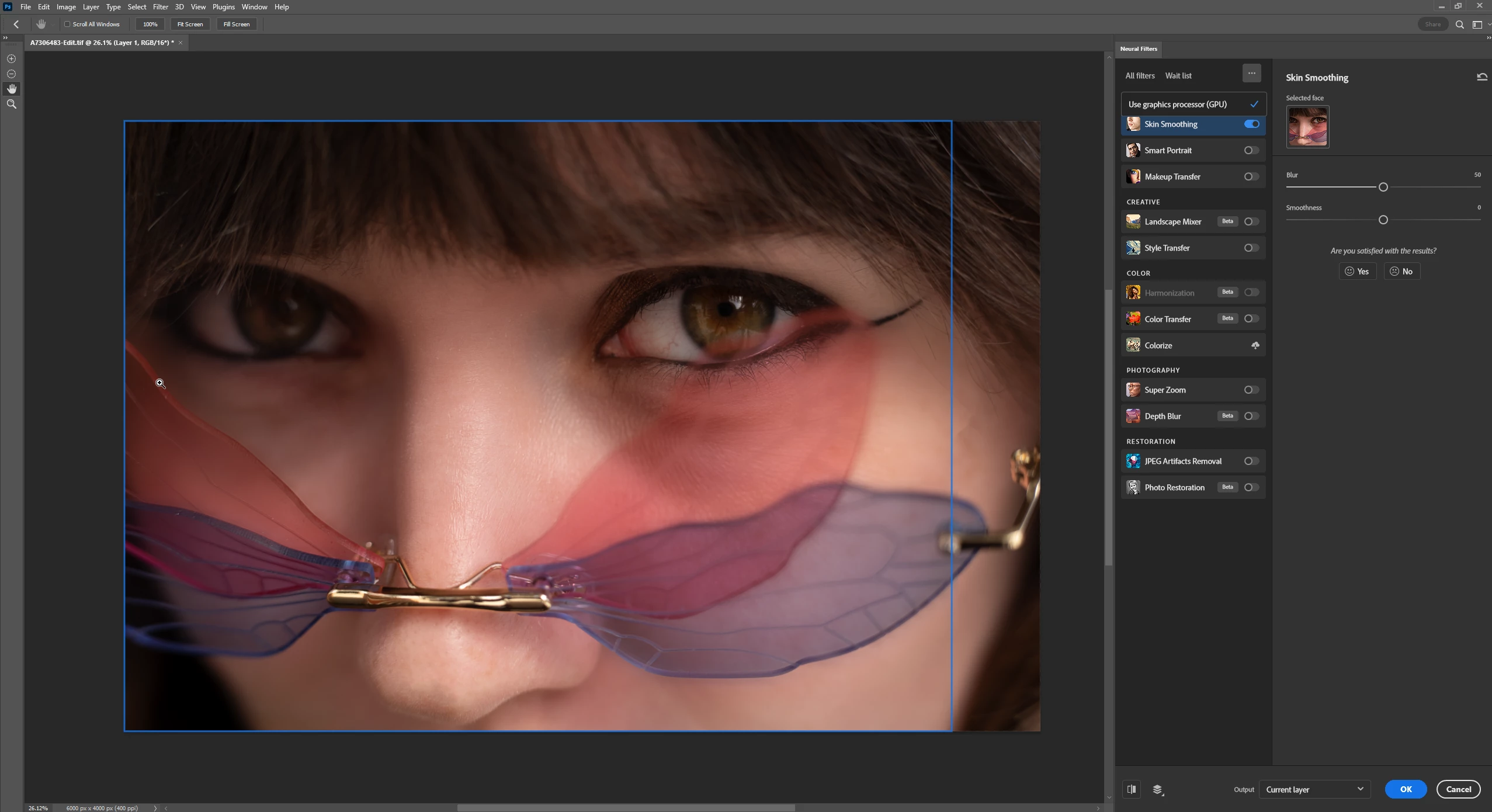
blue rectangle in neural filter skin smoothing not selecting properly

  • February 23, 2023
  • 6 replies
  • 1595 views

It's not selecting my model's whole face and it ends up creating a vertical dividing line in the final photo where the edited and unedited areas meet. Any help to get it to select the whole face? I looked for a button that would let me move the blue rectangle but I can't find one.

Thanks all!


6 replies

Known Participant
February 28, 2023

It seems to be just this photo for this problem, but I had another face closeup photo that was darker and I had to bring the exposure up a half stop for the neural filter to recognize it, then after I did skin smoothing, I created another layer and brought the exposure back down.

Michael Bullo
Community Expert
Community Expert
February 28, 2023

What if you take your original pixel based layer, add an adjustment layer above that to brighten the image, and then combine both layers into a Smart Object. Apply the neural filter to the Smart Object. Then open up the Smart Object and turn off the visibility of the adjustment layer.

Known Participant
February 28, 2023

I will do that preference reset. I had someone else mention that for another problem before but I never did it. When you mention the blurry part, the problem with the line being there is that it actually creates a very sharp dividing line that I have to manually do the spot healing brush. So I'm not worried about not being able to edit the blurry part. It's just the dividing line it creates. 


Known Participant
February 28, 2023

It's hit or miss with other closeup photos too. Sometimes the neural filter isn't even selectable because it doesn't detect a face, but if I bump the exposure by a half step, it detects the face. It seems to have different problems with very closeup images. 

CShubert
Community Manager
Community Manager
February 23, 2023

Hi @PatrickMcG in testing here we are not seeing this issue.  Does this happen to all images you test, can you share an image with the team to look at? Send to shubert@adobe.com.


Thank you,

Cory

rené becker
Participant
April 13, 2024

It would additionally be great to have control over moving the blue box and/or including body skin so it matches with the facial smoothing (maybe I am missing that option--it doesn't seem apparent, if so).

Bojan Živković11378569
Community Expert
Community Expert
February 23, 2023

Same thing happens to me while testing, blue rectangle is not covering entire image but it seems effect is applied everywhere (far right part is blurry anyway so I do not see what filter can do for it) and blue rectangle is gone after clicking OK. 

Perhaps you can try with preference reset Preferences in Photoshop (adobe.com) to solve weird problem with blue line stays visible after confirming, If that does not help copy/paste here Help > System Info.

Michael Bullo
Community Expert
Community Expert
February 23, 2023

Have you tried other images with different faces? Should help you work out if it's Photoshop or that particular image.

defaultp4arh47paq7y
Participant
February 17, 2026

It happens to me with all faces. Is there a way to position the blue box? I tired redicuceing the face to make it fit inside the blue box and the blue box just follows the face and won’t select all of it?