
practical_parent0D4C
Known Participant
Aug 14, 2024 4:49 PM UTC
Answered

Bogue ... je sais pas donc je vous demande de l'aide : merci !

Donc bonjour à toutes et tous !

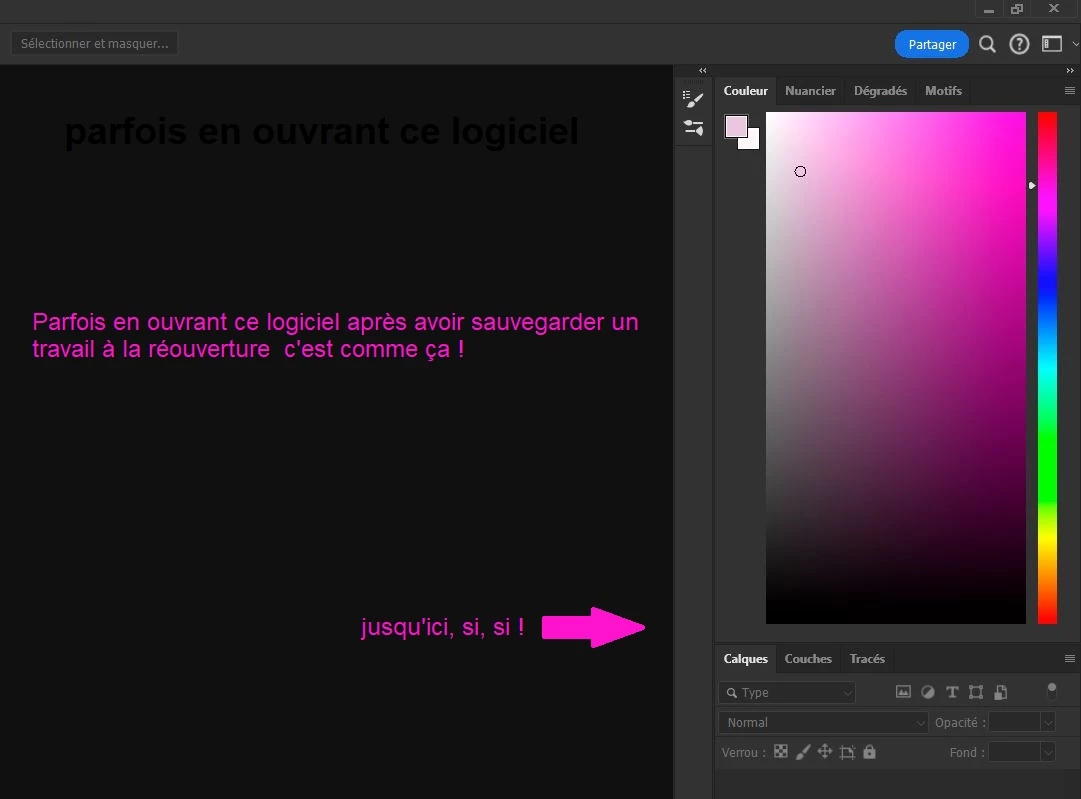
Entre autres problèmes (ce soir peu de temps) quelles sont les raisons qui font que le nuancier à gauche de photoshop s'agrandisse tout à coup ?

Surtout lorsque l'on n'a rien fait pour cela ...

N'étant pas une pointure j'ai pu faire des erreures , 
Merci !

G

    This topic is closed to new replies. Start a new post to keep the conversation going.
    davescm
    davescmCorrect answer
    Community Expert
    Aug 22, 2024 9:21 AM UTC

    The colour panel will expand to fit the available screen space. So you can move the bottom of the panel up and down with your mouse. Also if you have a panel below it docked, e.g. the layers panel, and drag that panel elsewhere on your screen the colour panel will expand into the space.

    The quickest way to reset it is to click the down arrow at the top right of the Photoshop application (not the colour panel) and click on 'Reset xxxxxxx'     - xxxxxxx being the name of the current workspace.


    Dave

    6 replies

    davescm
    Community Expert
    davescmCommunity ExpertCorrect answer
    Community Expert
    Aug 22, 2024 9:21 AM UTC

    The colour panel will expand to fit the available screen space. So you can move the bottom of the panel up and down with your mouse. Also if you have a panel below it docked, e.g. the layers panel, and drag that panel elsewhere on your screen the colour panel will expand into the space.

    The quickest way to reset it is to click the down arrow at the top right of the Photoshop application (not the colour panel) and click on 'Reset xxxxxxx'     - xxxxxxx being the name of the current workspace.


    Dave

    Translate
    practical_parent0D4C
    Known Participant
    Aug 22, 2024 4:48 PM UTC
    Bonjour et merci DAVE tout a bien fonctionné !
    Bien à vous !
    _Messenger !
    Translate
    Adobe c'est vraiment magique ... lorsque cela fonctionne normalement
    kglad
    Community Expert
    Community Expert
    Aug 14, 2024 4:56 PM UTC

    in the future, to find the best place to post your message, use the list here, https://community.adobe.com/

    p.s. i don't think the adobe website, and forums in particular, are easy to navigate, so don't spend a lot of time searching that forum list. do your best and we'll move the post (like this one has already been moved) if it helps you get responses.


    <"moved from using the community">
    Translate
    practical_parent0D4C
    Known Participant
    Aug 14, 2024 10:24 PM UTC
    merci je n'ai fait que répondre à un mail de 2023 reçu hier !
    Bon été !
    Translate
    Adobe c'est vraiment magique ... lorsque cela fonctionne normalement
    kglad
    Community Expert
    Community Expert
    Aug 14, 2024 10:27 PM UTC

    you're welcome 

    Translate