


Participant
October 26, 2024
Answered

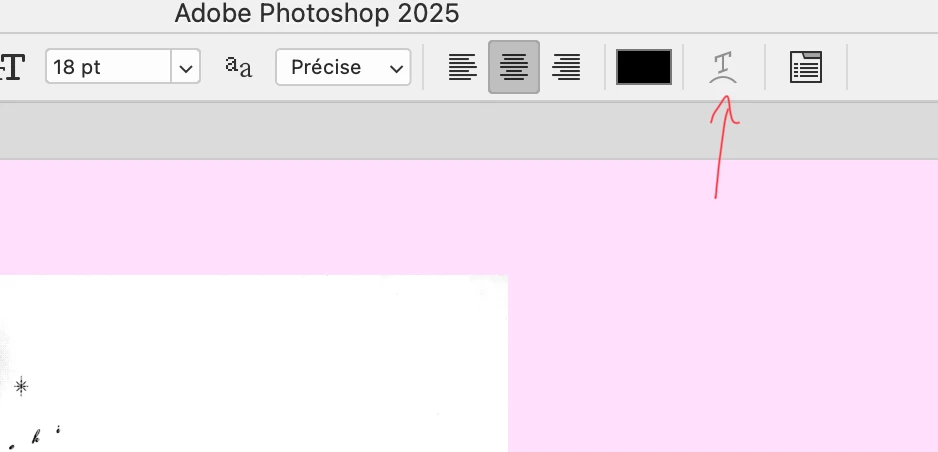
Bouton "Créer un texte déformé" grisé dans la barre d'option

  • October 26, 2024
  • 3 replies
  • 228 views

Photoshop 2025

MacOS Sequoia 15.01


Bonjour à tous,


Depuis la mise à jour vers Photoshop 2025, un bug ne me facilite pas la tache : lorque l'on veut déformer un texte avec l'outil T "Créer un texte déformé" qui est dans la barre d'option quand on utilise le Texte, ce bouton reste grisé et inutilisable. Il est présent, mais pas fonctionnel. On est obligé de faire plusieurs manipulations pour parvenir à déformer le texte alors que le bouton de raccourci est là pour éviter ces manipulations.

J'ai réinitialisé les options par défaut, mais rien n'y fait...

Est-ce que vous rencontrez aussi ce souci ?

Merci de votre aide. 

Ci-joint une capture d'écran. 


Correct answer Ophely34153257p21k

@Ged_Traynor Thank you so much for your concern and your help. Finally, I reset all the parameters again, closed the computer and restart it, and It works now !

3 replies

jacquesb15433374
Participant
June 27, 2025

J'ai le même souci, et comment faire pour l'activé ?

Ophely34153257p21kAuthorCorrect answer
Participant
October 28, 2024

@Ged_Traynor Thank you so much for your concern and your help. Finally, I reset all the parameters again, closed the computer and restart it, and It works now !

Ged_Traynor
Community Expert
Community Expert
October 27, 2024

@Ophely34153257p21k the option is available for me with Photoshop version 26.0, can you post a full screenshot of the Photoshop interface with all the pertinent panels opened