Participant
August 30, 2022
Question

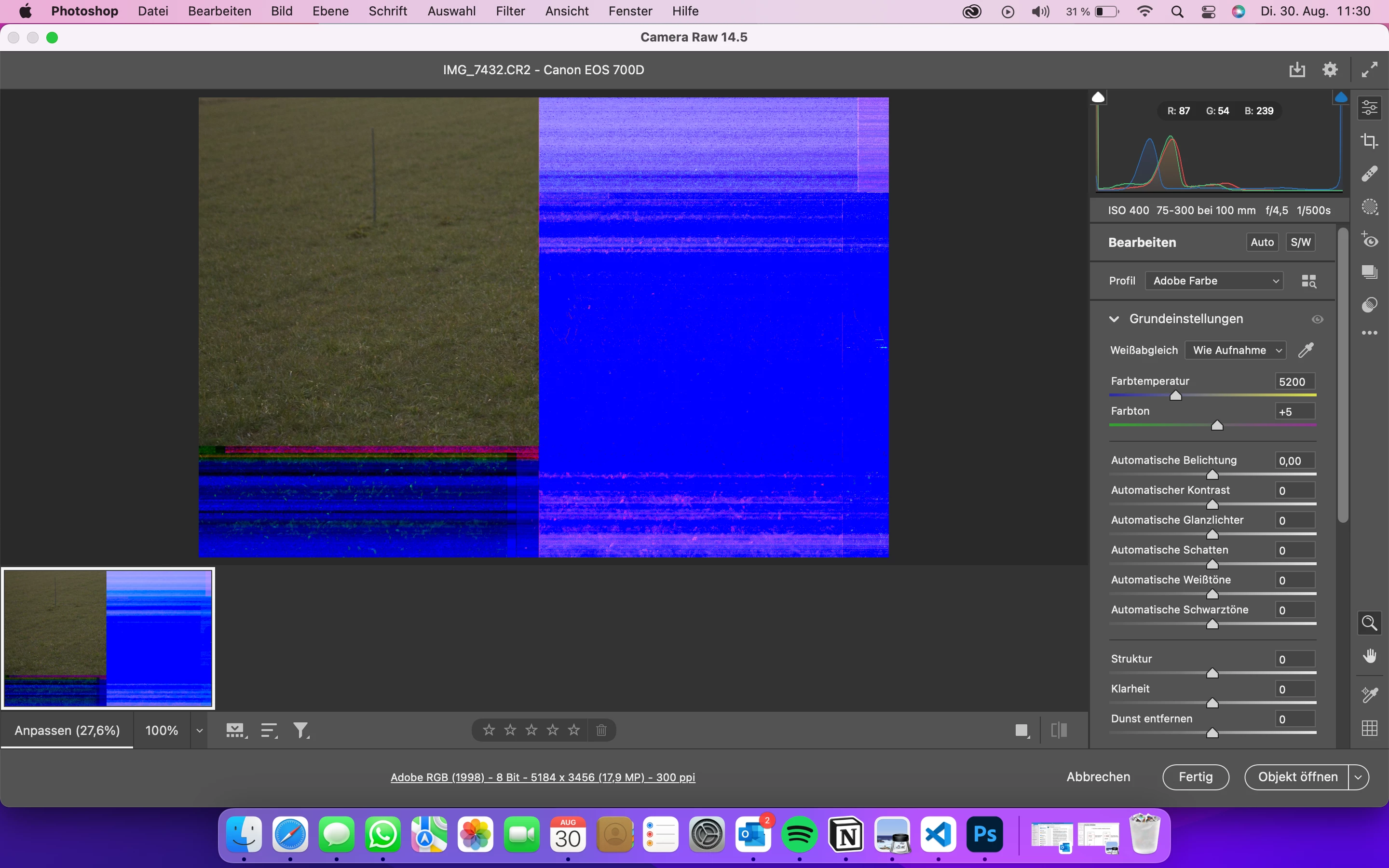
broken cr2 in photoshop
  • August 30, 2022
  • 4 replies
  • 198 views

hi everyone,

today i tried to open my cr2 files in photoshop but they always looked like that... if i open it in lightroom everything is fine. it just happens in photoshop. Can you help me?

This topic has been closed for replies.

4 replies

CShubert
Community Manager
Community Manager
August 30, 2022

Hi @adrian25881976ipkz sorry to see this.


Go to Preferences > Technology Previews... and check "Disable Native Canvas" - then restart Photoshop. Does the problem still occur? 


Thank you,

TheDigitalDog
Inspiring
August 30, 2022

All raws or only one (or a few recent ones)?

If not all raws, those that are looking this way are corrupted. 

As for LR, you're viewing a preview in all modules but Develop. In Develop, if you pick the same raw and zoom in to 1:1, it still looks OK? 

Author “Color Management for Photographers" & "Photoshop CC Color Management/pluralsight"
Participant
August 30, 2022

hi @TheDigitalDog thanks for the fast response

unfortunately nothing worked...

TheDigitalDog
Inspiring
August 30, 2022

First, try disabling GPU in the Preferences (Performance tab). Any better?
If not, recalibrate and build a new ICC display profile, the old one might be corrupted.
If you are using software/hardware for this task, be sure the software is set to build a matrix not LUT profile, Version 2 not Version 4 profile.

If turning OFF GPU works, it's a GPU bug and you need to contact the manufacturer or find out if there's an updated driver for it. On the Mac, that's part of the OS update(s) so if this is the latest OS version, you may need to roll back a release.
Also see: https://helpx.adobe.com/photoshop/kb/acr-gpu-faq.html
https://helpx.adobe.com/photoshop/kb/photoshop-cc-gpu-card-faq.html

Author “Color Management for Photographers" & "Photoshop CC Color Management/pluralsight"