

Nic-B
Known Participant
February 13, 2020
Answered

Brush Question - Opacity Jitter

  • February 13, 2020
  • 3 replies
  • 2687 views

Hi guys,


I'm wanting to use the 'opacity jitter' in my brush settings, when I click on it and set the amount as soon as I click away (to use the brush, save it or to change to another brush) the opacity gitter option drops back down to 0. I've tried re-saving new brushes with it set etc but it won't stay activated. 

I assume I've overlooked something, any help greatly appreciated~
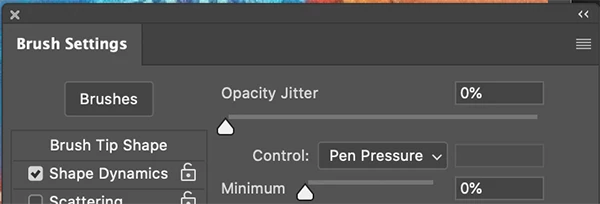


This topic has been closed for replies.
Correct answer JJMack

Are you toggling transfer opacity with the tool option bar opacity button? When Dark active its seems to set 0%.

3 replies

Mike_Gondek10189183
Community Expert
Community Expert
February 14, 2020

What happens if you uncheck all your other brush settings like shape dynamics, and try with only transfer checked?


Sounds like a technical issue, what OS and Photoshop version are you using. Please try with mouse as your tablet might need driver update or causing the issue.


Nic-B
Nic-BAuthor
Known Participant
February 14, 2020

Hi there,
Thankfully all's resolved -  I didn't realise I had options on the toolbar checked as well, which was interfering with the brush settings~

Thank you for your time and advice!


Jeff Arola
Community Expert
Community Expert
February 14, 2020


Not paying attention, please disregard.


😎

JJMack
Community Expert
JJMackCommunity ExpertCorrect answer
Community Expert
February 13, 2020

Are you toggling transfer opacity with the tool option bar opacity button? When Dark active its seems to set 0%.

JJMack
Nic-B
Nic-BAuthor
Known Participant
February 14, 2020

Ah! Perfect - Thanks buddy, this did the trick 🙂 

I didn't realise I had the tool bar option active (ha, I knew I must be over-looking something so simple!) - I switched off it and opacity jitter works a charm - cheers for your quick help!
