
Participating Frequently
January 15, 2025
Answered

brush strokes and duplication pads chiselled

  • January 15, 2025
  • 3 replies
  • 561 views

Hello
I'm a beginner on PS, mostly for photo corrections. I follow tutorials on Youtube to improve my knowledge on how to use PS.
I sometimes make mistakes in my settings and now I have a problem.
The outlines of the brush strokes and duplication pads are chiselled and when I use the duplication pad, what I copy doesn't completely fill the circle.
How can I remedy this problem?
Thanks in advance

Traduit par Deepl
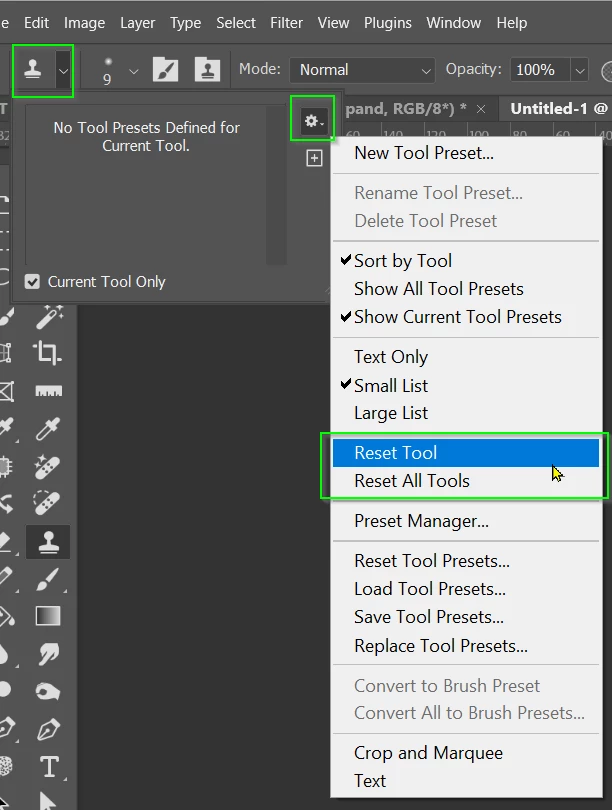
Correct answer Trevor.Dennis

It's much more focused just to reset the tool. This will take it back it's default settings without messing up just about everything else.

3 replies

Participating Frequently
January 15, 2025

Thanks for your feedback. Following the tutorials, I actually had to change some settings, but I've forgotten which ones! I wouldn't know which settings they were - with age comes memory loss.
I've reset the PS preferences and everything's back to normal.
Thanks again!

Trevor.Dennis
Community Expert
Trevor.DennisCommunity ExpertCorrect answer
Community Expert
January 16, 2025

It's much more focused just to reset the tool. This will take it back it's default settings without messing up just about everything else.

Participating Frequently
January 16, 2025

Ok, thank you very much for this useful tip

Trevor.Dennis
Community Expert
Community Expert
January 15, 2025

Words like 'duplicate' and 'copy' make me think you are talking about the Clone tool.  Your screen shots show a fully soft brush preset.  You can right click to chose any of the presets.  I if you choose the fully hard preset, I suspect it will work how you'd like it to.


Your second screen shot shows that you know how to change brush size and hardness using the Opt key, so try doing that and move the mouse sideways to get a hard red circle.  That will do the same thing.

Participant
January 15, 2025

Hi Viclanel51,

It sounds like you're experiencing an issue with the brush settings in Photoshop. The "chiselled" outlines and incomplete duplication might be due to the brush settings or the tool options being inadvertently changed.