
commpass
Participant
October 23, 2019
Question

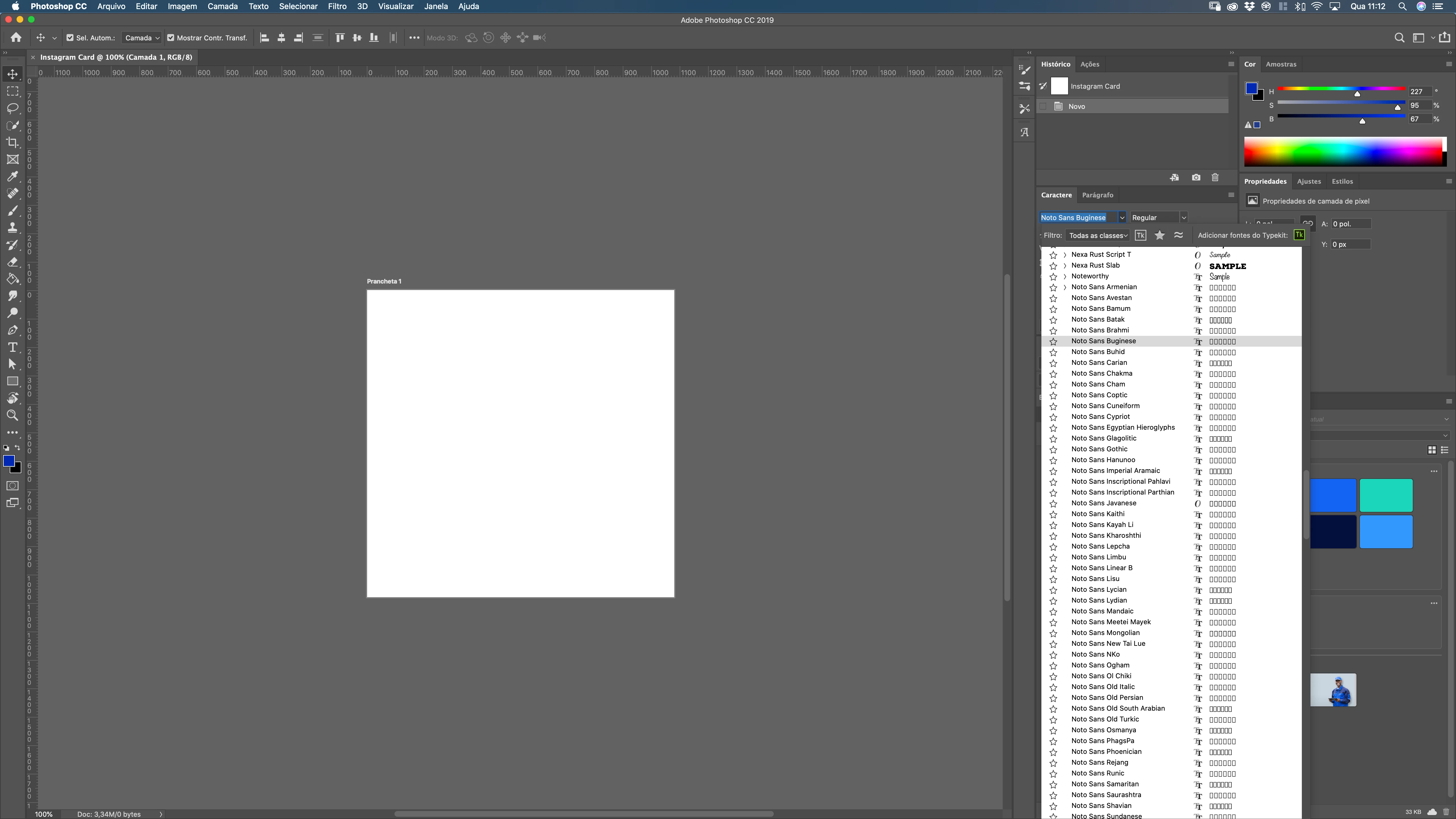
BUG in Photoshop with macOS Catalina: Noto fonts are crowding font list.

  • October 23, 2019
  • 11 replies
  • 6137 views

BUG in Photoshop with MacOS Catalina: Noto fonts are crowding font list. This is happening only in ADOBE Apps (PSD, AI, ...).    Hey ADOBE!  Could you please FIX THIS ANNOYING BUG?  
 

[Moved from generic Start/Help forum to the specific Program forum... Mod]
[To find a forum for your program please start at https://community.adobe.com/]


    This topic has been closed for replies.

    11 replies

    Aashu_Bhargava
    Adobe Employee
    Adobe Employee
    December 8, 2020

    Hi 

    If any one is still facing this issue, please check if you have Rightfont app installed or updated recently. 

    Open it > Go to all fonts or activated fonts > look for Noto fonts which you want to remove > select the font > click on Font (top menu bar) > delete from library.

    Close the app restart Photoshop & check.

    Participant
    December 8, 2020

    Hi Aashu,

    this is really incredible, but it works! Just great! Thanks for the tip - finally a neat and tidy font list again.

    This does not work with all fonts that annoy, but at least most of them can be deactivated.

    Thanks, stay healthy and have a nice day!

    MAB

    Participating Frequently
    June 26, 2020

    Updated Mac OS and PS yesterday and this has gotten to be more than annoying. I know these fonts got on my machine somehow via Google. Is there some way Adobe can tap into the Font Book on Mac and filter via the Font Book's "smart collections"? There's a collection just called "English" that eliminates the Noto fonts but I don't believe PS works with Font Book in that way. I know you can filter all sorts of ways in PS itself, but I wanna scroll through all my fonts without having to stop and change filters (serif, sans-serif, handwritten decorative, etc.)

    Legend
    June 26, 2020

    These fonts are owned by Google but they are included with macOS by Apple. It's not recommended to remove system fonts, even though the number keeps growing. https://support.apple.com/en-us/HT210192

    Participant
    June 11, 2020

    Has anybody fixed this mess?

    Participating Frequently
    June 26, 2020

    oops - sorry.  Meant to reply to the main thread...

    Participant
    February 21, 2020

    The same problem here. The Noto-Fonts are part of Catalina and cannot be deactivated or deleted. In Apple-apps the non-latin fonts are NOT visible, but Adobe shows them all. This is really annoying.


    If Adobe cannot implement a filter not to show the system fonts (like Apple), then at least they should give us a font class "Latin Fonts" where the non-latin fonts dissappear. Even better: let us create own font classes.


    Edit: Some Noto-Fonts were installed in Mojave, too. But they (and other non-latin fonts) were sorted to the end of the Adobe-font list - this is not a perfect solution, but a lot better than the Noto-mess in Catalina at the moment.

    B. B-R
    Participating Frequently
    February 20, 2020

    oui toujours ce problème très embêtant. Apple répond qu'il s'agit bien d'un bug Photoshop ; je soupçonne que l'origine Google de cette police de caractère y soit pour quelque chose.


    Legend
    October 29, 2019

    Doesn't look like a bug. If you don't want the fonts you could remove them?

    B. B-R
    Participating Frequently
    June 11, 2020

    Impossible ce serait super.


    jane-e
    Community Expert
    Community Expert
    October 29, 2019

    Hi


    The Noto font / Catalina issue has also been reported in Affinity and Apple forums. This is the only possible solution I have seen, and I can’t test it as I have not yet updated my OS.

    https://discussions.apple.com/thread/250770888


    Affinity forum:

    https://forum.affinity.serif.com/index.php?/topic/45481-fixed-how-to-remove-fonts/


    ~ Jane

    Participant
    October 29, 2019

    This is a serious annoyance! Has anyone resolved the issue? 

    jane-e
    Community Expert
    Community Expert
    October 24, 2019

    Hi Commpass,


    Here is the list of fonts included with Catalina:

    https://support.apple.com/en-us/HT210192


    The list can be expanded to show additional fonts that can be downloaded.


    ~ Jane

    Legend
    October 23, 2019

    Noto fonts are from Google. This has nothing to do with Adobe.

    https://www.google.com/get/noto/

    commpass
    commpassAuthor
    Participant
    October 23, 2019

    It's not about font owner, but how it shows at font list inside the software. Every time you need to choose a font, you need to scrool down a bunch of Noto fonts variations (not grouped).  Maybe it's a Catalina bug, but it affects a lot Adobe users.

    Legend
    October 23, 2019

    Looks like these arte shipping with Catalina. Google has a bunch more variations. See if Font Book can deactivate them?