



[BUG] Photoshop 27.10 on Windows: "Error 44: Cannot convert" when running "Load Files into Stack..."
Hi team,
After updating to Photoshop v27.10 on Windows, running the **"Load Files into Stack..."** script immediately triggers an error and fails to launch the dialog.
* **Steps to Reproduce:**
1. Open Photoshop v27.10 (or Photoshop Beta v27.11) on Windows.
2. Go to **File** > **Scripts** > **Load Files into Stack...**
ファイル > スクリプト > ファイルをレイヤーとして読み込み
* **Expected Result:**
The "Load Layers" dialog opens.
* **Actual Result:**
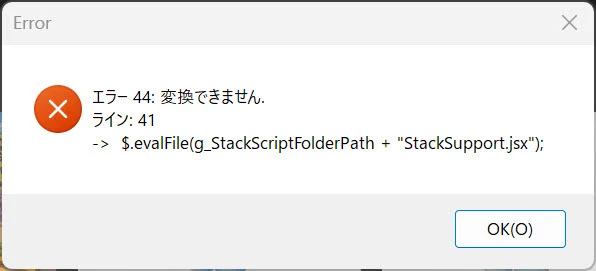
An error popup appears immediately:
> **Error 44: Cannot convert.**
> **Line: 41**
> `-> $.evalFile(g_StackScriptFolderPath + "StackSupport.jsx");`
* **Observations & Environment:**
* **OS:** Windows 11 64-bit
* **Photoshop Versions affected:** Photoshop v27.10.0 and Photoshop Beta v27.11.
* **Mac Behavior:** Working normally on macOS (v27.10), issue appears isolated to Windows.
* **Workaround:** Rolling back to Photoshop v27.9.1 resolves the issue completely.
* **Notes:** Reinstalling clean v27.10 does not fix the issue. Replacing `StackSupport.jsx` from v27.9.1 also does not resolve it, suggesting an issue with path evaluation/handling (`g_StackScriptFolderPath`) in the Windows ExtendScript environment.
Multiple users in the Japanese community have verified and reproduced this identical issue on Windows.
Could the engineering team please look into this?
Thank you!


 AdChoices