Known Participant
December 23, 2024
Answered

[Bug] text in Photoshop v26 (2025)

  • December 23, 2024
  • 1 reply
  • 280 views

cannot press T to use the Text tool when selecting a text layer, please watch the video:

https://youtu.be/geJTZfvr500

(still can press T to call the text tool when selecting an Image layer)


I never have this problem with older versions.
Correct answer Ged_Traynor

@nguyenkt08 not seeing the issue on my system with Photoshop version 26.2

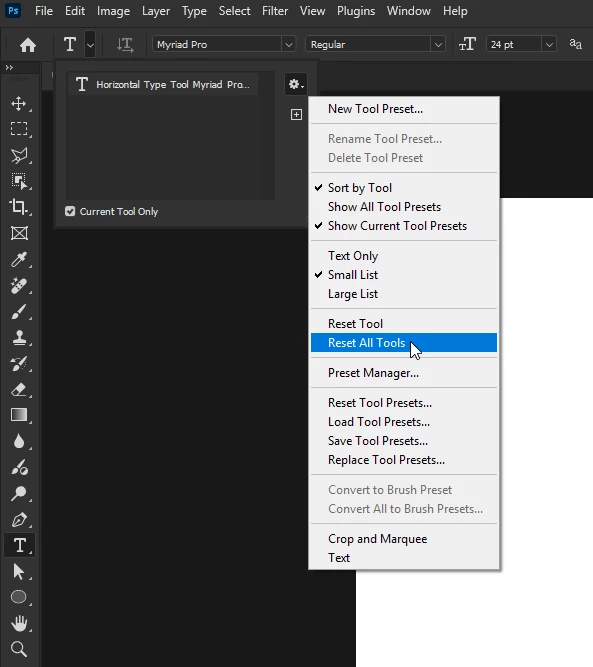
Have you tried resetting the tools

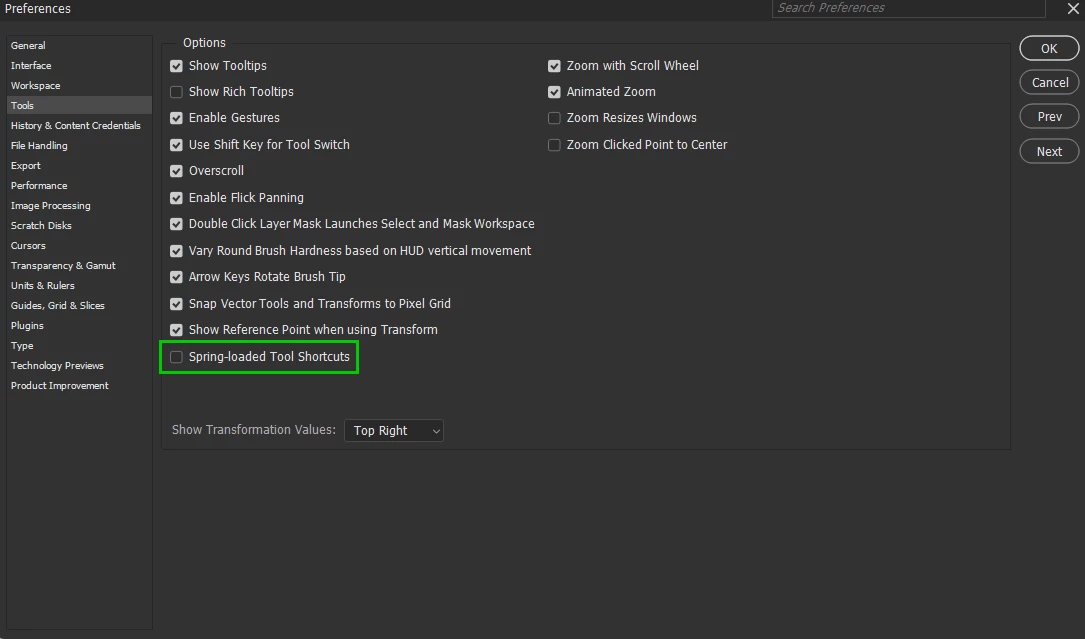
If that doesn't help, try disabling this option in the preferences

If neither of the above help, try manually resetting your Photoshop preferences
https://helpx.adobe.com/ie/photoshop/using/preferences.html#Manually
Remember to back up your settings before doing the preference reset
https://helpx.adobe.com/ie/photoshop/using/preset-migration.html

1 reply

Ged_Traynor
Community Expert
Ged_TraynorCommunity ExpertCorrect answer
Community Expert
December 23, 2024

@nguyenkt08 not seeing the issue on my system with Photoshop version 26.2

Have you tried resetting the tools

If that doesn't help, try disabling this option in the preferences

If neither of the above help, try manually resetting your Photoshop preferences
https://helpx.adobe.com/ie/photoshop/using/preferences.html#Manually
Remember to back up your settings before doing the preference reset
https://helpx.adobe.com/ie/photoshop/using/preset-migration.html