

Bug? Wrong RAM allocation set by Photoshop 22.4.3 compared to system on Windows 10
Photoshop is displaying less available memory than the system provides.
We had this problem 3 years ago and the engineers looked into it then and was fixed by an update on June 20 2018
Same issue fixed with a Photoshop update in June 2018
There is a variation of available RAM between this version of my Photoshop 22.4.3 compared to the previous version 21.2.10. I was double checking my preferences and noticed that the available RAM is lower compared to the previous version.
My installed RAM is 32.0 GB with (31.9 GB usable) Photoshop says I have less available RAM than I had in the previous version (21.2.10).
My system hasn't changed. Windows 10
Below is the comparison
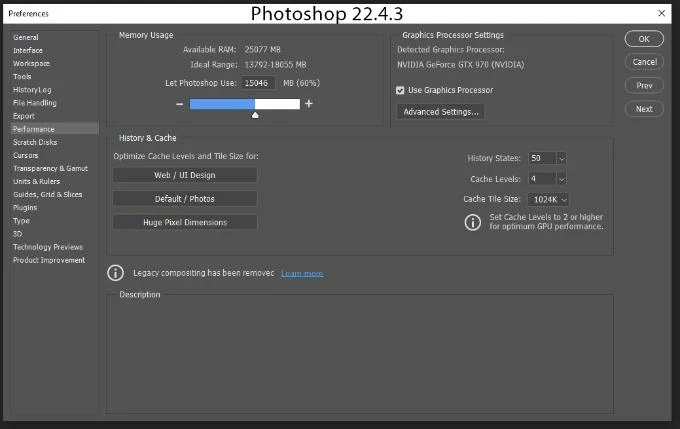
This version 22.4.3
Performance Panel: Memory Usage:
Available RAM is 25077 MB
Ideal Range 13793-18055 MB
Photoshop Use 15046 MB or 60%
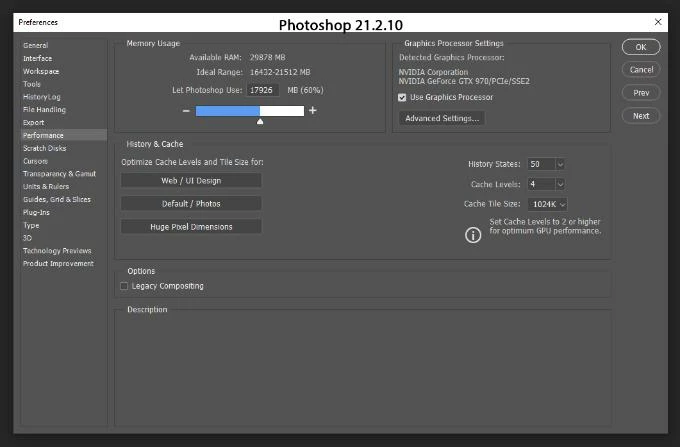
Previous version 21.2.10
I took snapshots of my preferences in the previous version of PS and the available ram was higher:
Performance Panel: Memory Usage
Available RAM was 29878 MB
Ideal Range 16432-21512 MB
Photoshop Use 17926 MB or 60%
First part of my System info
Adobe Photoshop Version: 22.4.3 20210708.r.317 bb896cc x64
Number of Launches: 2803
Operating System: Windows 10 64-bit
Version: 10 or greater 10.0.19041.1151
System architecture: Intel CPU Family:6, Model:14, Stepping:3 with MMX, SSE Integer, SSE FP, SSE2, SSE3, SSE4.1, SSE4.2, AVX, AVX2, HyperThreading
Physical processor count: 4
Logical processor count: 8
Processor speed: 3408 MHz
Built-in memory: 32627 MB
Free memory: 19421 MB
Memory available to Photoshop: 25078 MB
Memory used by Photoshop: 60 %
{Thread title edited by moderator}


 AdChoices