chrisell99
Known Participant
September 27, 2023
Question

c2paws files now being created with every document saved - why?

  • September 27, 2023
  • 4 replies
  • 2772 views

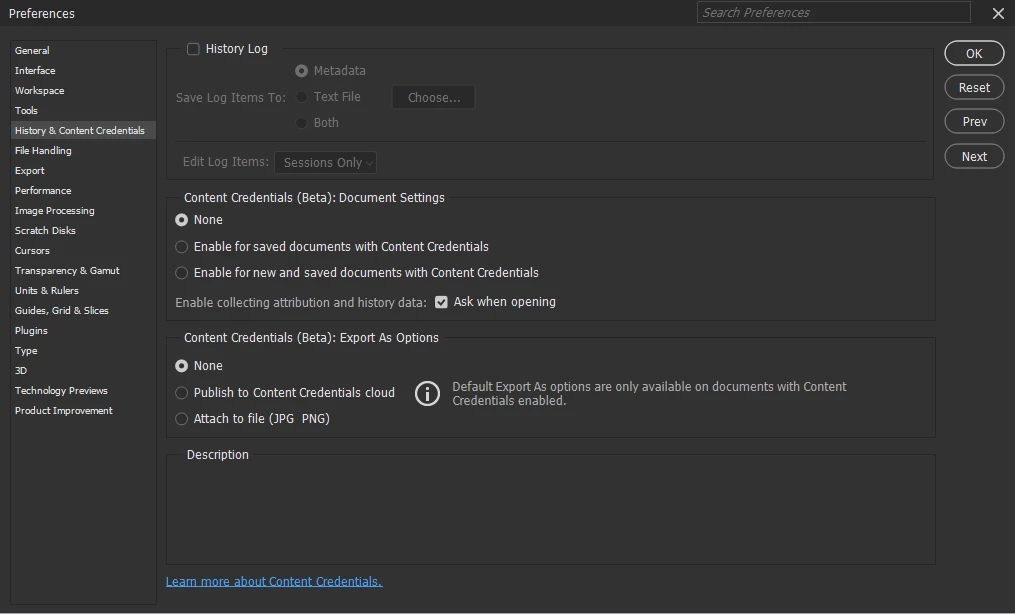
Since changing to PSv25.0.0, every document I save (note: NOT export, just a regular file->save) now generates a .c2paws file alongside it. I discovered them today - I have hundreds that have appeared in my folders. As I underatand it these are "content credentials" files except in my preferences, and in the document properties, content credentials are both disabled. This happens for all filetypes that I use (jpg, tif, psd, tga, bmp)

When going back to v24.x, this does not happen.

This is like the "GUDE" file issue back in March - which was a total PITA and took forever to get solved. (https://community.adobe.com/t5/photoshop-ecosystem-bugs/p-photoshop-creates-a-gude-log-while-working-with-files/idc-p/13643494/page/20#M78946)  Now I have to scrub my disk for GUDE and C2PAWS files ?  C'mon.....


This topic has been closed for replies.

4 replies

chrisell99
Known Participant
November 17, 2023

According to one other topic (https://community.adobe.com/t5/photoshop-ecosystem-bugs/c2paws-file/idi-p/14096168) it's to do with content credentials.

chrisell99
Known Participant
May 12, 2024

@CJButler @Caity.psd @CShubert Can I just necro this topic please? I'm still suffering this problem with even the latest builds. Every TIF or JPG file I open now automatically creates .c2paws files in the associated folder, despite all the Photoshop preferences being disabled for content credentials.

CJButler
Community Manager
Community Manager
May 12, 2024

Is this unexpected behavior blocking any workflows? That will elevate the priority.


I did find these threads. Did you see them? (Never mind - I see you did)

(deleted links)


Cory is the one to carry this forward. (Cory: this looks like CAI? ref  CAI-4608.) Caity is now in another role in the organization. A bug will need to be logged, the issue will need to be reproduced, and it will need to be assigned to the correct team. (I'm not a cumminity manager, I'm just a developer in one corner of Photoshop. And I'm not the right guy to hunt this particular issue down.)


But - from a comment in the ticket above, it suggests that there is "an old style sidecar has the PS preferences ignored". That might be a clue to preventing future creation. (But I don't know since I don't have t his problem.). Also, notes indicates it is safe to delete these side-car files.

CJButler
Community Manager
Community Manager
November 17, 2023

Well that certainly looks annoying. I have no idea what would cause that, nor what service those files support. I can't even tell you if it is an Adobe Photoshop thing. The best bet is to tag @Caity.psd or @CShubert and let them investigate.

chrisell99
Known Participant
November 17, 2023

@CJButler  any chance we get some eyes on this one? I have c2paws files everywhere now and all the content credentials settings are turned off. See original post. Started in v25.0.0, does not happen in v24.x versions.

Participant
October 1, 2023

Same issue here. I updated last week however the issue just started today.