scotwllm
Inspiring
December 18, 2021
Answered

Calculate Hue from RGB?

  • December 18, 2021
  • 5 replies
  • 13951 views

Hi there --


Do any of you know the formulas to calculate hue from RGB values? I know I can plug the RGB values into the color picker, which will show the HSL values. That's a tedious process, and I want to do it in an Excel spreadsheet. I have a grid with blocks of solid colors in Photoshop, and I want to arrange the blocks in hue order (0-360). There are different formulas based on red, green, and blue light ratios:

R > G > B

R > B > G

B > R > G

B > G > R

G > R > B

G > B > R


Scott


Scott

This topic has been closed for replies.
Correct answer Stephen Marsh
quote

I'm not in Photoshop. I have a list of RGB values in an Excel spreadsheet.


By @scotwllm


So this sounds like it is more of a MS Excel question than a Photoshop one at this point...


https://www.mrexcel.com/board/threads/rgb-to-hue-formula.559852/


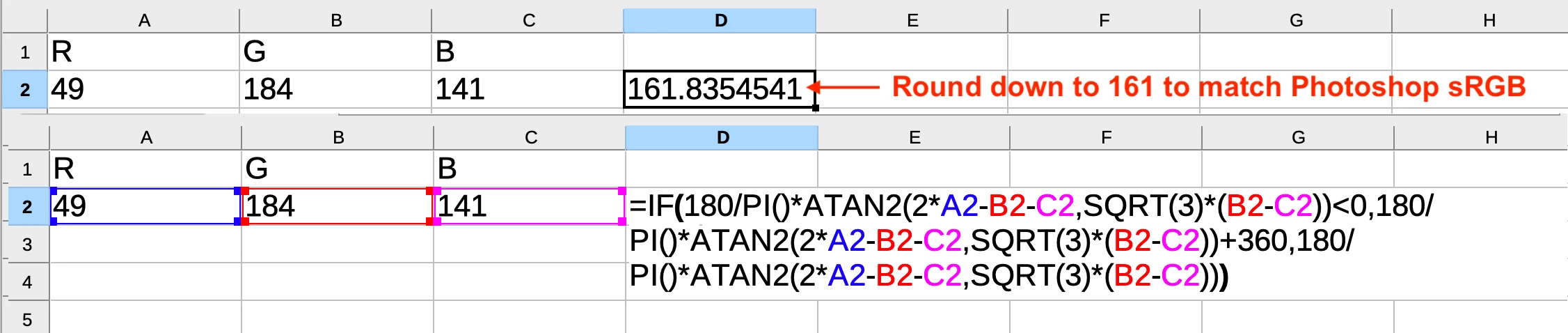
=IF(180/PI()*ATAN2(2*A2-B2-C2,SQRT(3)*(B2-C2))<0,180/PI()*ATAN2(2*A2-B2-C2,SQRT(3)*(B2-C2))+360,180/PI()*ATAN2(2*A2-B2-C2,SQRT(3)*(B2-C2)))


To round the result of the formula down to 161 to match Photoshop sRGB, apply the following formula in cell E2:


=ROUNDDOWN(D2)


5 replies

Legend
December 19, 2021

In general I say BEWARE of colour conversion information on the internet. Much of it is written by people who know nothing about colour. However, this is one of the safe ones. RGB is (as you may know) not an exact reference of colour: two people may see the same RGB colour as wildly different. However, HSL is a simple conversion of RGB. This means of course that HSL is also not an exact reference of colour and may look wildly different to different people.


Ok, warning aside, this page has both a converter and the actual formulae it uses:

RGB to HSL converter | color conversion (rapidtables.com) 

Don't necessarily trust the other converters on this site though, it has the common nonsense of a "CMYK to RGB converter" as if this even exists.

scotwllm
scotwllmAuthor
Inspiring
December 19, 2021

I understand about output looking different on different screens or when printed. I doubt the people I share these files with will have a monitor as good as mine. All I am trying to do is to sort the colors. 

Stephen Marsh
Community Expert
Stephen MarshCommunity ExpertCorrect answer
Community Expert
December 19, 2021
quote

I'm not in Photoshop. I have a list of RGB values in an Excel spreadsheet.


By @scotwllm


So this sounds like it is more of a MS Excel question than a Photoshop one at this point...


https://www.mrexcel.com/board/threads/rgb-to-hue-formula.559852/


=IF(180/PI()*ATAN2(2*A2-B2-C2,SQRT(3)*(B2-C2))<0,180/PI()*ATAN2(2*A2-B2-C2,SQRT(3)*(B2-C2))+360,180/PI()*ATAN2(2*A2-B2-C2,SQRT(3)*(B2-C2)))


To round the result of the formula down to 161 to match Photoshop sRGB, apply the following formula in cell E2:


=ROUNDDOWN(D2)


scotwllm
scotwllmAuthor
Inspiring
December 19, 2021

It's a Photoshop project that uses Excel a bit. It's a reasonable assumption that Photoshop users would be more versed in everything to do with light than your everyday Excel expert who's probably more interested in macros to create invoices.


I tried this formula earlier today. You have to change the semi-colons to commas, and it still doesn't work.

Stephen Marsh
Community Expert
Community Expert
December 19, 2021

It worked for me in LibreOffice, it also auto converted the semi-colons to commas when I pasted in the formula. The screenshots in my  post shows that it works (in LibreOffice at least) and I tested and verified in Photoshop with multiple values before posting this as a proposed solution. I have updated my previous post to use commas.


EDIT: It also works in Excel and Apple Numbers. I have attached the spreadsheet.

Semaphoric
Community Expert
Community Expert
December 18, 2021

If you search the web for "rgb to hsl algorithm", you'll find lots of info about this. Mostly differing in presentation,some more general, some aimed at coders.


Here's a site that has description of how it works.

TheDigitalDog
Inspiring
December 18, 2021

First, you must define which RGB color space. That defines the scale of the RGB values. IOW, in sRGB, R234/G56/B89 isn't the same color as the same triplets in Adobe RGB (1998).

Author “Color Management for Photographers" &amp; "Photoshop CC Color Management/pluralsight"
scotwllm
scotwllmAuthor
Inspiring
December 19, 2021

At this phase of the workflow, I'm not in Photoshop. I have a list of RGB values in an Excel spreadsheet. I need to sort them by hue. Then I use the colors in that order in Photoshop. 


TheDigitalDog
Inspiring
December 19, 2021

@scotwllm wrote:

At this phase of the workflow, I'm not in Photoshop. I have a list of RGB values in an Excel spreadsheet. I need to sort them by hue. Then I use the colors in that order in Photoshop. 


RGB numbers without a color space have no definition.

1000 alone is meaningless.

1000 miles versus 1000 kilometers does.

Where did the RGB triplets come from? Do they have an associated RGB color space? No calculations are possible without one.

Author “Color Management for Photographers" &amp; "Photoshop CC Color Management/pluralsight"
Kukurykus
Legend
December 18, 2021
with(new SolidColor) rgb.hexValue = '00ff00', hsb.hue
scotwllm
scotwllmAuthor
Inspiring
December 18, 2021

Thanks for the speedy reply. Kukurykus. What do I do with that code?


Scott

Kukurykus
Legend
December 18, 2021

Save as hue.jsx to Presets/Scripts folder of your Photoshop. After relaunch go to File/Scripts.


The '00ff00' is hex value you may change to other while end of code change to alert(hsb.hue).