

MahaB82A
November 30, 2025
Question

Camera Raw Filter

  • November 30, 2025
  • 2 replies
  • 514 views

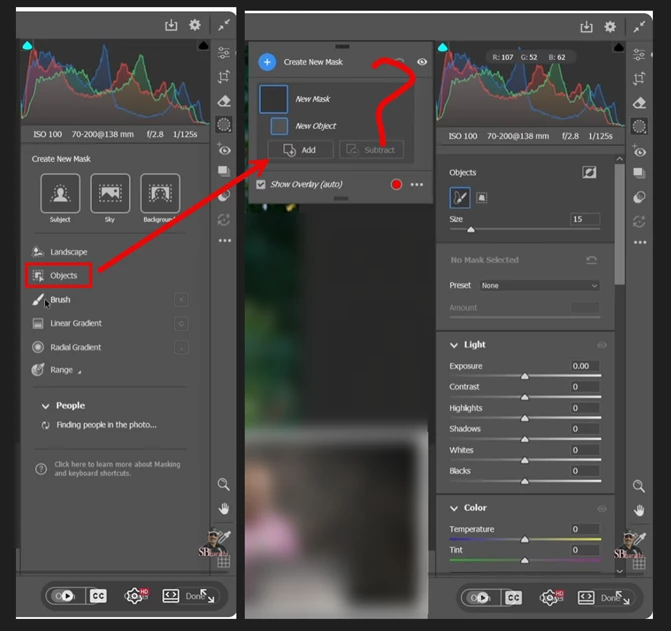
How can I make this "Objects" selection open in a separate flaying window? drag & drop does not work. 
 

2025-11-30_16-05-14.png

2 replies

Jeff Arola
Community Expert
Community Expert
December 1, 2025

Semms there is a difference in way some of the panels work in the Adobe Camera Raw and the Camera Raw Filter as stated by D.Fosse. Just wanted to post a video that showed the ACR Masking Panel actually being docked and undocked.


You should be able to dock and undock the Mask Panel in Adobe Camera Raw as shown in this video at about the 0.40 time.

https://www.youtube.com/watch?v=i1TNZhRUY3Y


The full Camera Raw is what you get when, for example, using File>Open in Photoshop to open a Camera Raw File.

(file from your digital camera)

The Camera Raw Filter under Filter>Camera Raw, for whatever reason, doesn't"t allow the undocking of the Mask panel.

MahaB82A
MahaB82AAuthor
December 1, 2025

I do Ps for my interest appart from that I do not know anything about real world camera. 

D Fosse
Community Expert
Community Expert
December 1, 2025

Using the ACR filter on a rendered RGB file inside Photoshop, is not the same thing as using the full ACR raw processor (the plugin) on a raw file from a camera.


Many of the ACR controls are different, and behave differently, when used on the ACR filter from within Photoshop. The underlying data are very different. The filter is just a small subset of the full processor.

MahaB82A
MahaB82AAuthor
December 1, 2025

In this video there is a "floting window" how was it made? time 7.00

Outdoor Portrait Color Correction


aaaaaaaaaaa.png


D Fosse
Community Expert
Community Expert
December 1, 2025

Again - you are using the ACR filter, not the ACR raw processor.
