Participant
September 16, 2023
Answered

Camera Raw Filter in Photoshop 24 doesnt open

  • September 16, 2023
  • 16 replies
  • 7445 views

Hi,


when I work in photoshop on RAW files and try to open the Camera Raw plugin, it doesn't open. I only get an error sound when I click somewhere, but no error message. With Alt+F4 I can turn back to Photoshop, which tells me that my computer is somehow trying to open Camera Raw in the background until I press that key combination.


I have all the latest updates and have already tried to delete and re-install the software as well as improving the performance of photoshop.


Version: Photoshop 25.0

Windows 10


Correct answer Per Berntsen

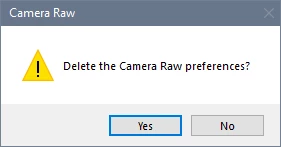
There's an easier way to reset the ACR preferences.

In Photoshop, go to Edit > Preferences > Camera Raw, and click Camera Raw with the Control key pressed, which brings up this dialog.


16 replies

Participating Frequently
January 4, 2024

Sometimes works and sometimes doesn't for me. Works fine on iPhone images but only sometimes works on images from my Nikon Z5. Sometimes won't display thumbnails of RAW files in Bridge and then Camera RAW won't open the images. Displays JPG files in Bridge then opens them in RAW, but doesn't list my lens for lens profile corrections. I'm using Windows 10 and have been unable to successfully update the Camera Raw plug-in using the Camera Raw 16.1 installer so had to use the Camera Raw 14.5 installer.

alanp13498454
Participating Frequently
January 2, 2024

Update, I got photo raw to sort of work for a while, but it has stopped working again. I have a second monitor and it doesn't show up on it anywhere when I try to open a raw image. My video card has 6 gb of ram and I updated the drivers Everything was working fine until a few months ago.  I tried Affinity photo which seems to be working fine but doesn't have quite as many features. Does Adobe offer solutions or am I just wasting my money on something that doesn't work anymore? 

D Fosse
Community Expert
Community Expert
December 8, 2023

It's crashing in your graphics processor (GPU). Either your GPU is old and underpowered, or you have a laptop with conflicting dual GPUs.


ACR has stricter requirements from the GPU than Photoshop has nowadays. The "enhance" functions are particularly GPU-intensive and any problems are bound to show up here.

alanp13498454
Participating Frequently
December 8, 2023

My computer was already connected to a 2nd monitor. I somehow did a seperate install of camera raw - to edit in camera raw, but it doesnt have an option to ai enhanced noise reduction and when I try to do enhance resolution it crashes I get an error... one step forward and 2 steps back I hate to invest in another software to do these functions when I am already supposibly paying for it.

alanp13498454
Participating Frequently
December 6, 2023

I am having the same type of issue with photoshop and bridge but Camera raw is not opening on a screen anywhere that I can see. If I hit escape I can go back to photoshop or bridgeis there a way to reset it?

Participant
September 16, 2023

I found a solution: I connected a monitor to m laptop and CAR opened on that 2nd screen... So, my guess is that CAR opens but outside of my laptop screen...