
Participating Frequently
May 28, 2026
Question

Camera Raw Filter in Photoshop crashes with unrecoverable GPU error after Select Subject or Adaptive Presets

  • May 28, 2026
  • 4 replies
  • 137 views

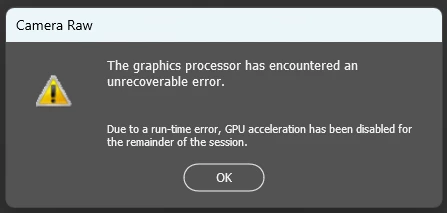
Issue summary: Camera Raw Filter inside Photoshop fails with an unrecoverable GPU error after using Select Subject or Adaptive Presets. The subject mask is created successfully, but GPU memory remains pinned and Photoshop disables GPU acceleration several (about 30) seconds later.

This error is also induced simply by invoking the presets in Camera Raw and doing nothing else – error after about 30 seconds.

Sometimes more editing in the session can take place, but after closing Camera Raw can no longer be invoked (ACR requires graphics processor to edit).

Product and version:

  • Photoshop desktop version 27.7.0
  • Camera Raw version 18.3.1.2580
  • Lightroom version 15.3

Operating system:

  • Windows 11 64-bit

Hardware:

  • HP Z2 Tower G4 Workstation
  • NVIDIA Quadro P4000 (8 GB VRAM)

Steps to reproduce:

  1. Open an image in Photoshop.
  2. Choose Filter > Camera Raw Filter.
  3. Use Select Subject or apply an Adaptive Preset that uses AI masking.
  4. Observe GPU memory usage in Windows Task Manager.
  5. Wait several (about 30) seconds after the subject mask appears.

Expected result:
The AI mask completes successfully and Camera Raw continues functioning normally.

Actual result:
The subject mask is created successfully, but dedicated GPU memory remains high and does not release. After several seconds, Camera Raw reports an unrecoverable GPU error and disables GPU acceleration.

Additional information:

  • The issue occurs consistently in Camera Raw Filter inside Photoshop.
  • The same images work correctly in Lightroom using Select Subject and Adaptive Presets.
  • GPU memory usage rises in Lightroom as well, but Lightroom does not crash.
  • Updating to the latest Photoshop, Camera Raw, Lightroom, and NVIDIA Quadro drivers did not resolve the issue.
  • The problem is reproducible with TIFF and JPEG files.
     

    4 replies

    MarkH_CCAuthor
    Participating Frequently
    May 30, 2026

    Additional observations:

    After the "The graphics processor has encountered an unrecoverable error" message appears, Camera Raw Filter remains partially functional.

    Basic adjustments (Exposure, Curves, Color, Optics, etc.) continue to work normally. AI features such as Select Subject, Select Sky, and AI Presets also continue to function, although AI Presets first display the message "Updating AI Settings. Your edits were applied, but updating AI settings may take some time."

    Some GPU-intensive features no longer function. For example, Lens Blur returns an "unexpected error" message and cannot complete.

    The most significant issue is that after closing Camera Raw Filter following the GPU error, Camera Raw Filter cannot be opened again during the same Photoshop session. Photoshop must be closed and restarted before Camera Raw Filter can be used again.

    This suggests that Camera Raw Filter enters a reduced-functionality mode after the GPU error rather than failing completely.

    D Fosse
    Community Expert
    Community Expert
    May 30, 2026

    @MarkH_CC 

    I hate to be the one to say this, but the P4000 is nine years old by now, and it doesn’t have the “Tensor” cores that most of the newer advanced ACR functions are built around. I replaced a P2200 three-four years ago just for this reason.


    The official Adobe recommendation is a GPU no older than around 7 years, that’s the support horizon, and they specifically recommend an RTX series GPU for full functionality.


    Now, I’m not saying you should rush out and buy a new GPU immediately. But what I am saying is that maybe you shouldn’t expect all these new AI-based functions to work on a card that was made many years before this AI-based processing technology was even on the drawing board. Don’t forget, there has really been a technological revolution in this field in only the last few years.


    The P4000 should still work well for all the “traditional” Camera Raw functionality. But you need to be realistic. This train is moving faster and faster. We may or may not like that (personally I’m not sure what I think about it) - but the reality is that you need to hang on if you want to be on board.


    I just got a good deal on a 16 GB RTX 5060 Ti, and I thought that was well worth it. But yes, prices are quite high now due to the industry eating up hardware like there’s no tomorrow. So you may want to wait until you come across a good deal.

    MarkH_CCAuthor
    Participating Frequently
    May 30, 2026

    Thank you for your perspective. I understand that the P4000 is an older Pascal-generation card and lacks Tensor cores. What makes me think there may still be a software issue is that the same AI operations work correctly in Lightroom on the same system. The failure appears specific to Camera Raw Filter when hosted inside Photoshop.

    So while the age of the P4000 may certainly be a contributing factor, I'm still trying to determine whether this is simply a hardware limitation or whether there is an issue specific to the Camera Raw Filter workflow when hosted inside Photoshop on older GPUs.

    MarkH_CCAuthor
    Participating Frequently
    May 29, 2026

    Given the troubleshooting performed, I believe this may be a product defect rather than a usage question.

    The issue is reproducible on the latest versions of Photoshop, Camera Raw, Lightroom, and the latest NVIDIA Quadro driver. The same operations work correctly in Lightroom but fail in Camera Raw Filter hosted inside Photoshop.

    Would it be possible to have this reviewed and, if appropriate, moved to the Bug Reports section for engineering visibility?

    I am happy to provide additional details, logs, or system information if needed.

    Lex86
    Participant
    May 29, 2026

    I have same problem and i tries everything include upgrade 1660s OC to 5060 dual.

    I upgrade win 10 to win 11 with clean install and have exact same problem. What can i do?

    My PC:

    Device name    Toshizo
    Processor    Intel(R) Core(TM) i7-14700K (3.40 GHz)
    Installed RAM    64.0 GB Dram5 (63.8 GB usable)
    Graphics card    NVIDIA GeForce RTX 5060 (8 GB)
    Storage    12.50 TB of 13.67 TB used
    Motherboard Z790M AORUS ELITE AX (Rev. 1.2)
    System type    64-bit operating system, x64-based processor
    Pen and touch    No pen or touch input is available for this display

    Ged_Traynor
    Community Expert
    Community Expert
    May 29, 2026

    @MarkH_CC I cannot reproduce the issue you described with Photoshop version 27.7 and the latest version of ACR, I’m using Windows 11 with an RTX 3090

    Try resetting the GPU support in the ACR preferences


    MarkH_CCAuthor
    Participating Frequently
    May 29, 2026

    Thank you, Ged. Unfortunately after the reset the behavior is exactly the same for me.

    It appears that in my case GPU resources accumulate or remain pinned and eventually the Photoshop-hosted Camera Raw GPU context becomes unstable.