mata_o
Participating Frequently
January 7, 2026
Question

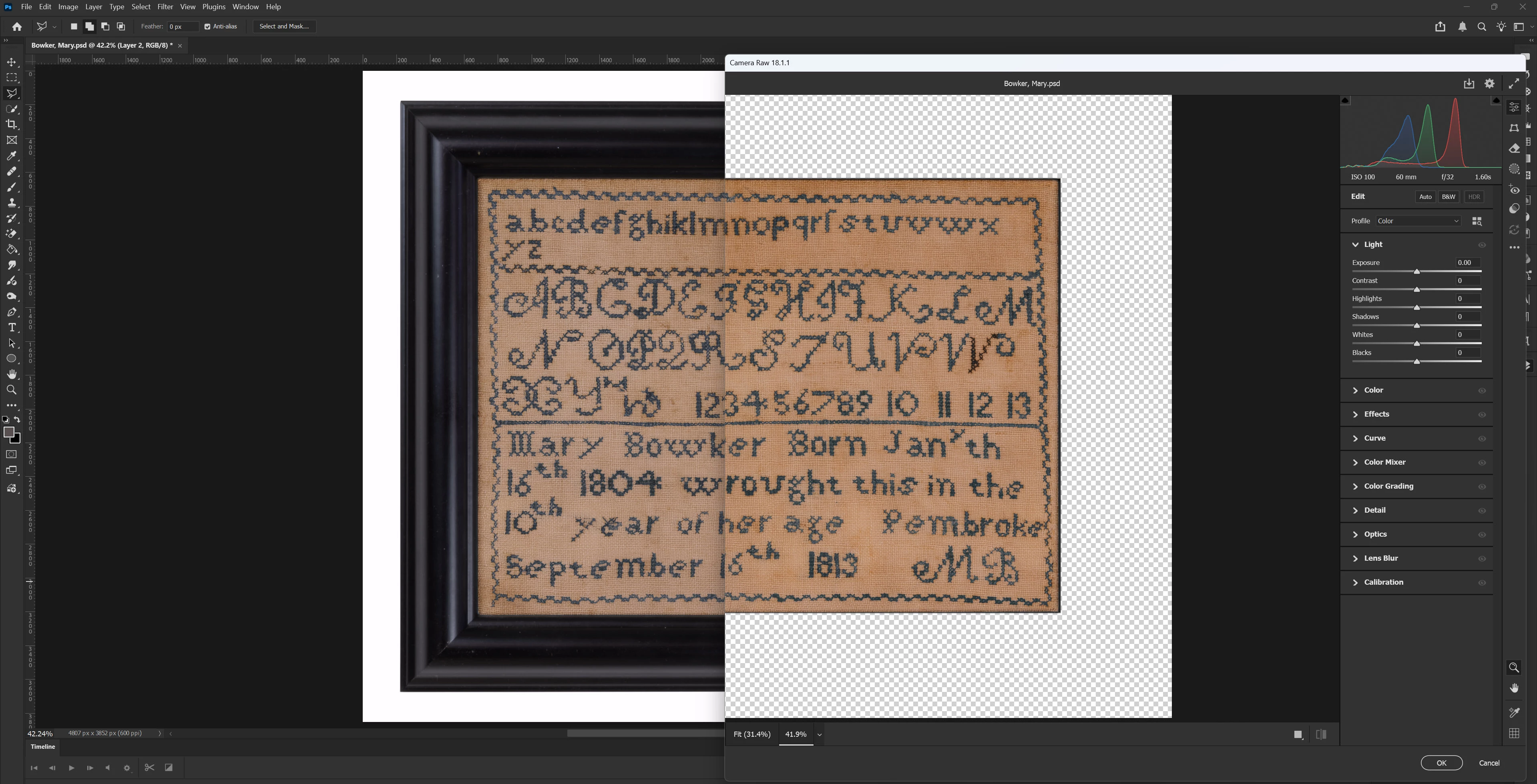
Camera Raw filter looks different than photoshop file

  • January 7, 2026
  • 2 replies
  • 337 views

Why is this happening?  See below for example and color presets:
 

Camera Raw issue.jpg


mata_o_0-1767814742285.png


Thanks!

2 replies

Earth Oliver
Legend
January 8, 2026

Let me guess, you're using a wide-gamut display? Also, you cropped out the most important setting in ACR for us to be able to help you... the color profile at the bottom center of the window.

mata_o
mata_oAuthor
Participating Frequently
January 8, 2026

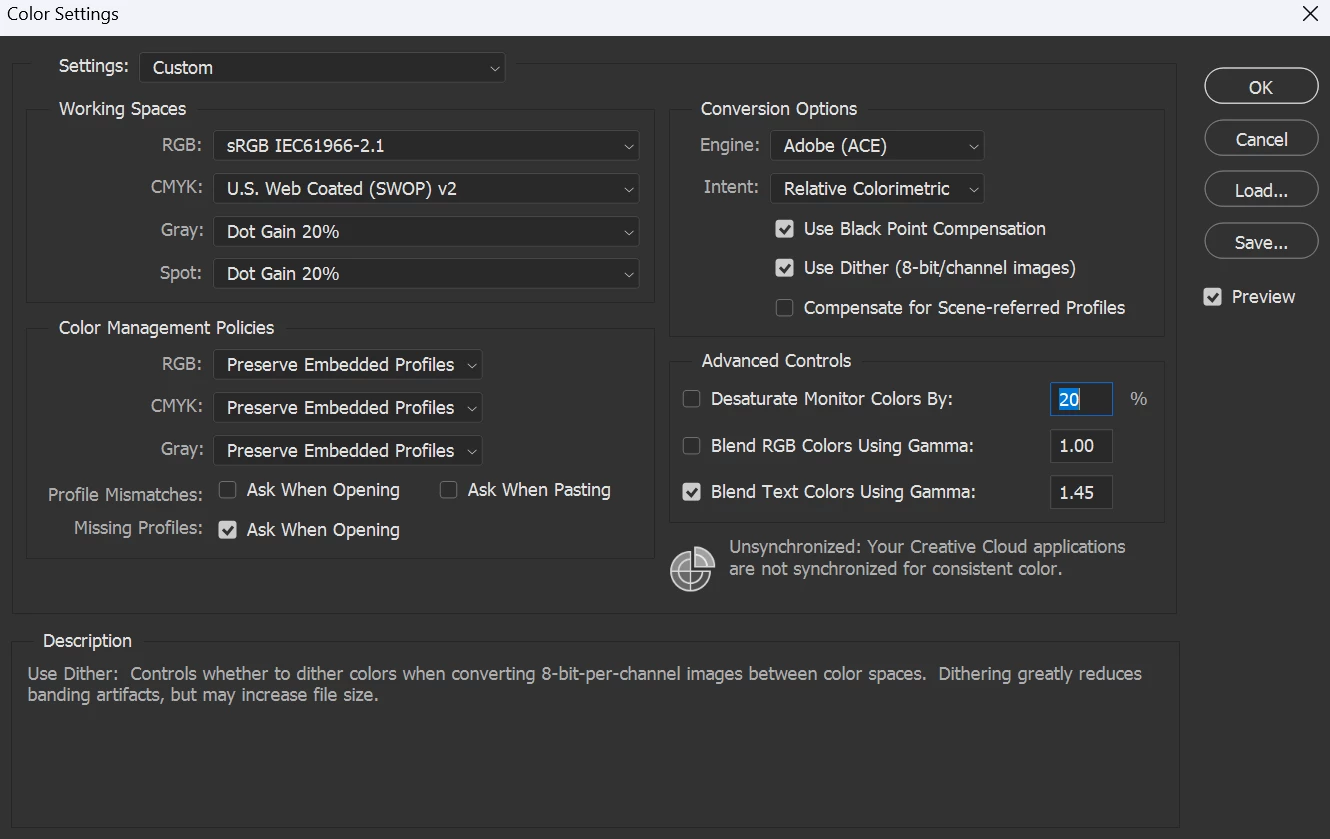
I am using a Dell U2723QE (DP) monitor. I believe 98% DCI-P3 and 100% sRGB means wide-gamut, but please correct me if I'm wrong.  How does that affect ACR?


Here is the full screenshot of the Adobe Camera Raw screen I'm working with.  I don't see the color profile at the bottom center of the window.  Can you clarify where to find this important setting?

mata_o_0-1767887393703.png


Thanks for the help


D Fosse
Community Expert
Community Expert
January 8, 2026

Is the color profile embedded in the Photoshop file?


If it is, it doesn't matter what the document color profile is (for the purposes of this discussion) - any profile will be correctly represented, and if they are all correct, they are identical.


Please set the status bar to show "Document profile" and post a screenshot, like this:

notification_3.png


I still suspect a bad/broken/incorrect monitor profile. That usually affects applications differently, that's a smoking gun.


What is your monitor profile, where does it come from, what made it? Look it up in Windows Settings > System > Display.

D Fosse
Community Expert
Community Expert
January 7, 2026

Do you have any layers above the one you're opening in the ACR filter? This is apparently a layered file, but the ACR filter doesn't show the full layer composite, only the specific layer selected. Any adjustments above are ignored.


If that's not it, it's most likely a broken monitor profile or a GPU bug. These are two sides to the same coin, since the conversion into the monitor profile is executed in the GPU. A problem in one can cause the other to fail.

mata_o
mata_oAuthor
Participating Frequently
January 7, 2026

All logical thoughts.  Here is my layer panel:

mata_o_0-1767819435124.png


I have reinstalled GPU drivers for both my integrated Intel GPU and NVIDIA GPU as well.  Still the same issue, different file.


D Fosse
Community Expert
Community Expert
January 8, 2026

Well, dual GPUs can be a general problem with a range of symptoms. The advice is usually to disable the integrated GPU altogether. Since the GPU is doing actual image processing for Photoshop - including converting into the monitor profile - it's obvious that multiple GPUs is just a potential conflict.


You can disable the GPU in Photoshop, but ACR requires a functional GPU to run at all. So you can't really test it that way.


But you can test the monitor profile, by replacing it with a system profile like sRGB, Adobe RGB or Display P3 (depending on type of display). Relaunch all applications when done, the profile is loaded at application startup.


If the symptoms disappear, you know you have a bad profile. Are you using a calibrator to make the monitor profile?