
Participant
January 9, 2026
Answered

Camera RAW landscape masks technical glitch
  • January 9, 2026
  • 1 reply
  • 94 views

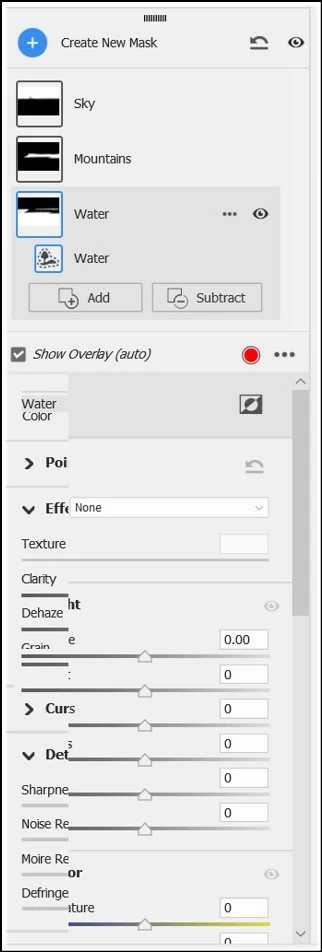
PS RAW issue when moving between landscape masks.jpg


This doesn't happen every time, but enough that it's becoming a nuisance.


I open a RAW file in Camera RAW, select masking, select landscape, select multiple masks, then open them to edit. I'm able to make adjustments with the first mask, but as soon as I click on a second one, it glitches like this. I then have to click elsewhere and back on the mask for the issue to disappear. 


Before you ask, Photoshop, Camera RAW, and Windows 11 are all up-to-date 🙂
Correct answer Ged_Traynor

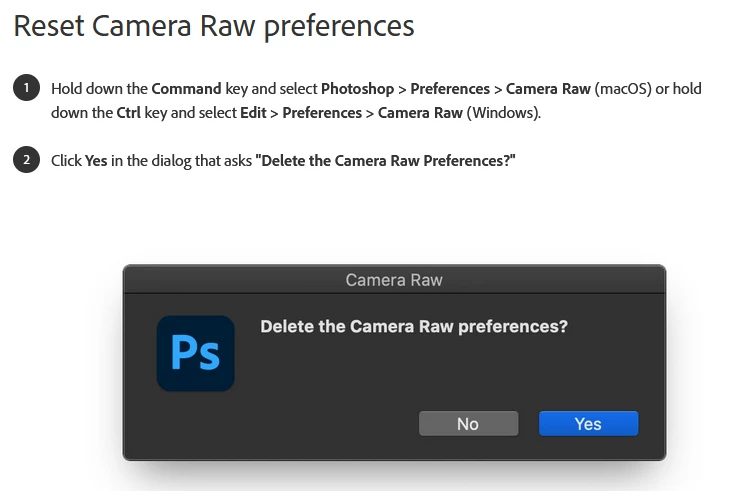
@Vee2024 try resetting the ACR preferences

2024-03-01 15_00_51-Manage Adobe Camera Raw settings — Mozilla Firefox.png

1 reply

Ged_Traynor
Community Expert
Ged_TraynorCommunity ExpertCorrect answer
Community Expert
January 9, 2026

@Vee2024 try resetting the ACR preferences

2024-03-01 15_00_51-Manage Adobe Camera Raw settings — Mozilla Firefox.png

Vee2024Author
Participant
January 10, 2026

Thank you, Ged. I'll try this.