PêuPaixão
Participant
September 14, 2023
Answered

Camera Raw Parece ativo, porém não é mostrado na tela.

  • September 14, 2023
  • 4 replies
  • 1798 views

Olá Adobers,

Estou com um problema no Camera Raw, quando eu importo uma foto ou tento usar filter.

Eu clico e parece como se ele abrisse em outro monitor, porém não estou com 2 monitores.

Eu digo que ele aparenta abrir em outro local, pois após clicar no filtro para abrir, por exemplo, o photoshop fica ainda na tela, mas não consigo clicar em nada, parece que a janela do filtro está aberta em outro local da tela e eu não encontro ou vejo. Eu sei que está aberta, pois após usar o ESC ou o ENTER o Photoshop volta ao normal, como se eu tivesse encerrado a tela do filtro.

Podem me ajudar?

Correct answer Per Berntsen

Here's the standard method to reset the Camera Raw preferences on Windows.

In Photoshop, go to Edit > Preferences > Camera Raw.

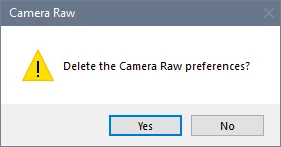
Click Camera Raw with the Control key pressed. Click Yes in the dialog that appears.

(On a Mac, this is in the Photoshop menu. Not sure if you press the Control or Command key.)


4 replies

PêuPaixão
Participant
September 14, 2023

Consegui resolver!

Para alguém que tenha o mesmo problema, resetei as configurações do Camera Raw:
1 - Arraste um arquivo RAW para o PS e antes de soltar o arquivo aperte ALT+CTRL+SHIFT e solte o arquivo, aparecerá uma mensagem perguntando se quer resetar as configurações e pronto!

Participant
April 11, 2024

Estou com esse mesmo problema, só que não consegui entender seu comentário, tem como explicar melhor? Em que se refere com arquivo RAW? E em qual parte do PS soltar? 

Per Berntsen
Community Expert
Per BerntsenCommunity ExpertCorrect answer
Community Expert
April 12, 2024

Here's the standard method to reset the Camera Raw preferences on Windows.

In Photoshop, go to Edit > Preferences > Camera Raw.

Click Camera Raw with the Control key pressed. Click Yes in the dialog that appears.

(On a Mac, this is in the Photoshop menu. Not sure if you press the Control or Command key.)


Bojan Živković11378569
Community Expert
Community Expert
September 14, 2023

You tried with Photoshop preferences right? Please try with Camera Raw preference reset, it may help.

PêuPaixão
Participant
September 14, 2023

Thanks, but is not working.

Bojan Živković11378569
Community Expert
Community Expert
September 14, 2023

It appears that you have unintentionally moved or dragged the window out of sight, and it will remain there until you reposition it. From my experience, this can occur on a Windows machine.


Try with Preference reset is suggestion that comes to my mind. Save unsaved actions and presets before reseting prefs.