SB-W
Inspiring
October 16, 2024
Question

Can no longer strike a path in Adobe PS CC 26.0
  • October 16, 2024
  • 2 replies
  • 250 views


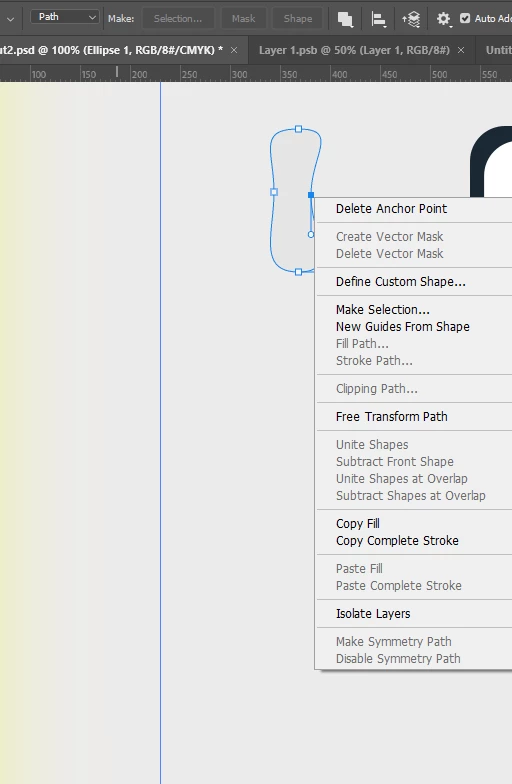
It is greyed out, no matter what I try. Does anyone know why? I just want to apply my brush preset!

This topic has been closed for replies.

2 replies

Bojan Živković11378569
Community Expert
Community Expert
October 17, 2024

Even with the shape layer selected in the Layers panel, I still have the option to Stroke path. Please post a screenshot of the entire window with both the Layers panel and Paths panel expanded and visible so we can try to clarify this. I cannot reproduce this issue on Windows running version 26.0 of Photoshop.


In the meantime, try resetting Pen or whichever tool is currently active.

Jeff Arola
Community Expert
Community Expert
October 17, 2024

Can you show us a screenshot that includes the Layers panel?


Looks like from your screenshot than an Ellipse shape layer is selected in the layers panel.


Certain types of layers like smart objects, shape layers, etc won't allow the stroking of a path.


Did you draw out your path with Path set in the tool options?

SB-W
SB-WAuthor
Inspiring
October 17, 2024

When I get back to my PC, I will. It seems to work on Mac, but not on PC.