Inspiring
December 10, 2022
Answered

can not nudge clone source with keyboard shortcuts

  • December 10, 2022
  • 2 replies
  • 944 views

Hello, 

Watching a max session on PS and wanted to use short cuts for clone stamp source.

I am on latest version of PS and updated win pro 11

the size up and down work fine

The rotate works fine

But the nudge up and down or sideways (arrow keys with alt and shift) 

Do not do anything.  In the clone source panel if you click to highlight a field and use arrows, that works fine. And move tool works fine with the arrow keys

Again everything working fine except the keyboard shortcut for nudging clone source.

    Thanks
 

This topic has been closed for replies.
Correct answer Sameer K

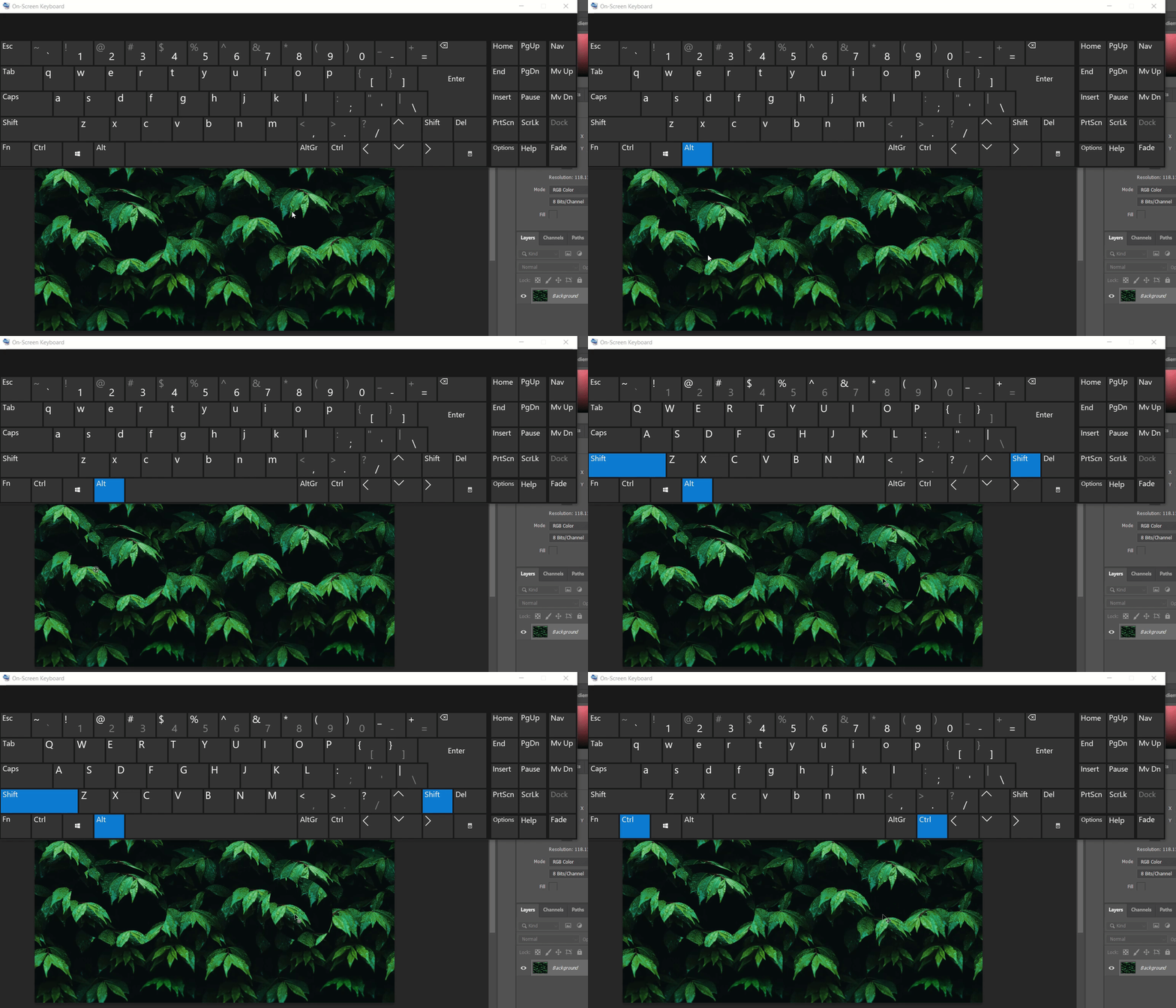
I have tried to recreate this on my end on two machines running Windows 11 & 10. I could not recreate this. I've added a GIF to showcase this.


What version of Photoshop & the operating system are you running on?


Ensure there are no stale preferences in Photoshop. Go to the location of the preference folder mentioned below and rename it to backup. 

https://helpx.adobe.com/photoshop/using/preferences.html


  • Windows 10/11: Users/[user name]/AppData/Roaming/Adobe/Adobe Photoshop [version]/Adobe Photoshop [version] Settings
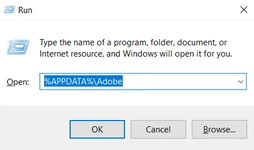
  • Press Windows + R & type this is the Run Window - %APPDATA%\Adobe


  • Rename the Adobe Photoshop folder by adding a .old at the end. (Adobe Photoshop 2023 > Rename > Adobe Photoshop 2023. old)


This will give a fresh start to Photoshop as a fresh install. Let me know how it goes.

Thanks!

Sameer K.

2 replies

PECourtejoie
Community Expert
Community Expert
December 12, 2022

Hello, Jens. are you on Ps 24.0.1 or 24.1?

Is it a US english version, or a localized one? is your keyboard QWERTY?

Inspiring
December 13, 2022

Hey PE ,  24.0.1    as 24.1 is not an option my CC app say's 24.0.1 is the latest and I am up to date

So skip this and see first answer reply above if you want more info

PECourtejoie
Community Expert
Community Expert
December 14, 2022

Hi, hit the check for updates button on the CC application. Also, one might need to wait for the replication of the update on the worldwide servers.

Sameer K
Community Manager
Sameer KCommunity ManagerCorrect answer
Community Manager
December 12, 2022

I have tried to recreate this on my end on two machines running Windows 11 & 10. I could not recreate this. I've added a GIF to showcase this.


What version of Photoshop & the operating system are you running on?


Ensure there are no stale preferences in Photoshop. Go to the location of the preference folder mentioned below and rename it to backup. 

https://helpx.adobe.com/photoshop/using/preferences.html


  • Windows 10/11: Users/[user name]/AppData/Roaming/Adobe/Adobe Photoshop [version]/Adobe Photoshop [version] Settings
  • Press Windows + R & type this is the Run Window - %APPDATA%\Adobe


  • Rename the Adobe Photoshop folder by adding a .old at the end. (Adobe Photoshop 2023 > Rename > Adobe Photoshop 2023. old)


This will give a fresh start to Photoshop as a fresh install. Let me know how it goes.

Thanks!

Sameer K.

Inspiring
December 13, 2022

Hello Samir K.

I went with the manual -move preferces to desk top and restart to make fresh

(then spent 2 hours redoing and reloading all my actions,brushs, tool bar, workspace, plugins, yada, yada) 

and problem is resolved.


Inspiring
December 15, 2022

hello again Samir K.

In this thread someone else said to update to 24.1 (was 24.0.1) so I did that this morning (long download)

Anyway I now have the same problem. So that means every update I will have to go through this again. So now my question is how to trash the settings folder without haveing to spend 2 hours to redo all my brush's, actions, plugins, workspace, toolbar, keyboard shortcuts,etc etc etc. every time I have to do that.


And 1 more question is there a fix for save as?  on new 24.1 update now problem is even though I checked the box to default to my computer to save instead of cloud, but now when I save as.A new cloud box comes up andI have to change it to my computer every time. Which adds a step to every save as. And which I did not have to do last version. And use legacy save as is checked because it's only way you can get all the save as options.

Update to this- Samir skip last part about save as. After half a dozen save as  operations PS is now back to normal (no idea why but good enough)

So just need the first question answered.

   Thanks